Book Appointment Now
Top Radeon RX 6800 XT Motherboards: 2026 Buyer’s Guide
AMD officially introduced the Radeon RX 6800 XT in late 2020, and it quickly became one of the most powerful graphics
cards for high-end gaming and content creation. To unlock its full potential, choosing the right motherboard is just
as important as selecting the GPU itself. A well-matched Radeon RX 6800 XT motherboard ensures maximum performance,
stability, and access to AMD’s exclusive technologies.
One of the standout features of the RX 6800 XT is that it marked AMD’s first serious entry into hardware-accelerated
ray tracing, putting it in direct competition with
NVIDIA’s RTX
lineup. Unlike its rivals, AMD leveraged its unique position as both a CPU and GPU manufacturer to introduce
platform-exclusive features. Technologies like
Smart Access Memory (SAM)
allow Ryzen processors to access the GPU’s full VRAM pool, resulting in measurable real-world performance gains.
The Radeon RX 6000 series officially launched on October 28, 2020, bringing with it ray tracing support, hardware
acceleration, and improved efficiency through AMD’s RDNA 2 architecture. These GPUs signaled AMD’s return to the top
tier of graphics performance, complementing their already dominant Ryzen CPU lineup.
Today, AMD stands as a market leader in gaming hardware, delivering CPUs and GPUs that rival—and in many cases
outperform—competing solutions. The RX 6800 XT benefits significantly from this ecosystem approach, especially when
paired with compatible chipsets.
According to AMD, some of the RX 6800 XT’s most important performance-boosting features are only available when used
with a specific hardware configuration. To achieve up to an 11% performance uplift, users need:
- An
AMD 500-series motherboard - An
AMD Ryzen 5000 series processor - An
AMD Radeon RX 6000 series graphics card
With an AMD 500-series chipset, features like
Above 4G Decoding
and
Resizable BAR support
are enabled, allowing the GPU to operate more efficiently and reduce bottlenecks.
Thanks to
128MB AMD Infinity Cache
and
16GB of GDDR6 memory
, bottlenecking becomes far less of a concern, even at ultra-high 4K resolutions. This makes the RX 6800 XT an
excellent choice for gamers seeking smooth performance in demanding titles, as well as creators working with
graphics-intensive applications. Another advantage is its broad compatibility with a wide range of AMD motherboards,
giving users more flexibility when building or upgrading their systems.
The RX 6800 XT features boost clock speeds of up to
2550 MHz
, along with support for
Mesh Shading
,
Radeon Boost
, and
FidelityFX
. To fully take advantage of these technologies, it’s essential to pair the GPU with a motherboard that offers strong
power delivery, PCIe 4.0 support, and robust thermal design.
With so many motherboard options available, making the right choice can feel overwhelming. That’s why we’ve carefully
researched and selected the best
motherboards
for the Radeon RX 6800 XT, focusing on performance, reliability, and value.
Games like
Cyberpunk 2077
have pushed modern GPUs to their limits and intensified the long-standing rivalry between Team Red and Team Green.
While this guide touches on multiple games, Cyberpunk 2077 serves as a key benchmark due to its demanding graphics and
ray tracing features.
AMD has also made major strides in productivity and content creation, especially with the Ryzen 5000 series, making
their platform a strong all-around choice for gamers and professionals alike.
Now, let’s take a closer look at the AMD chipsets that work best with the Radeon RX 6800 XT and explore the
top motherboard
options available today.
Radeon RX 6800 XT Motherboard Guide for 2026: What Has Changed
This guide was originally written when the RX 6800 XT was a current-generation flagship. In 2026 the situation is
different in ways that matter for anyone buying a motherboard today, so read this section before the product list. The
card is still capable, but the platform around it has moved on, and some of the advice that made sense in 2021 no
longer does.
Is the RX 6800 XT Still Worth Building Around in 2026?
Yes, with one important qualification. The RX 6800 XT launched at $649 in November 2020 with 16GB of GDDR6, 72 compute
units, and 128MB of Infinity Cache. In 2026 it sits in the upper-middle of the performance stack rather than at the
top. It remains a genuinely strong 1440p card and a capable 4K card when FidelityFX Super Resolution is enabled, and
its 16GB of VRAM has aged better than the 8GB and 10GB cards it originally competed against.
The qualification is that the 6800 XT is now a mature product. Driver support continues, but it receives optimization
rather than new feature development. Its first-generation ray tracing hardware is roughly half as capable as current
RDNA 4 cards, so ray tracing remains a novelty rather than a reason to own it. FSR frame generation helps close the gap
at 4K, but it is not a substitute for newer hardware. If you already own the card, building a sensible AM4 system
around it is a smart, cost-effective choice. If you are buying from scratch and gaming at 4K with ray tracing enabled,
a newer GPU deserves serious consideration.
Reference Specs vs Factory Overclocked Cards
AMD’s reference specification for the RX 6800 XT lists a game clock of 2015 MHz and a boost clock of 2250 MHz. The
2550 MHz figure quoted earlier in this guide refers to factory-overclocked partner cards from AIB vendors such as
Sapphire, PowerColor, and ASUS, which ship with higher power limits and larger coolers. This distinction matters when
choosing a motherboard, because heavily overclocked three-fan cards draw more sustained power and occupy more physical
space than the reference design.
AM4 vs AM5 in 2026: Which Platform Should the 6800 XT Live In?
The RX 6800 XT works in both platforms, and the decision depends entirely on whether you already own an AM4 processor.
The table below summarizes the practical differences.
| Consideration | AM4 (B550 / X570) | AM5 (B650 / X670 / B850 / X870) |
|---|---|---|
| Processor options | Ryzen 3000 and 5000 series | Ryzen 7000 and 9000 series |
| PCIe generation | PCIe 4.0 | PCIe 5.0 on most boards |
| Memory | DDR4, mature and inexpensive | DDR5, faster but costs more |
| Smart Access Memory | Supported with Ryzen 5000 and 500-series boards | Supported and enabled by default on most boards |
| Upgrade path | End of the road, no new CPUs coming | Ongoing support for future generations |
| Best for | Existing AM4 owners and budget builds | New builds and long-term upgraders |
The honest recommendation for 2026 is this. If you already have a Ryzen 3000 or 5000 processor, buy a B550 or X570
board from this guide, keep the 6800 XT, and enjoy a very capable system at a low cost. If you are building from
nothing, buy an AM5 board with a current Ryzen processor and carry the 6800 XT over as a stopgap GPU. Buying a
brand-new AM4 board and CPU in 2026 is spending money on a platform with no future upgrade path, and the performance
difference between a 6800 XT on PCIe 4.0 and PCIe 5.0 is negligible because the card does not saturate either
interface.
Smart Access Memory in 2026: Now Standard, Not Exclusive
When the RX 6800 XT launched, Smart Access Memory required the exact combination of a 500-series board, a Ryzen 5000
CPU, and an RX 6000 GPU. AMD later extended support to Ryzen 3000 processors on 500-series boards, and on AM5 the
equivalent feature, now generally called Resizable BAR, is enabled by default on most motherboards with modern BIOS
versions. If you are building on AM4 in 2026, enable Above 4G Decoding and Resizable BAR in the BIOS manually, because
older board firmware often leaves them disabled. The performance gain varies by game, but it is real and costs nothing.
Power Supply, PCIe, and Case Clearance in 2026
Three practical requirements apply regardless of which board you choose. First, the RX 6800 XT draws around 300W under
load, and AMD recommends a 750W power supply for a typical system. A factory overclocked three-fan card with a raised
power limit benefits from 850W. Second, the card uses two 8-pin PCIe power connectors on most models, so confirm your
power supply has them. Third, the reference card is a two-slot design around 267mm long, but AIB versions frequently
occupy 2.5 to 3 slots and exceed 300mm. Measure your case before buying.
Our Recommendations For Top Radeon RX 6800 XT Motherboards
- Best mATX Motherboard for RX 6800 XT |
MSI MAG B550M Mortar
- Best Budget Motherboard for RX 6800 XT |
MSI MAG X570 TOMAHAWK WIFI
- Best Overall Motherboard for RX 6800 XT |
MSI MEG X570 GODLIKE
- Best Enthusiast Motherboard for RX 6800 XT |
ASUS ROG X570 Crosshair VIII Hero
- Best High-end Motherboard for RX 6800 XT |
GIGABYTE X570 AORUS XTREME
- Best Mid-range Motherboard for RX 6800 XT |
GIGABYTE X570 AORUS ULTRA
- Best ATX Motherboard for RX 6800 XT |
GIGABYTE X570 AORUS MASTER
- Best mITX Motherboard for RX 6800 XT |
GIGABYTE X570 I AORUS PRO WIFI
RX 6800 XT Motherboard Comparison Table (2026)
Use the table below to compare the boards covered in this guide before reading the full reviews. All entries are AM4
boards unless noted, and all support PCIe 4.0, which is what the RX 6800 XT actually needs.
| Motherboard | Chipset | Form Factor | Best For | 2026 Verdict |
|---|---|---|---|---|
| MSI MAG B550M Mortar | B550 | Micro-ATX | Compact builds | Best value for a new AM4 build |
| MSI MAG X570 TOMAHAWK WIFI | X570 | ATX | Budget X570 | Strong all-rounder, still available |
| MSI MEG X570 GODLIKE | X570 | E-ATX | Overclocking flagship | Only worth it second-hand |
| ASUS ROG X570 Crosshair VIII Hero | X570 | ATX | Enthusiast | Excellent VRM, buy used if possible |
| GIGABYTE X570 AORUS XTREME | X570 | E-ATX | Premium overclocking | Large, expensive, niche |
| GIGABYTE X570 AORUS ULTRA | X570 | ATX | Mid-range | Good balance of ports and price |
| GIGABYTE X570 AORUS MASTER | X570 | ATX | ATX all-rounder | Best audio and storage in this list |
| GIGABYTE X570 I AORUS PRO WIFI | X570 | Mini-ITX | Small form factor | One of the few X570 ITX options |
| ASRock X570M Pro4 | X570 | Micro-ATX | Budget X570 | Cheapest route to X570 features |
One board below, the ASUS ROG STRIX Z490-E, is an Intel platform motherboard rather than an AM4 board. It is included
for readers pairing an RX 6800 XT with an Intel processor, and it is clearly marked in its own section.
Quick Shopping Suggestions
Purchasing motherboards is a difficult undertaking because they are expensive, and choosing the wrong one will result in
a significant loss. Don’t judge a motherboard solely on the basis of its price; there are a number of factors to
consider, which we’ve listed below:
Voltage regulating module (VRM)
is a term that refers to a device that regulates the voltage. Providing a sufficient voltage supply is responsible for
overclocking CPUs. Overclocking causes hardware components to consume more electricity, allowing the voltage to be
distributed evenly for a stable motherboard workflow. As the overclocked speed increases, greater voltage distribution
is required for improved stability.
Input and output ports
are referred to as IO ports. The IO port and convenience are inextricably linked. Regardless of the work you do, the
more IO ports you have, the more convenient it is for you. These IO ports are used to connect peripherals such as a
keyboard and mouse. As a result, the faster the IO ports supply, the faster the response it registers.
The size of the motherboard
is referred to as the form factor. The larger the size, the more connectivity possibilities are available, but space in
our CPU cabinet is a concern. In general, E-ATX is known for its extensive connectivity, whereas ATX is known for its
balance, and M-ATX is the most cost-effective option.
Sound quality
is the most important part of the game. You always have an advantage in gaming since the motherboard provides superior
sound quality. We’ve also taken care of Audio Quality, so you won’t have to spend money on sound cards.
Warranty:
Damages to electronics are common, and having them insured is the greatest way to save money for other things. These
motherboards come with a two- to three-year warranty since they understand how costly it is to damage a motherboard. You
now have a better understanding of the criteria used to evaluate a motherboard. Now we have a list of motherboards that
will be discussed along with their purchase links.
MSI MEG X570 GODLIKE (Top Pick) – Best Overall RX 6800 XT Motherboard
Main Features
Brand:
MSI |
Processor:
AMD 2nd/3rd Gen Ryzen |
Chipset:
AMD X570 |
Memory:
128 GB, 4 x DIMM |
Memory Speed:
1866 MHz to 5000+ MHz (O.C) |
Socket:
AM4 |
Form Factor:
E-ATX |
Audio:
Realtek 8-Channel High Definition with Xtreme Audio DAC |
VRM:
14+4+1 |
Dimensions:
12.00 x 10.70 x 2.50 inches This motherboard has considerable room, incredible control, excellent diagnostics, and
high-end hardware support. The top-of-the-line overclocking capabilities, the latest WiFi-6 antenna, the M2 Expansion
slot, and PCIe 4.0 support for the most recent
graphic cards
. It’s a pricey board, but the benefits outweigh the price. The
MSI MEG X570 GODLIKE
offers a broad specification that takes into account all of the E-ATX form factor’s possibilities. The aesthetics are
appealing with its integrated IO shield, labelled board, RGB control, MSI Logo, and neutral-colored metal. Three M.2
slots with heatsinks and four 4-way Crossfire PCIe 4.0 x16 slots are included. Definitely a gaming motherboard. You may
add five M.2 drives with the expansion card. Setup is easy, and there are enough wires and accessories to prevent
delays. A GPU-integrated CPU lacks output ports, thus you’ll need a graphics card. We’re testing if the Radeon RX 6800
XT works with this motherboard. The best
graphics card
available. To use smart access memory, which boosts gaming performance by 11%, you’ll need an upgraded BIOS. Radeon RX
6800 XT competes with Cyberpunk 2077 for cheaper than the RTX 3080. If you want 100+
FPS at 4K resolution in AAA games
, get this motherboard. If your budget allows, the MSI MEG X570 GODLIKE is a great option. This ‘godlike’ motherboard
has hundreds of features and sparkles. The board’s bling is top-notch. The board has an infinite mirror, matte black and
grey PCB, and RGB LEDs. The X570 contains 14+4+1 phase IR digital VRM. The server-grade PCB and metal chokes are
long-lasting. Massive heatsinks are connected to the processor by a liquid-filled heat pipe. The processor’s built-in
fan keeps the system cool. The gadget has three M2 and six SATA slots. Godlike’s AMD X570 chipset includes four PCI-E
x16 slots. 4 DIMM slots support 128GB of DDR4 memory, which may be overclocked to 5000 MHz. Board supports CrossFire and
SLI. Front I/O panel has one Type-C 3.2 port and four Gen1 Type-A ports. Back I/O panel has one Type-C Gen 2, three Gen2
Type-A ports, and two Gen1 Type-A ports. Features include ESS ES9018 audio codec, Wi-Fi 6.0, and Bluetooth 5.0. MSI MEG
X570 GODLIKE is the best premium RX 6800 XT motherboard. It contains five M.2 heatsinks, three LAN ports, and WIFI 6
technology, and its name represents its role. The motherboard’s A-XPM OC feature boosts RAM to above 5000 MHz for
gaming. Cyberpunk 2077 and other 4k games can reach 100 fps. When LN2 cools the motherboard, the temperature sensor
can’t keep up. Multiple
graphics cards
(four) can work with PCIe 4.0 to maximise application output. High-quality audio chipset with 6.3mm jack. MSI needs PCIe
4.0 to fully utilise the driver. The PS/2 port helps with overclocking. Simple installation and lots of wires prevent
problems. The MSI emblem’s RGB control is amazing, and the motherboard looks great. Enable smart access memory in your
BIOS to boost gameplay by 11%. You can also check the price and availability of the MSI MEG X570 GODLIKE on
Amazon
.
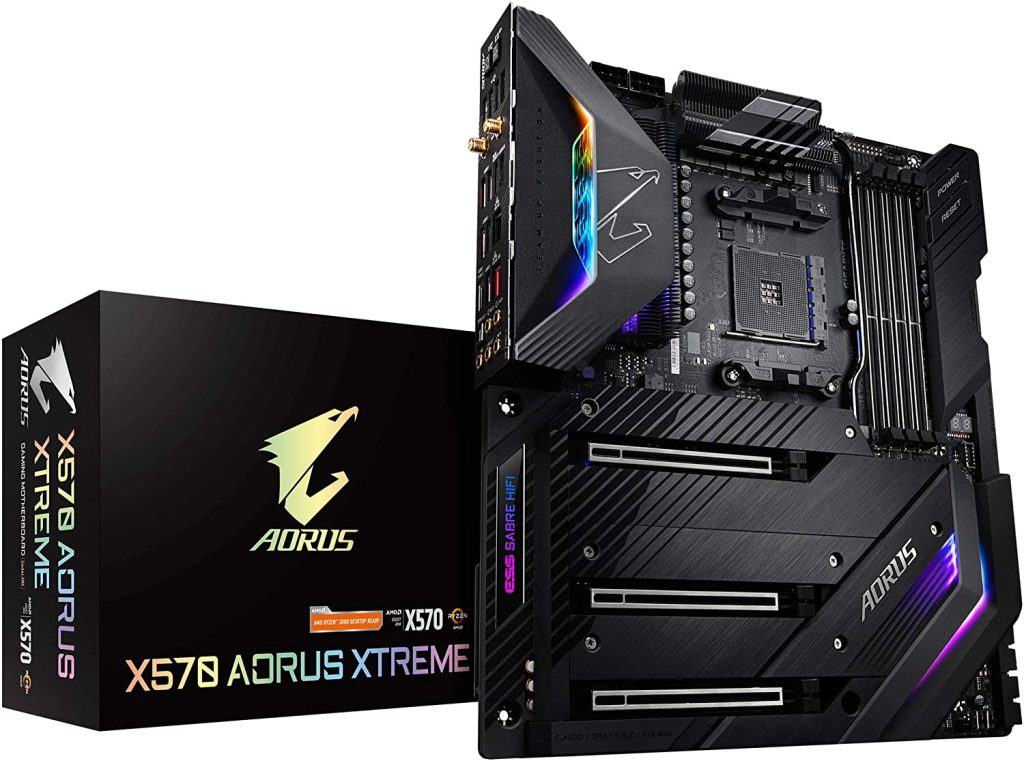
GIGABYTE X570 AORUS XTREME – Best High-end Motherboard for RX 6800 XT

Main Features
Brand:
Gigabyte |
Processor:
AMD 2nd/3rd Gen Ryzen |
Chipset:
AMD X570 |
Memory:
128 GB, 4 x DIMM |
Memory Speed:
2133 MHz to 4400 MHz (O.C) |
Socket:
AM4 |
Form Factor:
E-ATX |
Audio:
Realtek 8-Channel High Definition with ESS SABRE9218 DAC chip |
VRM:
16 |
Dimensions:
15.00 x 12.25 x 5.08 inches It’s a good AM4 motherboard with enough fan ports and a well-designed layout for M. 2 PCIe
card slots. Missing CMOS reset or power on button. It has a
USB 3.2 Gen 2 Type-CTM port
. Dual BIOS support in case yours becomes corrupted. High-end motherboard
GIGABYTE X570 AORUS XTREME
. 3 M.2 slots, 6 SATA connections, and room for a 3-fan graphics card. Fanless chipset cooling reduces noise.
Future-proof your device with the Aquantia GbE LAN chip and Intel GbE LAN PHY. This motherboard’s minimalistic design
will appeal to minimalists. Your hardware stands out in brushed metal. This motherboard has 4 RGB IO for addressable and
static RGB lighting. WiFi-6 and Bluetooth 5.0 provide wireless connectivity. The X70 Aorus Xtreme is expensive for most
mid-range PC designs, but it’s worth it if you can afford it. RGB lighting, clean look, and huge performance make this a
fan favorite. 16-phase power delivery, 14+2 arrangement, 2-layer copper PCB. This board is power-hungry and ready to
provide with its 8+8 pin CPU Power Connector. A 5 W/mK LAIRD Thermal Conductivity Pad and a thicker heat pipe transfer
thermal load efficiently. The M2 slots include three bigger heatsinks to protect the SSDs and can accept hefty cards.
This board features 4 DIMM slots with 128GB of 4600 MHz RAM. Two M.2 and six SATA connections provide storage. Three
PCI-E full-length x16 slots allow expansion. Realtek ALC1220-VB with ESS Sabre 9218 DAC provides rich audio for gaming.
Wi-Fi 6.0 and Bluetooth 5.0 are available on the X570 Xtreme. Since this board is created for RGB lighting fans, it’s
vital to examine the design. All-black, clean-looking board. The board has two RGB headers and two addressable RGB
headers for customizable RGB illumination. So, despite this board’s pricing is higher than others, you get looks and
more. The Best Flagship Motherboard, GIGABYTE X570 AORUS XTREME, has a decent aesthetic and superior heat dissipation
with RGB lights. It doesn’t have a physical overclocking knob, but it still overclocks well. Official RAM overclocking
is 4000 MHz. No Thunderbolt Port will bother creators. This company made a rapid charger for mobiles, iPods, etc. 70A
power stages and 16-phase VRM system aren’t criticized by overclockers. All PCIe slots are PCIe 4.0 to eliminate
bottlenecks. Good motherboard with enough fan port. It has a backup BIOS. Fanless chipset cooling makes motherboards
silent. It contains a new Aquantia GbE LAN chip and Intel GbE LAN PHY to make this motherboard easy to use. WIFI 6 and
Bluetooth 5.0 ensure connectivity. This enthusiast-level motherboard has 11ax 160MHz wifi and 2.4 Gbps data throughput.
It’s a 500-series motherboard with good chipset cooling and robust VRMs for steady overclocking. The motherboard’s
components are well-arranged, so the Radeon RX 6800 XT fits effortlessly. You can check the price and availability of
the GIGABYTE X570 AORUS XTREME on
Amazon
.
GIGABYTE X570 AORUS ULTRA – Best Mid-range Motherboard for RX 6800 XT

Main Features
Brand:
Gigabyte |
Processor:
AMD 2nd/3rd Gen Ryzen |
Chipset:
AMD X570 |
Memory:
128 GB, 4 x DIMM |
Memory Speed:
2133 MHz to 4400 MHz (O.C) |
Socket:
AM4 |
Form Factor:
ATX|
Audio:
Realtek 8-Channel High Definition with DSD Audio |
VRM:
12+2 |
Dimensions:
13.58 x 11.57 x 3.14 inches The motherboard has an 802.11ax WiFi antenna. This board addresses throttling and
bottlenecking difficulties caused by the thermal guards or heatsinks for three M.2 drives. New
graphics cards
and M.2 SSDs are supported by PCIe 4.0. The device’s front and back have USB 3.1 Gen 1 headers. TurboCharger is one of
the
GIGABYTE X570 AORUS ULTRA’s
distinctive features. Two addressable headers link RGB. The mobo’s excellent single-core and multi-core processing
handle streaming and gaming demands. This motherboard is priced appropriately for mid-range gaming PCs. Users that want
to run server PCs 24/7 with fast LAN transmission speeds use the latest Intel GbE LAN chip. HDMI output supports 4k at
60 fps. Dual BIOS makes this motherboard worth the money. After examining budgets and high-end motherboards, it’s
acceptable to cater to moderate budgets. We have PC builders covered. The GIGABYTE X570 Aorus Ultra has great features
and a low price. This board has 12+2 Phases VRM and dual 6+2 controllers. Due to the 40A PowIRstage and MOSFETS, this
board should be able to overclock with appropriate cooling. GIGABYTE claims VRM heatsinks coupled via a direct-touch
heat pipe can reduce MOSFET temps by 30%. This board employs array-fin heatsinks with thermal conductivity pads to
evenly distribute heat. Seven 4-pin fan/pump headers provide extra cooling. 4 DIMM slots support 128GB of DDR4 memory at
up to 3600 MHz. Storage has six SATA connections and three PCIe 4.0 x4 M2 slots. The top two PCIe slots are x1 and the
bottom is x16. The top two slots are reinforced with Armour Steel to accommodate heavy-duty cards. The board’s style is
subtle. Black PCB with metal finishing is clean and elegant. The VRM heatsink and back have RGB lighting to match your
setup. Three RGB and two Addressable RGB headers are available for colour customization. Connectivity possibilities are
next. Included are 10 USB ports, HDMI 2.0, Intel Gigabit Ethernet, Wi-Fi 6.0, and Bluetooth 5.0. ALC1220-VB-Audio
completes the set. The GIGABYTE X570 AORUS ULTRA is the best overall motherboard for the price. Mid-gaming PCs can use
it. WIFI 6 helps with connectivity. Three M.2 SSDs are getting thermal shields and heatsinks to prevent overheating and
bottlenecking. Turbocharging speeds up phone charging. Unique in the market, it supports dual BIOS. It has 4K HDMI
output and 60 Hz refresh rate. It has one LAN port, which gamers don’t require but makers do. 6-layer PCB motherboard
with 480A VRM. It supported several Radeon GPUs. High-performance PCIe 4.0 ports connect four GPUs. Four USB 3.2 Gen2
ports link your keyboard and mouse.
Amazon
lists the pricing and availability of the
GIGABYTE X570 AORUS ULTRA.
This motherboard delivers mid-range specs at a decent price. Your AMD graphics card can still use Quad-GPU CrossFire.
It’s a smart access memory-enabled x570 chipset motherboard for the Radeon RX 6800 XT. This motherboard’s 3rd-gen Ryzen
CPU supports USB 3.2 Gen 2.
ASUS ROG X570 Crosshair VIII Hero – Best Enthusiast Motherboard for RX 6800 XT

Main Features
Brand:
ASUS |
Processor:
AMD 2nd/3rd Gen Ryzen |
Chipset:
AMD X570 |
Memory:
128 GB, 4 x DIMM |
Memory Speed:
2133 MHz to 5100 MHz (O.C) |
Socket:
AM4 |
Form Factor:
ATX |
Audio:
ROG Supreme FX8-Channel High Definition |
VRM:
14+2 |
Dimensions:
14.57 x 12.28 x 4.25 inches The audio on ROG-branded motherboards is superior. ESS9023P DAC in ROG Supreme FX8-Channel
High Definition. Although this version lacks WiFi, those who prefer to stay connected save money. Storage and backup are
made easier with eight SATA connectors. My peripherals have sufficient I/O. The VRM on the
ASUS ROG X570 Crosshair VIII Hero
supports two-way CrossFireX. When overclocked, the VRMs only reached 55°C, which is far lower than the competition. Dual
M PCIe 4.0 PCIe 4.0 PCIe 4.0 PCIe 4.0 PC Two slots allow for quick data transfer for the most recent games. StoreMI
improves performance. This motherboard is designed for gamers that want to increase their frame rate through
overclocking. When overclocked, this motherboard works admirably. If the BIOS becomes bricked during the operation, BIOS
FlashBack will recover the motherboard. This motherboard is compatible with all Ryzen 5000-series processors. ASUS is
one of the few motherboard companies that can compete with MSI. The X570 Crosshair VIII seems to be here to stay. The
jet-black PCB and grey stripe on this board are simple but effective. Customize using the 2 RGB headers and 2
addressable RGB headers. The 14+2 power stages and microfine alloy chokes on this board make it capable of overclocking.
Over time, the 5-way optimization maintains the rig stable and prevents bottlenecks. To keep temperatures down, the
board has two huge VRM heatsinks connected by a heat pipe. Even while intense gaming, a little fan on the processor
keeps the temperature down. M2 heatsinks are removable on this board. It has three M2 slots as well as eight SATA ports.
There are three PCI Express x16 slots that are CrossFire compliant. There are four DIMM slots and 128GB of RAM running
at 4600 MHz. A PCIe x1 slot is also available. ROG The SupremeFX8-Channel High Definition Audio Codec, Realtek
RTL8125-CG 2.5G LAN, and a plethora of USB connections are all included. Bluetooth 5.0 and Wi-Fi 6.0 are included.
Crosshair is a fantastic board for die-hard players. Even after overclocking, ASUS’ VRM design allows 2-way CrossfireX
and maintains temperatures low. PCIe 4.0 Dual M.2 slots let you transport data more quickly, which is necessary for
gaming. It only supports a single GPU, however, it can overclock RAM to 5000 MHz. Due to the lack of WIFI, wired users
are not charged an additional fee. Storage and data backup are made possible via the 8 SATA connectors. Only Ryzen 5000
processors are supported. It offers easy-to-use peripheral IO. High-speed networking is not possible due to the 2.5G
Intel LAN chipset. It consumes more power than motherboards with similar specs, but it provides higher FPS in
competitive games like CSGO and Valorant. Its audio software and technology deliver crystal-clear sound. This
motherboard is designed for gamers who have no interest in anything. The price and availability of the ASUS ROG X570
Crosshair VIII Hero can be found on Amazon. This motherboard is a good value for money when it comes to
Radeon RX 6800 XT crossfire
and single GPU configurations. The graphics card and PCIe 4.0 x16 slots provide enough airflow to keep the components
cool. For Radeon 6000 GPUs, the revised X570 chipset now supports smart access memory.
MSI MAG X570 TOMAHAWK – Best Budget Motherboard for RX 6800 XT

Main Features
Brand:
MSI |
Processor:
AMD 2nd/3rd Gen Ryzen |
Chipset:
AMD X570 |
Memory:
128 GB, 4 x DIMM |
Memory Speed:
1866 MHz to 4600+ MHz (O.C) |
Socket:
AM4 |
Form Factor:
ATX |
Audio:
Realtek 8-Channel High Definition |
VRM:
12 |
Dimensions:
12.00 x 9.60 x 1.50 inches It’s the greatest overclocking motherboard with an integrated IO shield. The motherboard’s
VRMs are overkill, but the USB 3.2 Gen 2 10Gbps Type-C port is fast. The processor’s HDMI port looks excellent with RGB
lighting and fans.
MSI MAG X570 TOMAHAWK
has the best price-to-performance ratio. The VRMs’ ISL69247 controller outputs the core component, which is doubled by
phase doublers. MOSFET and PCB reach 60C 4.3GHz and 1.4 volts on MSI’s cooler variants. Extended heat sinks and a twin
ball-bearing fan help cool the chipset. Overclocking is easy. If you run stock frequency, MSI may be cheaper. PCIe 4.0
supports M.2 storage and graphics devices. Connecting two WiFi-6 antennae helps keep gamers’ low latency competitive
edge. CrossFireX support for AMD
graphics cards
is included. MSI caters to users of all budgets, and the X570 Tomahawk WIFI is an excellent motherboard for overclockers
on a budget. This board’s cooling system is intended to tolerate high speeds. The X570 combines 8+4 power and a superior
layout for best performance. PCIe Steel Armor protects the board’s slots from bending or damage. Dr.Mos helps the
board’s stability and long-term performance. The board’s cooling prevents overheating. Extended PWM heatsinks dissipate
heat from vital areas. MSI’s curved blade fan and double ball bearings boost the Frozr Heatsink’s performance. Zero
Frozr uses AI to adjust fan speeds by chipset temperature, eliminating fan noise by stopping fans when necessary. After
reviewing two important motherboard factors, we go on to others. The X570 Tomahawk includes four DIMM slots and a dual
memory channel for 128 GB of overclockable DDR4 memory. MSI’s PCB features 2M of storage. Two slots and six SATA III
ports are plenty. Four PCI-E, two PCI-E x16, and two PCI-Ex1 slots are available. Given the budget, the board’s
connectivity options are astonishing. 8125B 2.5G LAN controller, 5+ Optical S/PDIF (Realtek ALC1200 Codec), and several
USB Type-C and Type-A ports are included. X570 Tomahawk includes Intel Wi-Fi 6 AX200 with Bluetooth 5.0. The board’s
elegant appearance with RGB and a rainbow LED strip will complement your PC build. For overclocking, choose the
MSI MAG X570 TOMAHAWK
. A double ball-bearing fan keeps the system cool. Double ball bearings ensure the fan’s durability. This motherboard’s
RGB is concealed on the right side when it should be on the IO shield, which is more peaceful. It doesn’t have dual LAN
support, although you wouldn’t know it when gaming or streaming online. The motherboard only supports 4600 MHz memory.
Consider RAM, motherboard, and CPU. The fan heaters will help the motherboard’s airflow, resulting in speedier cooling.
PCIe 4.0 prevents bottlenecking when overclocking hardware. There’s a Type C USB port on the motherboard. Three fans
immediately cool the motherboard. It fits the Radeon RX 6800 XT 3 fan version.
X570 motherboards
provide smart access memory. PCIe 4.0 will prevent the processor and GPU from being bottlenecked by the motherboard.
Front-panel USB Type C. Its RGB software is horrible. You can check the price and availability of the MSI MAG X570
TOMAHAWK on
Amazon
.
GIGABYTE X570 AORUS MASTER – Best ATX Motherboard for RX 6800 XT

Main Features
Brand:
Gigabyte |
Processor:
AMD 2nd/3rd Gen Ryzen |
Chipset:
AMD X570 |
Memory:
128 GB, 4 x DIMM |
Memory Speed:
2133 MHz to 4400 MHz (O.C) |
Socket:
AM4 |
Form Factor:
ATX|
Audio:
Realtek 8-Channel High Definition |
VRM:
14 |
Dimensions:
13.58 x 11.57 x 3.14 inches It’s ideal for gamers who want to keep all of their games on SSD drives. At this price,
three M.2 slots are uncommon. The 5th and 6th SATA ports are deactivated when the third M.2 slot is used. It lacks an
HDMI port for integrated graphics, necessitating the use of a graphics card. Everything is well worth the investment.
128GB dual-channel ECC memory is supported by the
GIGABYTE X570 AORUS MASTER
. It has 14 phases and 50A power stages in its VRM. A passive fin-array heat sink is included in the motherboard’s
thermal design. Fast, lag-free data transfer is ensured with Intel WiFi-6, Bluetooth 5.0, and the AORUS antenna. The
back connector on this motherboard contains a 7.1 surround sound chipset and an ESS Sabre 9218 DAC, which produces 130dB
of amplitude. A USB turbocharger would also be preferred by smartphone users. For power users, Realtek 2.5GbE and Intel
Gigabit LAN are available. Motherboards, like PC builds, are highly personal. You want long-term outcomes because it’s
such a large investment. The greatest
ATX motherboard
is the Gigabyte X570 Aorus Master. The Infineon MOSFET-powered 14-phase board is designed for the most demanding gamers.
The Aorus Master includes a 24-pin ATX Power Connector, thus with the right GPU, you can anticipate amazing performance.
A LAIRD Thermal Conductivity Pad with a 5 W/mK rating promises to transport heat more quickly than its predecessors. The
use of a thermal baseplate and a heatsink with a fins-array design improves efficiency and prevents overheating.
Additional cooling is provided by seven 4-pin fan headers. 128GB dual-channel DDR4 RAM, overclockable to 4400 MHz, is
provided by four DIMM slots. Storage is provided by two PCIe 4.0 M.2 slots and six SATA III ports. There’s also a PCIe
4.0 x16 extension slot and a PCIe 4.0 x1 slot. It’s cool to be connected. This board has Intel GbE, Realtek 2.5 GbE,
Wi-Fi 6 (802.11ax), Bluetooth 5.0, and Realtek ALC1220-VB 7.1-channel HD audio. There are ten USB Type-A and Type-C
ports available. The blackboard is modernized by a white plastic cover over the heatsink. Aorus is known for its RGB
Fusion Lighting RGB headers. For gamers and ordinary users, the GIGABYTE X570 AORUS MASTER is the finest choice. Yes,
you will have to pay extra for storage because it has 3 M. If all slots are occupied, the SATA port is disabled. Because
it lacks an HDMI connector for integrated graphics, you’ll need to purchase a graphics card. The audio on this
motherboard is excellent. Certain noises are automatically boosted or canceled by the amplifier. It has audiophile-grade
capacitors for best-in-class sound in HIFI systems for home theatres. To assist you to compete, it offers dual LAN and
WIFI. A phone-charging USB turbocharger is included in the price. This motherboard is excellent if you are willing to
spend more money on storage and value having games and applications without having to download them. The best-in-class
audio on this motherboard earned it a spot on the list. For gamers who can afford the extra M.2 slot, WiFi-6, and
quality audio, this motherboard is ideal. The connectivity possibilities aren’t overbearing in any way. The USB
turbocharger is a plus in this price bracket. It’s excellent for
Radeon RX 6800 XT
thanks to PCIe 4.0 and the X570 chipset. The motherboard has enough features to accommodate high-tech applications. You
can check the price and availability of the GIGABYTE X570 AORUS MASTER on
Amazon
.
ASRock X570M Pro4 – Best Value Micro-ATX Motherboard for RX 6800 XT

Main Features
Brand:
ASRock |
Processor:
AMD 2nd/3rd Gen Ryzen |
Chipset:
AMD X570 |
Memory:
128 GB, 4 x DIMM |
Memory Speed:
2133 MHz to 4200+ MHz (O.C) |
Socket:
AM4 |
Form Factor:
Micro ATX |
Audio:
Realtek 8-Channel High Definition |
VRM:
8+2 |
Dimensions:
11 x 2.4 x 10.3 inches ASRock is known for producing low-cost motherboards with good looks and performance. This
motherboard features a high-density glass fabric PCB that supports all Ryzen processors with the AM4 socket, from 2000
to 5000 series. It stands out thanks to the strong Aluminum alloy heat sinks in white. Gamers adore the ASRock X570M
Pro4. Its pricing is the feature that people appreciate the most. This motherboard is ideal for beginning gamers due to
its great build quality and moderate overclocking capabilities. The motherboard costs less than half as much as its
competitors and supports a 4200MHz RAM overclock as well as complete cooling coverage for the M.2 drive. This
motherboard colour is ideal for RGB enthusiasts who wish to add a personal touch to the motherboard illumination. It
does not support Nvidia’s SLI, although it is CrossFireX compatible with the Radeon RX 6800 XT. For PWM fan controllers,
it has four pins. Because it lacks WiFi and Bluetooth, it is not suitable for frequent wireless connection users. This
is a motherboard designed for gamers and content developers on a tight budget. It has high-end PC motherboard features
at a low-cost budget PC price. It has enough power to run the Radeon RX 6800 XT and enough room to put it in. However,
because the exposed M.2 drive lacks a heat sink, it may overheat, causing throttling and bottlenecking, but the bargain
is still great for the price.
GIGABYTE X570 I AORUS PRO WIFI – Best mITX Motherboard for RX 6800 XT

Main Features
Brand:
Gigabyte |
Processor:
AMD 1st/2nd/3rd Gen Ryzen |
Chipset:
AMD X570 |
Memory:
64 GB, 4 x DIMM |
Memory Speed:
2133 MHz to 5300 MHz (O.C) |
Socket:
AM4 |
Form Factor:
Mini-ITX |
Audio:
Realtek 8-Channel High Definition |
VRM:
6+2 |
Dimensions:
10.43 x 9.25 x 3.14 inches This motherboard offers great performance and value for its size. Everything works. Ryzen 3rd
generation processors work perfectly on the board. Gigabyte’s Q-Flash + makes updating the BIOS easy. Flash buttons make
updating BIOS easier. The
GIGABYTE X570 I AORUS PRO WIFI
is a powerhouse in a little package; it can accommodate memory up to 5300+ MHz at a discounted price. The heatsink cools
an M.2 drive pair. It’s compatible with PCIe 4.0 graphics cards and M.2 storage. MSI’s MAG B550M Mortar is a heavy-duty
motherboard and processor. Built on an 8+2+1 Duet Rail Power System with a 60A power stage, the board has digital PWM,
Core Boost, and DDR4 Boost. The B550M Mortar’s robust cooling system prevents heat damage. Heatsinks and a 7W/mK pad
help your system function at peak performance, and pump fan support controls fan speeds. M.2 Shield Frozr prevents SSD
slots from overheating. The B550 chipset board features ample storage and connectivity. 4 DIMM slots and 128 GB of
overclockable DDR4 RAM. 2 M2 slots and 6 SATA connections with 6GB/s speeds are also included. 3 PCI-E 3.0 slots and 1
PCI-E 4.0 slot allow expansion. PCI-E x16 slots are 3.0 and 4.0. Dual CrossFire slots. This board supports Type-A and
Type-C USB ports for communication. Wi-Fi 6, Bluetooth 5, Realtek 2.5G LAN, 8-channel HD Audio with Audio Boost are also
included (ALC1200). This is a fantastic mATX (microATX) board for your PC. For compactness and portability, nothing tops
the X570 I Pro Wi-Fi. It’s compact and packed with functionality for a mITX board. The board’s 6+2 power delivery system
can survive overclocking better than expected for a mITX board. Given the power source, the cooling system is
surprisingly efficient. The multilayered heatsink contains two 4-pin fan headers in case more fans are needed. Right
side of board has memory connectors. This board has two DIMM slots that can handle 64GB of 2666 MHz DDR4 memory. Memory
Armor and Ultra Durable PCIe safeguard both DIMM slots. Two M2 slots, four 6GB/s SATA connections, and one PCI-E x16
slot handle storage and expansion. Audio is Realtek 1220-VB. Bluetooth 5.0 and Wi-Fi 6 are also included. The blackboard
can be used with any colour scheme. RGB lighting on the board may be controlled with AuraSync, and there are RGB and
Addressable RGB headers. The board’s build quality is also good, and it will enhance your setup. Last is
GIGABYTE X570 I AORUS PRO WIFI.
It’s the greatest motherboard for performance-to-size. Q-Flash Plus Technology makes BIOS updates easy. Using the
dedicated button will make BIOS easier than before. It allows premium motherboards to overclock memory to 5300+ MHz.
Mini-ATX improves sound quality. This motherboard is great for individuals with little space and storage. It has an
8-layer Mid-Loss PCB to prevent bottlenecking. WIFI 6 and Bluetooth 5 improve connectivity. GbE LAN is wireless and
wired. LAN support decreases latency for gamers. GIGABYTE has produced outstanding audio hardware and software. Wireless
users should opt for a Mini-ATX motherboard with strong overclocking potential and decent sound. It’s good for folks
with limited computer space. Then what? Having an x570 chipset with PCIe 4.0 and enough storage is wonderful. The PCB,
including the IO plate, is quite sturdy. Fastest WiFi 6 and Bluetooth 5.0. RGB appears glitchy, and consumers noticed
high heat despite the M.2 discs’ well-ventilated architecture. You can check the price and availability of the GIGABYTE
X570 I AORUS PRO WIFI on
Amazon
.
ASUS ROG STRIX Z490-E – Intel Platform Motherboard for RX 6800 XT Builds
This board is included for readers who are pairing the RX 6800 XT with an Intel processor rather than a Ryzen chip. It
uses Intel’s LGA 1200 socket and the Z490 chipset, so it is not an AM4 option and will not fit a Ryzen 5000 CPU. The
RX 6800 XT works perfectly well in an Intel system, but Smart Access Memory depends on the platform combination, so
confirm Resizable BAR support in the BIOS rather than assuming the AMD-exclusive feature list applies here.

This motherboard is capable of combining an AMD GPU with an Intel-powered processor. ASUS ROG STRIX Z490-E is the
best for Intel users and want to experience the power of AMD GPU. The best key feature is minimum bottlenecking with
respect to the processor. It has extended VRM heatsinks to avoid the issue of overheating which is being connected with
the U- tube heat pipe for MOS Heatsinks. It is loaded with a MOS fan for cooling the motherboard. It comes with WIFI 6
and LAN support of Intel 2.5 GbE which is secured with ASUS LANGuard. It has AI overclocking, AI cooling, and AI
networking that understand the games and provide the best in class experience to the user. It has premounted IO Shield,
BIOS flashback combining with Q-code, and FlecKey. ASUS Sync RGB lighting is eye-catching in its own kind. They have
extended that RGB to the Fan headers too. It has its own Audio software and Hardware when combined together will take
the motherboard to a lot of different levels. Artificial Intelligence is this motherboard that will ensure that you
never miss anything. The 5-way Optimization will help the motherboard to tune the processor to that extent where there
is the perfect balance for cooling and performance. It has a renowned UEFI (BIOS) that helps you to tune the processor
as much as you want. It has ample IO ports that will never miss out on the opportunity of not connecting peripherals. It
has a display port along with an HDMI port that supports a display of 4096×2304 at the rate of 60 Hz. It supports both
Nvidia 2-way SLI and AMD 3-way CrossFire. It comes with 6x SATA 6 Gb/s ports that help to render data at a much faster
rate. You can check the price and availability of the ASUS ROG STRIX Z490-E on
Amazon
.
Pros
- High-Quality components
- Supports advance overclocking
Cons
- LAN connection
- Does Not Support 8-Channel audio
Common Mistakes When Buying an RX 6800 XT Motherboard in 2026
Most disappointing builds are not caused by a bad board. They are caused by mismatches between the board, the GPU, and
the rest of the system. These are the errors that appear most often.
- Buying a new AM4 platform in 2026. AM4 is a closed platform with no future processors. If you are
starting from nothing, an AM5 board with a current Ryzen CPU and the 6800 XT carried over is a better use of money
than a brand-new X570 board. - Assuming Smart Access Memory works automatically. On older AM4 boards it frequently requires
enabling Above 4G Decoding and Resizable BAR manually in the BIOS, and some boards shipped with firmware that does
not expose the option at all. Check the BIOS revision before you buy. - Underestimating power supply requirements. The RX 6800 XT needs around 300W under load and two 8-pin
PCIe connectors. A 750W unit is the realistic minimum for a full system, and a factory overclocked card with a raised
power limit wants more headroom. - Ignoring physical clearance. Many AIB versions of the 6800 XT are 2.5 to 3 slots thick and longer
than 300mm. A micro-ATX or mini-ITX case may fit the board but not the card, especially once front-mounted radiators
are installed. - Paying flagship prices for a mid-range GPU. An E-ATX X570 board costing more than the graphics card
itself makes little sense in 2026. A B550 board with a solid VRM delivers the same gaming performance for a fraction
of the cost. - Overlooking BIOS flashback support. If you buy an older AM4 board to run a Ryzen 5000 processor, it
may ship with a BIOS that predates that CPU. USB BIOS Flashback lets you update without a compatible CPU installed,
which can save an entire build. - Forgetting that M.2 slots share bandwidth. On several boards in this guide, populating a third M.2
slot disables SATA ports or reduces PCIe lane allocation. Read the lane-sharing table in the manual before buying
multiple NVMe drives.
Conclusion
Best-in-class Radeon 6800 XT needs a compatible motherboard. We listed the finest motherboards in many categories. If
you buy an incompatible motherboard, you’ll lose all your money. Gamers and creators choose Radeon 6800 XT. Check the
URL for your needs. We didn’t just focus at high-speed storage rendering or best overclocking boost speed; we also
considered value-for-money motherboards that help your PC last. Remember, FPS wins unless you’re a skilled player! After
looking at our comprehensive list of motherboards, you may have multiple preferences. We can reduce your list. First,
decide what size gaming or content-creating rig you want. After that, filter motherboards by form factor. Decide if
you’ll use CrossFireX for your Radeon RX 6800 XT, then find a motherboard with 2 PCIe 4.0 x16 slots and support. What IO
connections are must-haves for your devices after connectivity? WiFi or wired internet connectivity. Filter overclocking
capabilities by number of VRMs and overclocking temperature. All of the information will help you choose a gaming or
production motherboard. AMD’s single and multi-core performance has improved at reduced power. Our collection of Ryzen
3rd Gen motherboards is your best choice for buying the greatest hardware.
The 2026 short answer is simple. If you already own an AM4 processor, the MSI MAG X570 TOMAHAWK or the GIGABYTE X570
AORUS MASTER are the most sensible pairings for this card, and the MSI MAG B550M Mortar is the best value if you want a
compact build. If you are starting fresh, buy an AM5 board with a current Ryzen CPU and keep the RX 6800 XT as your
graphics card until a newer GPU makes sense. Either path gets you a system that runs the card properly, and neither
requires spending flagship money on a platform that has reached the end of its life.
Frequently Asked Questions
Q. Which motherboard is best for Radeon RX 6800 XT?
If money isn’t an issue, the MSI MEG X570 GODLIKE is the greatest motherboard. It offers better-overclocking
capabilities, providing the best in class gaming experience, and as a maker, it’s not a bad choice because rendering on
these motherboards is excellent. This motherboard will once again feel like a GODLIKE, as the name says.
Q. How good is a Radeon 6800 XT?
Go for it if you want to get the most output with the least amount of bottlenecking. True, it is the first generation of
Ray-tracing, yet it is also the weakest. A motherboard like the MSI MAG X570 TOMAHAWK, on the other hand, will astound
you. You won’t be able to replace the hardware components after overclocking. With a simple BIOS update, you’ll be able
to access smart access memory for the Ryzen Processor if you have a 500 series motherboard.
Q. How long will a Radeon RX 6800 XT last?
It has dominated the industry for a few years due to its capacity to give the finest experience for both gamers and
designers. If you want to be safe financially, get a motherboard with a 3-year guarantee. A longer warranty means more
happiness and confidence from the user of the motherboard. With the latest Ryzen 5000 processors and this GPU, a
motherboard like MSI MEG X570 GODLIKE has a lot to see in the world.
Q. What is the best motherboard for Radeon RX 6800 XT?
The ASRock B550M Pro4 is the greatest option in terms of performance to price ratio. It will be on fire for esports AAA
titles like CSGO, Valorant, PUBG, and others, thanks to its inexpensive price and a slew of features and performance
when combined with the current Ryzen 5000 series processor.
Q. Which motherboard is best for Radeon RX 6800 XT?
The GIGABYTE X570 AORUS MASTER is the **best Radeon RX 6800 XT motherboard** because it supports AMD Quad-GPU CrossFire
and has enough room for four massive graphics cards. Overclocking is possible since the VRMs are stable. For most
gamers, the WiFi-6 with BT 5.0 and rapid charging capabilities make this motherboard an excellent pick.
Q. How good is a Radeon RX 6800 XT?
With an MSI MAG X570 TOMAHAWK, you can obtain maximum performance with little to no bottlenecking and stuttering. It has
enough room and connectors to accommodate the Radeon RX 6800 XT. After a simple BIOS change, it supports smart access
memory as a 500 series motherboard for Ryzen processors.
Q. How long will a Radeon RX 6800 XT last?
The Radeon RX 6800 XT is a long-lasting graphics card. The latest in ray tracing technology, with specific enhancements
to improve performance on Ryzen processors. The AMD Ryzen 5000 series processor, when paired with a motherboard like the
MSI MEG X570 GODLIKE, delivers the fastest performance available.
Q. What is the best motherboard for Radeon RX 6800 XT?
If you want to overclock the Radeon RX 6800 XT with minimal overhead, the ASRock X570M Pro4 is the most affordable
alternative. You may attain that 60+ fps ultra-setting
gaming performance in CyberPunk 2077 by combining this graphic card
with a 5000 series Ryzen 3rd gen processor.
Q. How much does a motherboard matter in a PC build?
Because it holds all of the PC’s most vital components and allows them to communicate with one another, the motherboard
is often referred to as the “heart” of the system.
Q. How good is the Radeon RX 6800 XT graphics card?
The RX 6800 XT is a formidable graphics card, with a game frequency of 2015 MHz that can be raised to 2250 MHz. The card
has 72 compute units and a GPU memory speed of 16 GB/s. Overall, the Radeon RX 6800 XT graphics card is a solid
performer that is here to stay.
Q. Is the RX 6800 XT still worth buying in 2026?
For 1440p gaming and for 4K with FidelityFX Super Resolution enabled, yes. The 16GB of VRAM has aged well and the card
remains capable in modern titles. What has not aged well is its first-generation ray tracing hardware and its driver
feature set. If you already own the card, keep it. If you are buying new and care about ray tracing or frame generation,
compare it against current mid-range options before deciding.
Q. Should I buy a B550 or X570 motherboard for the RX 6800 XT in 2026?
B550 unless you specifically need the extra chipset lanes. Both support PCIe 4.0 for the graphics card, which is the
only interface requirement the RX 6800 XT actually has. X570 adds more USB ports, more SATA connections, and better
multi-GPU support, but none of that changes gaming performance. A good B550 board with a solid VRM is the smarter buy.
Q. Does the RX 6800 XT need PCIe 4.0?
No. The card is a PCIe 4.0 x16 device, but it does not saturate a PCIe 3.0 x16 slot in practice. Independent testing
consistently shows a very small difference between PCIe 3.0 and 4.0 for this GPU, usually within a few percent. If you
already have a PCIe 3.0 system, moving to PCIe 4.0 is not a reason to upgrade the motherboard.
Q. How do I enable Smart Access Memory on an AM4 board?
Enter the BIOS, enable Above 4G Decoding, enable Resizable BAR, save, and reboot. Then confirm in the AMD software that
the feature is active. It requires a Ryzen 3000 or 5000 processor on a 500-series board in most cases, and you may need
a BIOS update first. Some older board revisions do not expose the option at all.
Q. Will an AM5 motherboard work with the RX 6800 XT?
Yes. The card is a standard PCIe x16 graphics card and works in any modern motherboard with a PCIe x16 slot, including
AM5 boards with B650, X670, B850, or X870 chipsets. Resizable BAR is generally enabled by default on AM5, so Smart Access
Memory works without manual configuration in most cases.
Q. What power supply do I need for an RX 6800 XT build?
AMD recommends a 750W power supply for a typical system with this card. If you are running a high-end CPU, multiple
drives, and a factory overclocked 6800 XT with a raised power limit, an 850W unit gives useful headroom. Confirm that the
unit has two separate 8-pin PCIe cables rather than a single daisy-chained cable.

A passionate tech enthusiast with a deep focus on PC hardware, gaming rigs, and performance tuning, Bertine Gaynor has spent years exploring the latest innovations in processors, GPUs, and custom builds. On DigitalUpbeat.com, he shares hands-on reviews, performance breakdowns, and expert insights to help readers make smart hardware choices. When not testing components, he’s often optimizing setups for peak efficiency or diving into the latest tech trends shaping the future of computing.