
Book Appointment Now


5 Best GPUs That Don’t Need PCIe Power Connectors
5 Best GPUs That Don’t Need PCIe Power Connectors
Not every GPU upgrade comes with the luxury of a beefy power supply and a case full of spare PCIe cables. Prebuilt office PCs, slim form factor desktops, older tower builds, and compact mini-ITX rigs are everywhere — and most of them share the same limitation: a modest PSU with no spare PCIe power connectors, or not enough headroom to safely power a card that demands them.
The good news is that a useful category of GPUs exists precisely for this situation. Cards that draw all their power directly from the motherboard’s PCIe x16 slot — capped at 75W by the PCIe specification — require zero extra cables from the PSU. Plug them into the slot, screw down the bracket, boot up, install drivers, and you’re done. No hunting for connectors, no PSU upgrade required, no worrying about adapter cables.
These cards won’t challenge an RTX 5080 in a benchmark, but that’s not what they’re for. At their best, they deliver smooth 1080p gaming in esports titles and older AAA games, meaningful GPU acceleration for video playback and creative apps, solid multi-monitor support, and a dramatic upgrade over integrated graphics — all without touching the PSU. This guide covers the 5 best GPUs that require no PCIe power connectors in 2026, what each one is best for, and which real-world workloads they can and can’t handle.
Key Takeaways
🔌 GPUs without PCIe power connectors draw ≤75W directly from the motherboard’s PCIe x16 slot — the official maximum the specification supports. No external cable from the PSU is needed or used.
🏆 The Nvidia RTX 3050 6GB is the most powerful GPU that requires no external PCIe power connectors — it draws a maximum of 70W from the slot and delivers genuine ray tracing and DLSS support at 1080p.
🎮 The GTX 1650 remains the sweet spot for 1080p esports gaming without a power connector — widely available, well-supported, and fast enough for Fortnite, Valorant, CS2, and Apex at high settings.
📐 Low-profile variants exist for most cards on this list — critical for slim and small form factor prebuilt PCs where a full-height card won’t physically fit.
⚡ Always verify your motherboard’s 12V rail capacity before installing — older boards from 2010–2012 may only reliably deliver 60–65W through the PCIe slot rather than the full 75W, which can cause instability under GPU load.
🖥️ These GPUs are ideal for: prebuilt office PCs, older tower upgrades, slim form factor desktops, HTPC builds, multi-monitor setups, video editing acceleration, and casual 1080p gaming without a PSU upgrade.
Who Should Use a GPU Without PCIe Power Connectors?
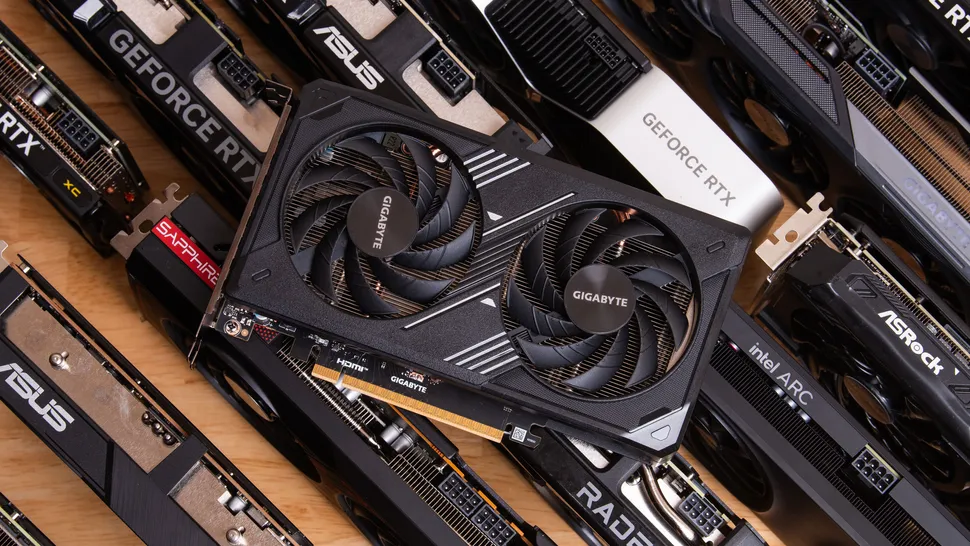
Slot-powered GPUs occupy a very specific and valuable niche. Before diving into the top 5, here’s a clear picture of exactly when one of these cards is the right choice — and when it isn’t.
✅ Prebuilt Desktop Upgrades
Dell OptiPlex, HP EliteDesk, Lenovo ThinkCentre, and similar office prebuilts ship with proprietary PSUs rated 180–300W with no spare PCIe power connectors. A slot-powered GPU is often the only way to add dedicated graphics without replacing the entire PSU — which may not even be possible in some form factors.
✅ Small Form Factor & Mini-ITX Builds
Compact SFF cases with low-wattage SFX or flex-ATX power supplies often have the slot to accept a GPU but limited PSU headroom. Slot-powered cards eliminate the power budget concern entirely — leaving all available PSU capacity for the CPU and system components.
✅ HTPC & Media Center Builds
Home theater PCs need GPU acceleration for smooth 4K video playback, hardware decoding, and HDR tone mapping — none of which require gaming-class GPU performance. A quiet, slot-powered card handles all of this while adding minimal heat and zero cable clutter to a living room build.
✅ Multi-Monitor Office Setups
Integrated graphics struggles with multiple monitors and display acceleration for productivity workloads. A slot-powered GPU adds 2–4 display outputs, offloads GPU-accelerated rendering from the CPU, and dramatically reduces the dropped frame and stuttering issues that affect iGPU-driven multi-monitor setups.
❌ High-End 1080p or 1440p Gaming
If smooth 60+ FPS at high or ultra settings in demanding modern titles (Cyberpunk, Alan Wake 2, Black Myth: Wukong) is the goal, slot-powered GPUs will disappoint. These workloads need the performance tier that only external-powered cards deliver. For serious gaming, a PSU upgrade is the better investment.
❌ 4K Gaming or Content Creation at Scale
4K gaming, high-resolution video rendering, and GPU-accelerated 3D work require significantly more raw compute power than any 75W card can provide. If your workload is this demanding, a slot-powered card is the wrong tool — a proper GPU and matching PSU upgrade is the right approach.
💡 How Slot Power Works: The PCIe x16 specification allows a slot to deliver a maximum of 75W — split across the 12V rail (66W max) and 3.3V rail (9.9W max). GPUs designed to run without external connectors are engineered to stay within this 75W envelope at all times, including under full load. The card communicates its power requirements to the slot and draws accordingly — no external cable is involved. As noted in our deeper guide on hardware and system maintenance best practices, always verify your specific motherboard’s PCIe slot capacity in its spec sheet — older boards occasionally have reduced 12V delivery on the PCIe slot.
What to Look For When Buying a No-Power-Connector GPU
✅ TDP at or below 75W: The card’s Total Board Power rating must be 75W or lower to safely draw all power from the PCIe slot. Any card with a higher TDP will either require an external connector or risk unstable operation if forced to run without one.
✅ Low-profile bracket included if needed: Many prebuilt small form factor PCs only accept low-profile cards (shorter bracket height). Check whether your case needs a low-profile card and verify the GPU comes with or offers an optional low-profile bracket.
✅ VRAM amount: 4GB GDDR6 is the practical minimum for 1080p gaming in 2026. Cards with 2GB VRAM are fine for display acceleration and legacy games but will struggle with modern titles that regularly exceed 3–4GB VRAM usage at 1080p.
✅ Display outputs for your monitor: Verify the card has the port your monitor uses — modern cards at this tier typically include HDMI and DisplayPort, but not always DVI or VGA. Budget adapters are available but add cable clutter.
✅ PCIe lane count: The AMD RX 6400 is notable for running on PCIe x4 lanes rather than the standard x16 — on older PCIe 3.0 boards this reduces its available bandwidth and clips performance. On PCIe 4.0 boards the x4 limitation has less impact. The Nvidia options all use full PCIe x16 lanes.
✅ Modern feature support: If DLSS, ray tracing, hardware video encoding, or AV1 decode support matters to your workload, check the card’s feature list carefully — not all cards at this tier support these features, and the differences between the RTX 3050 6GB and the GTX 1650 on this front are significant.
5 Best GPUs That Don’t Need PCIe Power Connectors in 2026
1. Nvidia GeForce RTX 3050 6GB — Most Powerful No-Connector GPU Available

The Nvidia GeForce RTX 3050 6GB is the crown jewel of slot-powered GPUs — the most capable graphics card on the market that draws all its power from the PCIe slot alone. With a maximum TDP of just 70W, it stays comfortably within the 75W PCIe slot limit while delivering performance that genuinely eclipses every other card in this category. Built on Nvidia’s Ampere architecture with the GA107 chip, it packs 2,304 CUDA cores, 18 RT cores for ray tracing, and 72 Tensor cores for AI-accelerated DLSS — features that simply don’t exist in the GTX or RX 550/6400 tier below it.
At 1080p, the RTX 3050 6GB handles esports titles like Valorant, CS2, and Fortnite at 100+ FPS on high settings without breaking a sweat, and delivers playable performance in more demanding titles like Elden Ring and Far Cry 6 at medium settings. The 6GB GDDR6 frame buffer means it’s less likely to run out of VRAM in modern games than the 4GB alternatives. DLSS support provides a meaningful performance multiplier in compatible titles — often pushing 1080p frame rates 30–50% higher than native rendering with minimal image quality loss. For anyone upgrading a prebuilt or older system and wanting the best possible GPU without touching the PSU, this is the card to get.
| Spec | Detail |
|---|---|
| Architecture | Nvidia Ampere (GA107) |
| CUDA Cores | 2,304 |
| VRAM | 6GB GDDR6 |
| TDP / Power Draw | 70W — no external connector required |
| PCIe Interface | PCIe 4.0 x16 |
| Ray Tracing | ✅ Yes — 2nd gen RT cores |
| DLSS | ✅ DLSS 3 supported |
| Display Outputs | HDMI 2.1, 3× DisplayPort 1.4 |
| Low-Profile Available | Yes (select SKUs) |
| Best For | Best overall slot-powered GPU — 1080p gaming, DLSS, ray tracing |
Pro Tip: The RTX 3050 6GB is not to be confused with the RTX 3050 8GB — the 8GB version requires an external 6-pin power connector. When purchasing, verify the specific SKU is the 6GB / 70W variant. The Zotac Gaming GeForce RTX 3050 Solo and MSI GeForce RTX 3050 LP are two well-regarded low-profile versions of this card suitable for slim prebuilt upgrades.
2. Nvidia GeForce GTX 1650 — The 1080p Esports Sweet Spot

The Nvidia GeForce GTX 1650 (GDDR6 version) has been the most popular slot-powered GPU for upgrade scenarios for years, and it remains the benchmark recommendation in 2026 for good reason. With a 75W TDP that sits exactly at the PCIe slot power limit, it delivers noticeably more gaming performance than any card below it in this category — smooth 1080p at high settings in Fortnite, Valorant, CS2, Apex Legends, and Rocket League, plus solid playability in older AAA titles at medium settings.
The GTX 1650’s key advantages for prebuilt and old PC upgrades are its extreme compatibility, its wide availability in both standard and low-profile form factors, and its very mature driver support. It draws exactly 75W — no more — making it safe for even older motherboards with somewhat reduced PCIe slot power delivery. It lacks ray tracing and DLSS compared to the RTX 3050 6GB above, but for esports-focused gaming without those features, the price gap between the two cards is significant. Note: always buy the GDDR6 version of the GTX 1650, not the older GDDR5 variant — the GDDR6 version is meaningfully faster at the same TDP.
| Spec | Detail |
|---|---|
| Architecture | Nvidia Turing (TU117) |
| CUDA Cores | 896 |
| VRAM | 4GB GDDR6 |
| TDP / Power Draw | 75W — no external connector required |
| PCIe Interface | PCIe 3.0 x16 |
| Ray Tracing | ❌ Not supported |
| DLSS | ❌ Not supported |
| Display Outputs | HDMI 2.0, DisplayPort 1.4, DVI-D |
| Low-Profile Available | Yes — widely available |
| Best For | 1080p esports gaming, prebuilt upgrades, best value slot-powered option |
3. AMD Radeon RX 6400 — Best AMD Option, Great for PCIe 4.0 Systems

The AMD Radeon RX 6400 is the most powerful no-connector GPU from AMD and one of the most efficient graphics cards ever released at this tier. Built on AMD’s RDNA 2 architecture with a 6nm manufacturing process, it sips a remarkably low 53W — well under the PCIe slot’s 75W limit — making it an excellent choice for systems with aging or power-limited motherboards where even the GTX 1650’s full 75W draw is a concern. Performance is competitive with the GTX 1650, with a roughly 15% advantage over the GTX 1650 in most 1080p gaming benchmarks.
The important caveat with the RX 6400 is its PCIe lane limitation: it runs on PCIe x4 lanes rather than the standard x16. On systems with PCIe 4.0 slots (which doubles the per-lane bandwidth), this limitation has minimal performance impact. On older PCIe 3.0 systems, the reduced bandwidth can noticeably clip performance in memory-bandwidth-intensive scenarios. For older PCs specifically, the GTX 1650 is generally the safer and better-performing choice unless the system has PCIe 4.0. The RX 6400 also shines in single-slot low-profile configurations — its compact design is available in genuinely tiny form factors that fit the most space-constrained prebuilts.
| Spec | Detail |
|---|---|
| Architecture | AMD RDNA 2 (Navi 24) |
| Stream Processors | 768 |
| VRAM | 4GB GDDR6 |
| TDP / Power Draw | 53W — among the lowest in this category |
| PCIe Interface | PCIe 4.0 x4 (limited lanes — see notes) |
| Ray Tracing | ✅ Yes — 1st gen RDNA 2 RT |
| Display Outputs | HDMI 2.1, DisplayPort 1.4 |
| Low-Profile Available | Yes — single-slot low-profile options available |
| Best For | PCIe 4.0 systems, ultra-compact SFF builds, lowest power draw at this tier |
⚠️ PCIe x4 Warning for Old PCs: On a PCIe 3.0 x4 slot (or a PCIe 3.0 system where the RX 6400 negotiates to x4), total available bandwidth is approximately 4 GB/s — roughly a quarter of a standard PCIe 3.0 x16 connection. This is adequate for casual gaming and productivity at 1080p but can create a noticeable performance gap versus the GTX 1650 in texture-heavy games on older hardware. If your system only has PCIe 3.0, the GTX 1650 or RTX 3050 6GB are safer choices.
4. Nvidia GeForce GTX 1050 Ti — Budget Pick for Older Systems and Legacy Games

The Nvidia GeForce GTX 1050 Ti is older than the GTX 1650, but it earned its place on this list for two important reasons: it is frequently available at very low prices on the used and refurbished market, and it remains a capable card for legacy gaming on older systems where the primary goal is improving upon integrated graphics rather than competing with modern mid-range performance. Built on Nvidia’s Pascal architecture with 768 CUDA cores and 4GB GDDR5 memory, it delivers a maximum 75W TDP with no external connector needed.
At 1080p, the GTX 1050 Ti handles games from 2015–2020 well at medium to high settings, and esports titles comfortably at high settings with 60+ FPS. It’s genuinely outperformed by both the GTX 1650 GDDR6 and the RX 6400 — by roughly 20–30% depending on the game — but if the budget is tight and a low-cost used card is the goal, the GTX 1050 Ti is one of the most reliable slot-powered options with the longest proven compatibility track record. Low-profile versions are also widely available second-hand for prebuilt upgrades.
| Spec | Detail |
|---|---|
| Architecture | Nvidia Pascal (GP107) |
| CUDA Cores | 768 |
| VRAM | 4GB GDDR5 |
| TDP / Power Draw | 75W — no external connector required |
| PCIe Interface | PCIe 3.0 x16 |
| Ray Tracing | ❌ Not supported |
| DLSS | ❌ Not supported |
| Display Outputs | HDMI 2.0, DisplayPort 1.4, DVI-D |
| Low-Profile Available | Yes — widely available used |
| Best For | Budget builds, legacy game libraries, widespread used market availability |
5. AMD Radeon RX 550 — Best for HTPCs, Multi-Monitor Office Setups & Ultra-Low Power

The AMD Radeon RX 550 (4GB GDDR5 version) is the card for situations where absolute minimum power draw and ultra-compact dimensions matter more than raw gaming performance. With a TDP of just 50W, it leaves the most headroom of any card on this list for systems with critically limited PSU capacity — making it the go-to choice for the most power-restricted prebuilts, HTPC media center builds, and silent office PCs where zero fan noise is a priority (some RX 550 models are passively cooled).
In terms of gaming, the RX 550 handles older titles and esports games at 1080p medium settings reasonably well — Minecraft, older Call of Duty titles, CS2 at lower settings, and most games from before 2019 are accessible. For anything more demanding, it will struggle. Where it genuinely excels is in non-gaming workloads: 4K video playback hardware decoding (including HEVC and VP9), multi-monitor support for up to 3 displays, GPU-accelerated display rendering for productivity apps, and AMD FreeSync support for smoother display output on compatible monitors. For a silent home theater build or an office PC that simply needs better-than-integrated graphics with minimal power overhead, the RX 550 4GB is the most refined slot-powered option at this tier.
| Spec | Detail |
|---|---|
| Architecture | AMD Polaris (Baffin) |
| Stream Processors | 512 |
| VRAM | 4GB GDDR5 |
| TDP / Power Draw | 50W — lowest draw on this list |
| PCIe Interface | PCIe 3.0 x8 (sometimes x4 on certain SKUs) |
| Ray Tracing | ❌ Not supported |
| FreeSync | ✅ Yes — AMD FreeSync supported |
| Display Outputs | HDMI 2.0, DisplayPort 1.4, DVI-D (varies by vendor) |
| Low-Profile Available | Yes — single-slot low-profile versions available |
| Best For | HTPC, ultra-low power, multi-monitor office, silent builds |
All 5 GPUs Compared at a Glance
| GPU | TDP | VRAM | Architecture | Ray Tracing | DLSS | Low-Profile | Best For |
|---|---|---|---|---|---|---|---|
| RTX 3050 6GB | 70W | 6GB GDDR6 | Ampere | ✅ Yes | ✅ DLSS 3 | ✅ Yes | Best overall — max 1080p performance |
| GTX 1650 GDDR6 | 75W | 4GB GDDR6 | Turing | ❌ No | ❌ No | ✅ Yes | 1080p esports, best value |
| RX 6400 | 53W | 4GB GDDR6 | RDNA 2 | ✅ Yes | N/A | ✅ Yes (single-slot) | PCIe 4.0 systems, ultra-compact |
| GTX 1050 Ti | 75W | 4GB GDDR5 | Pascal | ❌ No | ❌ No | ✅ Yes | Budget / legacy gaming |
| RX 550 4GB | 50W | 4GB GDDR5 | Polaris | ❌ No | N/A | ✅ Yes (single-slot) | HTPC, office, silent builds |
Realistic Performance Expectations at 1080p
Understanding what each of these cards can and cannot do at 1080p is essential before purchasing. These benchmarks are approximate averages drawn from real-world testing at 1080p with standard in-game quality settings.
| Game / Workload | RTX 3050 6GB | GTX 1650 GDDR6 | RX 6400 | GTX 1050 Ti | RX 550 |
|---|---|---|---|---|---|
| Valorant (High) | 160+ FPS | 130+ FPS | 120+ FPS | 100+ FPS | 80+ FPS |
| CS2 (High) | 140+ FPS | 110+ FPS | 100+ FPS | 85+ FPS | 65+ FPS |
| Fortnite (Medium) | 90–110 FPS | 65–80 FPS | 60–75 FPS | 50–65 FPS | 35–45 FPS |
| Apex Legends (Medium) | 80–100 FPS | 60–75 FPS | 55–70 FPS | 45–60 FPS | 30–40 FPS |
| Elden Ring (Medium) | 50–65 FPS | 35–45 FPS | 30–40 FPS | 25–35 FPS | 15–20 FPS |
| 4K Video Decode (HEVC) | ✅ Hardware | ✅ Hardware | ✅ Hardware | ✅ Hardware | ✅ Hardware |
| Multi-monitor (3 displays) | ✅ Yes | ✅ Yes | ✅ Yes | ✅ Yes | ✅ Yes |
📊 Who Each Card Is Really For, Summarized: The RTX 3050 6GB is for anyone who wants the absolute most performance without a power connector — modern games, ray tracing, DLSS. The GTX 1650 GDDR6 is the everyday upgrade card for esports gamers and prebuilt upgraders. The RX 6400 is for PCIe 4.0 systems and ultra-compact single-slot builds. The GTX 1050 Ti is the budget pick — excellent used market value for legacy gaming. The RX 550 is for HTPC, office, and ultra-silent builds where gaming is secondary to display acceleration and thermal efficiency.
Installing a No-Power-Connector GPU: What’s Different
- 1
Uninstall existing GPU drivers first. Before physically swapping cards, uninstall all existing GPU drivers using Display Driver Uninstaller (DDU) in Windows Safe Mode. This prevents driver conflicts after the new card is installed — especially important when switching from integrated Intel/AMD graphics to a dedicated card. - 2
Power down and unplug. Shut down completely, flip the PSU switch to off, and unplug from the wall. Hold the power button for 10 seconds to discharge residual system power. Anti-static precautions (wrist strap or touching the case chassis before handling the card) are good practice. - 3
Seat the card firmly in the PCIe x16 slot. Align the card’s gold connector edge with the PCIe slot and press down evenly and firmly until the retention clip clicks. Uneven seating is a common cause of no-display issues after installation — both ends of the card should sit flush. - 4
No power cables to connect — this is the advantage. Unlike most GPU installations, there’s nothing to plug into the card itself. The motherboard slot provides all required power automatically on first boot. - 5
Check BIOS display source. If your system has integrated graphics, access BIOS after first boot (using the motherboard’s video output if needed) and set the primary display source to the PCIe slot. This tells the system to use the new dedicated card rather than defaulting to integrated graphics. - 6
Install fresh drivers. Connect your monitor to the new GPU’s output port, boot into Windows, and install the latest drivers downloaded from Nvidia.com or AMD.com. Avoid relying on Windows Update to supply GPU drivers — manufacturer drivers are newer and better optimized.
Need Help Optimizing Your Website’s Performance?
The same methodical approach that goes into the right hardware upgrade applies to your website. If your WordPress site needs faster load times, better Core Web Vitals scores, or professional security hardening, our team delivers exactly that — no unnecessary upgrades, just the fixes that actually move the needle.
Keep Reading
- 🖥️ Things to Check Before Installing a GPU in an Old PC — Going further than a slot-powered upgrade? This comprehensive guide covers PSU wattage, PCIe compatibility, physical case clearance, CPU bottleneck assessment, driver preparation, and BIOS settings — everything you need to know before installing any GPU in an older system.
- 🚀 How to Increase WordPress Website Speed — If you’re upgrading hardware to improve your content creation or development workflow, this guide covers the website-side performance optimizations that make your WordPress site as fast as your new hardware allows.
- 🌐 Best Hosting for WordPress in 2026 — The right hosting is the server-side equivalent of the right GPU — it determines whether your site performs at its potential or bottlenecks on infrastructure. This guide covers the best hosts for speed, reliability, and value.
Frequently Asked Questions
Q: What is the most powerful GPU that doesn’t need a PCIe power connector?
A: The Nvidia GeForce RTX 3050 6GB is the most powerful GPU available that requires no external PCIe power connector, drawing a maximum of 70W from the motherboard’s PCIe slot. It delivers genuine ray tracing, DLSS 3 support, and 6GB GDDR6 memory — features unavailable in every other no-connector card. For anyone who wants maximum slot-powered performance in 2026, this is the card. It’s significantly more capable than the GTX 1650 (the previous go-to recommendation) while staying safely within the 75W slot power limit.
A: The Nvidia GeForce RTX 3050 6GB is the most powerful GPU available that requires no external PCIe power connector, drawing a maximum of 70W from the motherboard’s PCIe slot. It delivers genuine ray tracing, DLSS 3 support, and 6GB GDDR6 memory — features unavailable in every other no-connector card. For anyone who wants maximum slot-powered performance in 2026, this is the card. It’s significantly more capable than the GTX 1650 (the previous go-to recommendation) while staying safely within the 75W slot power limit.
Q: Why do some GPUs not need a power connector?
A: GPUs that don’t need external PCIe power connectors are designed with a Total Board Power (TDP) of 75W or less — the maximum the PCIe x16 slot specification allows. These cards draw all their required power directly from the motherboard slot’s 12V and 3.3V rails. The 75W PCIe slot limit was established in the PCIe specification as a safe power delivery ceiling for standard motherboard implementations. Any GPU requiring more than 75W must have additional power supplied via dedicated 6-pin, 8-pin, or 12VHPWR connectors from the PSU.
A: GPUs that don’t need external PCIe power connectors are designed with a Total Board Power (TDP) of 75W or less — the maximum the PCIe x16 slot specification allows. These cards draw all their required power directly from the motherboard slot’s 12V and 3.3V rails. The 75W PCIe slot limit was established in the PCIe specification as a safe power delivery ceiling for standard motherboard implementations. Any GPU requiring more than 75W must have additional power supplied via dedicated 6-pin, 8-pin, or 12VHPWR connectors from the PSU.
Q: Can I put a no-power-connector GPU in any PC?
A: In virtually any PC with a PCIe x16 slot, yes — slot-powered GPUs are highly compatible. The main checks are: (1) your case has a standard full-height PCIe slot or you purchase the low-profile version if needed; (2) your motherboard’s PCIe slot can deliver the full 75W on its 12V rail (most boards from 2008 onward can, but very old boards may deliver less); and (3) your PSU has enough total wattage left over to cover the additional GPU draw alongside existing components — the GPU needs 50–75W of PSU headroom above the current system load.
A: In virtually any PC with a PCIe x16 slot, yes — slot-powered GPUs are highly compatible. The main checks are: (1) your case has a standard full-height PCIe slot or you purchase the low-profile version if needed; (2) your motherboard’s PCIe slot can deliver the full 75W on its 12V rail (most boards from 2008 onward can, but very old boards may deliver less); and (3) your PSU has enough total wattage left over to cover the additional GPU draw alongside existing components — the GPU needs 50–75W of PSU headroom above the current system load.
Q: Is the GTX 1650 or RX 6400 better for an old PC?
A: For most old PCs with PCIe 3.0 slots, the GTX 1650 GDDR6 is the better choice. The RX 6400 runs on PCIe x4 lanes — on a PCIe 3.0 system this limits its available memory bandwidth and can reduce gaming performance compared to the GTX 1650 in texture-heavy scenarios. On a PCIe 4.0 system, the x4 limitation has much less impact and the RX 6400’s lower 53W TDP and competitive performance make it an excellent choice. On PCIe 3.0, stick with the GTX 1650 GDDR6 for better overall results in old PC upgrade scenarios.
A: For most old PCs with PCIe 3.0 slots, the GTX 1650 GDDR6 is the better choice. The RX 6400 runs on PCIe x4 lanes — on a PCIe 3.0 system this limits its available memory bandwidth and can reduce gaming performance compared to the GTX 1650 in texture-heavy scenarios. On a PCIe 4.0 system, the x4 limitation has much less impact and the RX 6400’s lower 53W TDP and competitive performance make it an excellent choice. On PCIe 3.0, stick with the GTX 1650 GDDR6 for better overall results in old PC upgrade scenarios.
Q: Will a no-power-connector GPU work in a prebuilt like a Dell OptiPlex or HP EliteDesk?
A: Yes — this is one of the most common and well-validated use cases for slot-powered GPUs. Dell OptiPlex, HP EliteDesk, HP ProDesk, and Lenovo ThinkCentre small form factor and tower models all typically have a PCIe x16 slot available for GPU installation. The key variables are: whether the case requires a low-profile card (SFF models do, tower models usually don’t), whether the prebuilt’s PSU has sufficient total wattage for the GPU’s draw on top of existing system components, and whether the BIOS will allow the PCIe slot to be set as primary display. In most cases all three conditions are met for cards in the 50–75W range.
A: Yes — this is one of the most common and well-validated use cases for slot-powered GPUs. Dell OptiPlex, HP EliteDesk, HP ProDesk, and Lenovo ThinkCentre small form factor and tower models all typically have a PCIe x16 slot available for GPU installation. The key variables are: whether the case requires a low-profile card (SFF models do, tower models usually don’t), whether the prebuilt’s PSU has sufficient total wattage for the GPU’s draw on top of existing system components, and whether the BIOS will allow the PCIe slot to be set as primary display. In most cases all three conditions are met for cards in the 50–75W range.
Q: Do these GPUs support 4K monitors?
A: All five cards on this list support 4K display output — connecting a 4K monitor and having it display at its native 4K resolution works fine. What they cannot do is run modern games at 4K with acceptable frame rates — the performance of slot-powered GPUs is tuned for 1080p gaming, and 4K gaming requires substantially more GPU compute power than any 75W card can deliver. For a 4K media center or office use case (watching 4K video, using a 4K monitor for productivity), slot-powered GPUs handle this perfectly through hardware video decode acceleration.
A: All five cards on this list support 4K display output — connecting a 4K monitor and having it display at its native 4K resolution works fine. What they cannot do is run modern games at 4K with acceptable frame rates — the performance of slot-powered GPUs is tuned for 1080p gaming, and 4K gaming requires substantially more GPU compute power than any 75W card can deliver. For a 4K media center or office use case (watching 4K video, using a 4K monitor for productivity), slot-powered GPUs handle this perfectly through hardware video decode acceleration.
Q: Do I need to update my BIOS before installing a slot-powered GPU?
A: For the GTX 1050 Ti, GTX 1650, and RX 550 — which have been on the market for several years — most motherboards already have BIOS support and no update is required. For the RTX 3050 6GB and RX 6400, which are newer cards, it’s worth checking your motherboard manufacturer’s BIOS update page for any compatibility notes. In general, slot-powered GPUs are less likely to require BIOS updates for recognition than high-end flagship cards, but checking takes less than 5 minutes and prevents a potential no-POST situation after installation.
A: For the GTX 1050 Ti, GTX 1650, and RX 550 — which have been on the market for several years — most motherboards already have BIOS support and no update is required. For the RTX 3050 6GB and RX 6400, which are newer cards, it’s worth checking your motherboard manufacturer’s BIOS update page for any compatibility notes. In general, slot-powered GPUs are less likely to require BIOS updates for recognition than high-end flagship cards, but checking takes less than 5 minutes and prevents a potential no-POST situation after installation.
Q: Should I buy new or used for a no-power-connector GPU?
A: Both options are viable. New cards offer warranty coverage and confirmed clean history — currently the RTX 3050 6GB and RX 6400 are widely available new at competitive prices. Used cards, particularly the GTX 1650 and GTX 1050 Ti, represent excellent value on platforms like eBay, Facebook Marketplace, and local PC part sales — these cards have very mature architecture and failure rates are low after the initial ownership period. If buying used, test the card thoroughly within the return window and verify the specific model number matches what was advertised (some sellers list incorrect models).
A: Both options are viable. New cards offer warranty coverage and confirmed clean history — currently the RTX 3050 6GB and RX 6400 are widely available new at competitive prices. Used cards, particularly the GTX 1650 and GTX 1050 Ti, represent excellent value on platforms like eBay, Facebook Marketplace, and local PC part sales — these cards have very mature architecture and failure rates are low after the initial ownership period. If buying used, test the card thoroughly within the return window and verify the specific model number matches what was advertised (some sellers list incorrect models).

Jaeden Higgins is a tech review writer associated with DigitalUpbeat. He contributes content focused on PC hardware, laptops, graphics cards, and related tech topics, helping readers understand products through clear, practical reviews and buying advice.


