Book Appointment Now

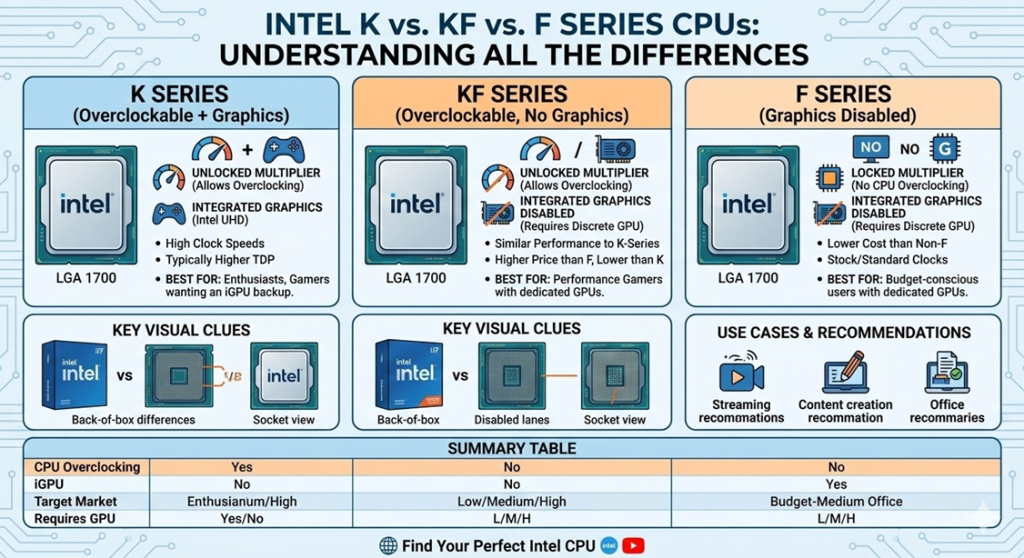
Intel K vs. KF vs. F Series CPUs: Understanding All the Differences
Quick Summary: Intel CPU suffix letters are not just marketing jargon — they directly determine whether you can overclock, whether you need a dedicated GPU, which motherboard chipset you require, and whether a stock cooler is included in the box. The three most important desktop suffixes are K (unlocked for overclocking, has integrated graphics), KF (unlocked for overclocking, no integrated graphics), and F (locked, no integrated graphics, no overclock). Understanding these three letters — and the other suffixes Intel uses — can save you from expensive compatibility mistakes and help you build the most cost-effective PC for your exact needs.
Intel K vs. KF vs. F Series CPUs: Understanding All the Differences
You have found the perfect Intel processor on paper — the right core count, the right generation, the right price. Then you notice there are three or four versions of the same chip: one ending in K, one in KF, one in F, and maybe one with no suffix at all. They seem almost identical in the spec sheet. So what is the difference, and which one should you actually buy?
Intel’s processor suffix system is one of the most important — and most misunderstood — aspects of buying an Intel CPU. Get it wrong and you could end up with a chip that requires a $300 motherboard when a $150 one would have served you equally well. Or worse, you could buy a processor that produces no video output, leaving your brand-new build completely dark on first boot.
This comprehensive guide explains every Intel CPU suffix in plain language: what each letter means, how the variants compare in real-world performance, what they cost, which motherboard and hardware they require, and exactly which one you should choose for your specific build in 2026.
⚡ The Three Key Intel Desktop Suffixes at a Glance
- K = Unlocked multiplier (overclockable) + Integrated Graphics. Needs a Z-series motherboard to overclock. No stock cooler included.
- KF = Unlocked multiplier (overclockable) + No Integrated Graphics. Slightly cheaper than K. Needs discrete GPU. No stock cooler.
- F = Locked multiplier (no overclocking) + No Integrated Graphics. Cheapest variant. Needs discrete GPU. Works on B- and H-series boards. Includes stock cooler on most models.
- No suffix = Locked multiplier + Integrated Graphics. The balanced “vanilla” option for most users.
- KS = Special Edition — higher-binned K chip, higher clocks, premium price. Rare.
- T = Low power (35W TDP). Same iGPU as non-T. For SFF and embedded builds.
Understanding Intel’s CPU Naming Convention
Before diving into the suffix comparison, it helps to understand how Intel names its processors so you can decode any CPU name instantly. Intel’s desktop CPU names follow a consistent structure across generations:
How to Read an Intel CPU Name
| Segment | Example: i7-14700K | What It Tells You |
|---|---|---|
| Brand | Intel Core | The product family (Core, Core Ultra, Xeon, etc.) |
| Brand Modifier | i7 | Performance tier: i3 (entry), i5 (mid), i7 (high), i9 (flagship) |
| Generation Indicator | 14 | The processor generation (14th Gen in this case) |
| SKU Digits | 700 | Specific model within the generation — higher = more capable |
| Product Line Suffix | K | Key feature indicator: unlocked, iGPU status, power class, etc. |
So Intel Core i7-14700K = 14th generation, i7 tier, model 700, K (unlocked overclocking + integrated graphics). Simple once you know the pattern.
Starting with the Core Ultra 200 series (Arrow Lake, 2024), Intel moved to a new naming structure — dropping the “i” prefix and using model numbers like Core Ultra 9 285K or Core Ultra 7 265KF. The suffix letters (K, KF, F, KS, T) remain the same and carry the same meaning as they always have. As Intel’s official processor naming guide confirms, the suffix system is consistent across both legacy Core iX and the new Core Ultra product lines.
The K Series: Unlocked, Overclockable, With Integrated Graphics
The K suffix is Intel’s signature for its most powerful mainstream desktop CPUs. When you see a K at the end of a processor name — whether it is a Core i5-13600K, Core i9-14900K, or Core Ultra 9 285K — it tells you three things simultaneously:
1. The Multiplier Is Unlocked
Normally, Intel locks down its CPU’s clock speed multiplier, preventing users from manually pushing the chip beyond its factory-rated speeds. K-series processors remove this lock entirely, allowing you to freely raise the multiplier in your BIOS and run the CPU at speeds beyond Intel’s stock specifications. This process is called overclocking, and it can deliver meaningful performance gains when done correctly on capable hardware.
For example, an Intel Core i9-14900K has a stock maximum boost clock of 6.0 GHz. An experienced overclocker with excellent cooling and a quality Z-series motherboard might push all-core workloads to 5.5 GHz or 5.6 GHz — a gain that would not be possible on a locked CPU of the same model. As performance testing from Tom’s Hardware’s CPU overclocking reviews consistently shows, a well-executed K-series overclock can deliver 5–15% additional multi-threaded performance depending on the workload and cooling solution.
2. It Requires a Z-Series Motherboard to Overclock
Buying a K-series CPU without a Z-series motherboard means paying for overclocking capability you cannot use. Only Intel’s premium Z-series chipset motherboards (Z690, Z790, Z890, and their generational equivalents) unlock the overclocking features for K processors. B-series and H-series motherboards — which are significantly cheaper — will run K processors at stock speeds but cannot unlock the multiplier or advanced power controls. If you are not going to overclock, a K processor with a B-series board is a valid but slightly wasteful choice — you are paying for unlocking you will never use.
3. It Includes Integrated Graphics
K-series processors come with Intel’s integrated GPU — typically Intel UHD Graphics 770 (on 12th–14th Gen) or Intel Arc graphics (on Core Ultra series). This iGPU serves as a useful backup: it provides video output in an emergency (GPU failure, GPU driver crash, troubleshooting), enables hardware-accelerated video encoding via Intel Quick Sync on applicable software, and powers the motherboard’s rear I/O video ports for secondary display setups.
4. No Stock Cooler Included
Intel does not include a cooler in the box with any K-series processor. This is because K chips are designed for enthusiast builders who will inevitably pair them with aftermarket cooling — air coolers or AIOs capable of handling the chip’s thermal demands, especially under an overclock.
Intel K Series: Real-World Specifications Examples
| Model | Cores / Threads | Base / Boost Clock | iGPU | TDP | Stock Cooler |
|---|---|---|---|---|---|
| Core i5-13600K | 14C / 20T | 3.5 / 5.1 GHz | UHD 770 | 125W | No |
| Core i7-14700K | 20C / 28T | 3.4 / 5.6 GHz | UHD 770 | 125W | No |
| Core i9-14900K | 24C / 32T | 3.2 / 6.0 GHz | UHD 770 | 125W | No |
| Core Ultra 9 285K | 24C / 24T | 3.7 / 5.7 GHz | Intel Arc (4 Xe) | 125W | No |
The KF Series: Unlocked, Overclockable, No Integrated Graphics
The KF series is exactly what the name suggests — a combination of K (unlocked multiplier) and F (no integrated graphics). KF processors are otherwise identical to their K counterparts in every meaningful hardware specification: same core count, same cache, same architecture, same base and boost clock speeds, same memory support, same PCIe lanes, and same overclocking potential.
The only difference is that the integrated GPU is physically fused off on the die — not merely disabled in software. This is a hardware-level removal, which means you cannot re-enable it through BIOS settings or software. A KF processor will never produce video output without a discrete graphics card installed.
Why Does KF Exist?
The KF variant exists for two reasons. First, binning: semiconductor manufacturing is imperfect, and some chips come off the production line with defects in the iGPU section of the die. Rather than discarding these otherwise perfectly functional chips, Intel disables the iGPU and sells them as KF variants at a slight discount. Second, market segmentation: many gaming PC builders will always use a discrete GPU and have no use for the iGPU. Intel gives them the option to save $20–30 by buying the KF variant.
Is KF Actually Better Than K?
There is a persistent community theory that KF chips overclock better or run cooler than K chips because the disabled iGPU frees up thermal headroom. The reality, based on extensive community testing documented by overclockers at forums like Overclock.net, is that the difference is negligible. As hardware testing confirms, the iGPU on a K chip draws only 1–2 watts when idle and not in active use — an amount that is essentially meaningless against the 200+ watt power budgets of high-end Intel desktop processors. There is no meaningful overclocking or thermal advantage to choosing KF over K.
💡 Pro Tip: KF Is the Smart Choice for Pure Gaming Builds
If you are building a dedicated gaming PC and are 100% certain you will always have a discrete GPU installed, the KF processor is the best value option in the overclockable category. You get identical CPU performance and identical overclocking capability compared to the K variant, but pay $20–30 less. The iGPU you are giving up is one you would never use for gaming anyway — your discrete GPU handles all graphics workloads. Save the $20–30 and put it toward a better cooler or more RAM.
If you are building a dedicated gaming PC and are 100% certain you will always have a discrete GPU installed, the KF processor is the best value option in the overclockable category. You get identical CPU performance and identical overclocking capability compared to the K variant, but pay $20–30 less. The iGPU you are giving up is one you would never use for gaming anyway — your discrete GPU handles all graphics workloads. Save the $20–30 and put it toward a better cooler or more RAM.
The F Series: Locked, No Integrated Graphics, Budget-Friendly
The F series combines the “no integrated graphics” characteristic with a locked multiplier — meaning F processors cannot be overclocked. They are the most affordable variant in Intel’s desktop lineup and are designed for builders who want a capable processor at the lowest possible cost and will always have a discrete GPU in their system.
F Series and Motherboard Flexibility
One of the most significant practical advantages of the F series over K and KF is motherboard compatibility. Because F series processors cannot be overclocked, you do not need an expensive Z-series motherboard to use them. F series processors run perfectly on the more affordable B-series chipset boards (like B660, B760, B860) and even entry-level H-series boards — which can cost $50–$100 less than a comparable Z-series board. This makes the F series particularly attractive for budget-conscious builders: the CPU costs less AND the motherboard costs less.
F Series vs K Series: Stock Performance
Here is where a common misconception needs addressing. Many people assume F series CPUs are significantly slower than K series CPUs. In reality, at stock speeds, the performance gap is modest. F series processors often have slightly lower base clock speeds compared to K variants, but their boost clocks are usually within a few hundred MHz of the K counterparts. In real-world tests, the stock performance difference between an i7-12700F and an i7-12700K is only around 5–8% in CPU-intensive workloads — a difference most users would never notice in everyday use.
F Series Does Not Include Stock Cooler? Actually — It Does
Unlike K and KF processors, most Intel F-series desktop CPUs come with Intel’s stock boxed cooler included in the retail package. This is another meaningful cost saving for budget builders — you do not need to purchase a separate aftermarket cooler for a non-overclocked F series CPU at stock speeds, at least for the mid-range i5 and i7 models.
Intel F Series: Real-World Specifications Examples
| Model | Cores / Threads | Base / Boost Clock | iGPU | Overclockable | Stock Cooler | Compatible Chipsets |
|---|---|---|---|---|---|---|
| Core i5-13400F | 10C / 16T | 2.5 / 4.6 GHz | None | No | Yes | B660, B760, H770, Z690+ |
| Core i5-14400F | 10C / 16T | 2.5 / 4.7 GHz | None | No | Yes | B760, H770, Z790 |
| Core i7-13700F | 16C / 24T | 2.1 / 5.2 GHz | None | No | Yes | B660, B760, H770, Z690+ |
| Core i9-14900F | 24C / 32T | 2.0 / 5.8 GHz | None | No | Yes | B760, H770, Z790 |
| Core Ultra 5 245F | 14C / 14T | 3.6 / 5.2 GHz | None | No | Yes | B860, H870, Z890 |
The No-Suffix Variant: The Balanced, Often-Overlooked Option
The processor with no suffix — like the Core i7-12700 or Core i5-13500 — is what Intel calls the “vanilla” or base model. It has an integrated GPU (same as the K variant) but a locked multiplier (same as the F variant). It typically has slightly lower clock speeds than the K model but is priced between the K and F variants.
The non-suffix model is surprisingly underrated. It offers integrated graphics for display flexibility and troubleshooting, works on affordable B- and H-series motherboards, and usually includes a stock cooler. For business desktops, family computers, productivity workstations, and anyone who simply wants a fast and reliable CPU without the complexity of overclocking, the non-suffix model is often the most sensible choice — but it is frequently overlooked because buyers gravitate toward the suffix variants based on marketing and review coverage.
The KS Series: Special Edition, Higher-Binned Performance
The KS suffix designates Intel’s Special Edition processors — the absolute best performing chips selected from the K production run. KS processors are “higher-binned,” meaning they were tested and verified to hit clock speeds that standard K chips could not reliably sustain. They come with higher factory-set boost clock speeds out of the box and are typically priced at a significant premium over the standard K model.
Not every generation of Intel processors has a KS variant — they appear selectively when Intel has sufficient high-quality silicon to justify the product tier. Examples include the Core i9-12900KS and the Core i9-13900KS. KS chips include integrated graphics and require a Z-series motherboard for overclocking, just like the standard K variants. For most buyers, the premium pricing of KS over K rarely represents good value — the performance delta at stock speeds is measured in single-digit percentages, and the best K chips can often reach similar performance through manual overclocking anyway.
The T Series: Power-Efficient Variants
The T suffix designates Intel’s low-power desktop variants. T processors have the same core count and architecture as the standard non-suffix models but operate at a reduced TDP of 35W — compared to the 65W or 125W of standard and K variants. They include integrated graphics and have a locked multiplier (no overclocking). Clock speeds are reduced to stay within the 35W power envelope.
T series processors are designed for small form factor (SFF) PCs, mini-PCs, embedded systems, media center builds, and enterprise desktops where power consumption and heat output are primary concerns. They are not typically found in retail stores — most T-series chips are OEM products sold to system integrators rather than end consumers. For a home gaming or productivity build, a T-series processor is almost never the right choice — the performance compromise at 35W is significant compared to the standard variants.
The Complete Intel Desktop Suffix Reference
All Intel Desktop CPU Suffixes Explained
| Suffix | Overclockable? | Integrated Graphics? | Required Chipset | Stock Cooler? | Relative Price | Best For |
|---|---|---|---|---|---|---|
| K | ✅ Yes | ✅ Yes | Z-series (to OC) | ❌ No | Most expensive | Enthusiast gaming, overclocking, maximum flexibility |
| KF | ✅ Yes | ❌ No | Z-series (to OC) | ❌ No | $20–30 less than K | Gaming builds with guaranteed discrete GPU, overclocking |
| KS | ✅ Yes (higher bins) | ✅ Yes | Z-series (to OC) | ❌ No | Most expensive of all | Extreme enthusiasts, silicon lottery winners |
| F | ❌ No | ❌ No | B or H series OK | ✅ Yes (most models) | Least expensive | Budget gaming builds, discrete GPU always present |
| (No suffix) | ❌ No | ✅ Yes | B or H series OK | ✅ Yes | Mid-range | Office PCs, family systems, balanced flexibility |
| T | ❌ No | ✅ Yes | B or H series OK | ✅ Yes | Similar to non-suffix | SFF PCs, low-power/embedded builds, OEM systems |
K vs. KF vs. F: Head-to-Head Comparison
K Series: Advantages
- Full overclocking potential — unlocked multiplier with Z-series board
- Integrated graphics serve as a backup display output and troubleshooting tool
- Intel Quick Sync hardware-accelerated video encoding available via iGPU
- Can power a second monitor from the motherboard’s rear I/O independently of the GPU
- Widest flexibility — works in any scenario, with or without discrete GPU
- Best resale value in the K/KF/F trio
K Series: Disadvantages
- Highest price among the three variants
- Requires expensive Z-series motherboard to unlock overclocking
- No stock cooler included — additional cooler purchase required
- iGPU is unused and irrelevant for most gaming builds with a discrete GPU
- Overclocking requires knowledge, quality cooling, and quality VRMs to benefit
KF Series: Advantages
- Identical CPU performance and overclocking potential to the K variant
- $20–30 cheaper than the K equivalent — real money saved for gaming builds
- No thermal or power budget wasted on an iGPU you will never use
- Same Z-series motherboard support and overclocking ceiling as K
KF Series: Disadvantages
- No integrated graphics — a discrete GPU is mandatory, always
- Cannot troubleshoot using iGPU if discrete GPU fails
- Motherboard rear I/O video ports are non-functional — no display output without a GPU
- Still requires expensive Z-series motherboard for overclocking
- No stock cooler included
F Series: Advantages
- Lowest price of all three variants
- Compatible with affordable B-series and H-series motherboards — lower total build cost
- Stock cooler included — one less purchase to make
- Near-identical stock performance to K variant in everyday workloads
- Ideal for budget gaming builds where overclocking is not a priority
F Series: Disadvantages
- No overclocking — multiplier is locked, performance ceiling is fixed
- No integrated graphics — mandatory discrete GPU at all times
- Slightly lower base clock speeds than K/KF variants in the same model family
- No Intel Quick Sync iGPU acceleration available
- Cannot output video from motherboard ports regardless of board features
The Total Cost Reality: K, KF, and F Including Motherboard
One mistake many buyers make is comparing only CPU prices without accounting for the total platform cost. The chipset requirement creates a very real cost difference that changes the value calculation significantly:
Total Platform Cost Comparison: K vs KF vs F (Approximate)
| Component | K Series Build | KF Series Build | F Series Build |
|---|---|---|---|
| CPU (i5 tier example) | $230–$280 (i5-14600K) | $205–$255 (i5-14600KF) | $155–$185 (i5-14400F) |
| Required Motherboard | $150–$300+ (Z790) | $150–$300+ (Z790) | $80–$160 (B760) |
| CPU Cooler | $30–$80+ (aftermarket required) | $30–$80+ (aftermarket required) | $0 (stock cooler included) |
| Estimated Platform Total | $410–$660+ | $385–$635+ | $235–$345 |
| Overclocking Possible? | Yes | Yes | No |
Prices are approximate retail estimates. The F series platform can cost $150–$300+ less in total than a K series setup — a significant difference that can go toward a better GPU, more RAM, or a faster SSD.
⚠️ Warning: F and KF CPUs Require a Discrete GPU — No Exceptions
Purchasing a processor with the F or KF suffix and attempting to connect your monitor to your motherboard’s HDMI or DisplayPort output will result in no display, no matter what. Motherboard video output ports are powered by the CPU’s integrated GPU. With the iGPU fused off, these ports are permanently non-functional. You must have a discrete graphics card installed before the system will produce any video output — this applies even during initial setup and BIOS configuration. If you are building a new system with an F or KF processor, your GPU must be in the build from the very first power-on.
Purchasing a processor with the F or KF suffix and attempting to connect your monitor to your motherboard’s HDMI or DisplayPort output will result in no display, no matter what. Motherboard video output ports are powered by the CPU’s integrated GPU. With the iGPU fused off, these ports are permanently non-functional. You must have a discrete graphics card installed before the system will produce any video output — this applies even during initial setup and BIOS configuration. If you are building a new system with an F or KF processor, your GPU must be in the build from the very first power-on.
Intel Quick Sync: The iGPU Feature You Might Actually Care About
For most gamers, the iGPU’s absence in KF and F processors is irrelevant — their discrete GPU handles all graphics work and the iGPU would sit completely idle. But there is one specific use case where the iGPU matters beyond just “having a fallback display”: Intel Quick Sync.
Quick Sync is Intel’s hardware-accelerated video encoding and decoding technology, built into the iGPU of K and non-suffix Intel processors. It allows applications like Handbrake, Adobe Premiere, OBS Studio, and various video converters to use the iGPU’s dedicated media engine for video transcoding — dramatically faster than software encoding and typically without impacting gaming performance since it runs on the iGPU, not the CPU cores or discrete GPU.
If you do any of the following, Quick Sync may genuinely matter to you: game streaming with OBS (Quick Sync HEVC encoding), video editing with hardware-accelerated exports, video format conversion, or media server transcoding (e.g., Plex). In these cases, the K variant’s iGPU provides a real and practical advantage over the KF or F, even in a system with a powerful discrete GPU. As Intel’s Quick Sync documentation explains, the technology offloads encoding workloads from the CPU entirely, freeing up CPU cycles for other tasks simultaneously.
Which Intel CPU Should You Buy? A Decision Guide
🎯 Intel CPU Suffix Decision Guide by Use Case
- Gaming PC, always using a discrete GPU, want to overclock and maximize performance: Choose KF — identical performance to K, $20–30 cheaper, still requires Z-series board and aftermarket cooler but saves where it counts.
- Gaming PC, want overclocking AND iGPU as a safety net or for Quick Sync streaming: Choose K — worth the small premium for the added flexibility and Quick Sync capability.
- Budget gaming PC, discrete GPU always present, no overclocking plans: Choose F — lowest total platform cost when paired with a B-series board, stock cooler included, near-identical stock CPU performance.
- Office PC, business workstation, family computer: Choose no-suffix — integrated graphics for reliability, no overclock needed, works on B-series boards, stock cooler included, best balance of features and cost.
- Small form factor or low-power build: Choose T series — 35W TDP keeps heat and power use minimal. OEM sourcing may be required.
- Maximum overclocking, best silicon, budget not a concern: Choose KS — pre-selected highest-bin chips with the best overclocking ceiling Intel offers. Rare and expensive.
- Unsure whether you will always have a discrete GPU: Choose K or no-suffix — keep the iGPU as insurance and for troubleshooting flexibility.
Intel Laptop Suffixes: A Quick Reference
Beyond desktop CPUs, Intel uses a completely different set of suffixes for its mobile (laptop) processors. Here is a brief overview so you can decode laptop CPU names as confidently as desktop ones:
Intel Mobile (Laptop) CPU Suffix Reference
| Suffix | Meaning | TDP Range | Typical Laptop Type |
|---|---|---|---|
| H | High Performance Mobile | 45W | Gaming laptops, mobile workstations |
| HX | Highest Performance Mobile (desktop-class) | 55W+ | Flagship gaming laptops, creator laptops |
| HK | High Performance + Unlocked (older gen) | 45W | Overclockable gaming laptops (legacy) |
| U | Ultra-low power, thin and light | 15–28W | Ultrabooks, business laptops, daily drivers |
| P | Performance balanced (12th Gen) | 28W | Thin-and-light productivity laptops |
| V | AI-focused (Lunar Lake, Core Ultra 200V) | 17W | AI PCs, Copilot+ ultrabooks |
Common Myths About Intel K, KF, and F Processors
❌ Intel CPU Suffix Myths — Busted
- Myth: “KF chips run cooler and overclock better because the iGPU is off.” — False. The iGPU draws only 1–2W when idle on K chips. This is negligible on a platform with 100–200W TDP CPUs. Thermal and overclocking performance between K and KF of the same model is effectively identical.
- Myth: “F series CPUs are defective or lower quality.” — Partially misleading. Some F chips do come from dies with iGPU defects, but Intel also intentionally produces F variants for market segmentation. The CPU cores, cache, and memory controller are not affected — the chip’s computational performance is equal to its non-F counterparts.
- Myth: “You need a Z-series motherboard to use a K processor.” — False. A K processor will run in any compatible chipset motherboard, including B and H series, at stock speeds. You only need a Z-series board if you want to overclock. Running a K on a B-series board is perfectly functional — just slightly wasteful if you never overclock.
- Myth: “The F series is noticeably slower than the K series.” — Mostly false at stock speeds. The performance difference in gaming is typically under 5% and practically unnoticeable in daily use. The real performance gap appears only when the K chip is overclocked — at which point the locked F chip cannot compete.
- Myth: “KF processors are rare or hard to find.” — False. Intel produces KF variants for every K processor in its mainstream gaming lineup. They are widely available from all major retailers alongside the K variants.
Frequently Asked Questions: Intel K vs KF vs F CPUs
What is the practical performance difference between a K and KF Intel CPU?
At stock speeds, there is essentially zero performance difference between a K and KF processor of the same model number. They share identical cores, cache, architecture, base clocks, boost clocks, memory controllers, and PCIe lane configurations. The only hardware difference is that the iGPU is fused off on the KF variant. When overclocked on the same motherboard and cooling setup, performance is again identical — the disabled iGPU creates no measurable benefit or disadvantage for CPU performance. Choose KF over K if you want to save $20–30 and have no use for integrated graphics.
Can I use an Intel F or KF processor without a graphics card?
No — this is not possible. F and KF processors have their integrated GPU permanently fused off at the hardware level. Without an iGPU and without a discrete GPU installed, the system has no means of producing any video signal. Your monitor will display nothing — not even the BIOS — because there is no graphics hardware present to generate an output signal. A discrete graphics card is a strict requirement for all F and KF processors, from the very first time you power on the system. This applies even during initial setup, BIOS flashing, and troubleshooting.
Do I need a Z-series motherboard for a KF processor?
You need a Z-series motherboard if you want to overclock the KF processor. The KF is an unlocked CPU — its multiplier is free to be raised — but the overclocking function can only be enabled on Z-series chipset motherboards (Z690, Z790, Z890). A KF CPU will work on a B-series or H-series motherboard at stock speeds without any issues, but the overclocking capability you paid for will be unavailable. If you buy a KF CPU intending to overclock, always pair it with a Z-series board and a quality aftermarket cooler. If you do not plan to overclock, consider the F series instead — you get the same stock performance at a lower price on a cheaper B-series board.
Is the Intel K series worth it if I never plan to overclock?
The honest answer is: not really — at least not for the overclocking premium specifically. If you have no intention of overclocking, you are paying for the unlocked multiplier and the required Z-series motherboard without ever using those features. However, the K processor still makes sense if the integrated graphics are valuable to you — for Quick Sync encoding, iGPU-backed second monitor, or as a troubleshooting fallback. In that case, the no-suffix variant (e.g., Core i7-14700 vs i7-14700K) is often a more cost-effective way to get the iGPU without paying the overclocking premium. Compare pricing carefully between the K and no-suffix variants before deciding.
Does Intel’s KF suffix exist across all processor generations?
Yes — Intel has consistently offered KF variants alongside K processors across its modern generations, including 10th, 11th, 12th, 13th, 14th Gen Core and the newer Core Ultra 200 series. Not every single K model has a KF counterpart (particularly at the i3/Core 3 tier), but all major i5, i7, and i9 class K processors typically have corresponding KF variants. The Core Ultra 200 series introduced KF variants for the Arrow Lake lineup as well, confirming that Intel plans to continue the KF product tier in future generations.
What does the KS suffix mean and is it worth buying?
KS stands for Special Edition — Intel’s designation for higher-binned K processors that are verified to achieve higher clock speeds than the standard K variant. KS chips are tested to reach specific boost frequencies that standard K chips may not reliably hit. They cost significantly more than the standard K variant — often $100 or more extra — for a performance difference that is typically in the range of 3–8% in benchmarks. For most users, the KS is very difficult to justify on value grounds. An experienced overclocker can often achieve similar performance on a standard K chip through manual tuning. KS chips are best suited for enthusiasts who want the absolute best out-of-the-box performance and are willing to pay a premium for pre-selected silicon.
Final Verdict: Which Intel CPU Suffix Should You Buy?
The Intel suffix system is genuinely logical once you understand the two variables it controls: overclocking (K/KF = yes, F/no-suffix = no) and integrated graphics (K/no-suffix = yes, KF/F = no). Everything else — price, motherboard requirement, cooler inclusion — flows naturally from these two characteristics.
For pure gaming builds with a discrete GPU and overclocking on the agenda: go KF. For gaming builds where you want the iGPU safety net or Quick Sync: go K. For budget-first gaming builds without overclocking plans: go F with a B-series board and save significantly on total platform cost. For balanced productivity and office builds: the no-suffix variant is the underrated champion.
The most important takeaway is to always calculate total platform cost — CPU plus motherboard plus cooler — rather than comparing CPU prices alone. That full picture almost always makes the F series look far more attractive than the K and KF variants for builders who are not planning to overclock.
📚 Related Articles From DigitalUpbeat
- Best Processors for Gaming — Find the right Intel CPU (K, KF, or F) for your gaming build
- Best Motherboards of 2026 — Z-series and B-series boards matched to your chosen Intel CPU suffix
- How to Choose the Right CPU and GPU Combo for Gaming — Pair your Intel chip with the perfect graphics card
- Bottleneck Calculator — Check that your Intel CPU and GPU are well matched for your target resolution
- Top 10 CPU Coolers Tested and Ranked — Essential reading if you are buying a K or KF processor (no cooler included)
- Best RAM for PC in 2026 — Match fast DDR5 memory to your Intel platform for maximum performance
- i7-9700K vs i5-13600K vs Ryzen 7 7800X3D — Real-world performance comparison across Intel generations

Jaeden Higgins is a tech review writer associated with DigitalUpbeat. He contributes content focused on PC hardware, laptops, graphics cards, and related tech topics, helping readers understand products through clear, practical reviews and buying advice.