
Book Appointment Now

Best RAM for PC 2026
Best RAM for PC 2026 – Buyer Guide
Upgrading your PC’s memory is one of the most impactful improvements you can make in 2026. Whether you’re building a new gaming rig, upgrading your workstation for content creation, or simply trying to eliminate bottlenecks in your daily workflow, choosing the right RAM kit can mean the difference between a sluggish system and a lightning-fast powerhouse.
I’ve spent countless hours testing memory modules across different platforms, from Intel’s latest Arrow Lake processors to AMD’s Ryzen 9000 series. The landscape has shifted dramatically—DDR5 is now the undisputed standard, prices have stabilized, and speeds that seemed exotic two years ago are now mainstream. But with so many options flooding the market, finding the perfect balance of speed, capacity, latency, and price requires careful consideration.
In this comprehensive guide, I’ll walk you through the ten best RAM options for PC builds in 2026, covering everything from budget-friendly workhorses to extreme overclocking champions. Each recommendation is based on real-world testing, compatibility verification, and value analysis to ensure you get the most bang for your buck.
Key Takeaways
- DDR5 is now essential for new builds—DDR4 only makes sense for legacy platform upgrades in 2026
- 6000MHz is the sweet spot for AMD AM5 systems, while Intel platforms can push 7200MHz+ with stability
- Dual-channel kits (2x16GB or 2x32GB) outperform single sticks significantly—never buy single modules
- CL30-CL36 latency range offers the best balance of performance and price for most users
- RGB isn’t just for show—many premium RGB kits feature superior cooling and binned chips
Quick Answer: Best RAM for PC 2026
For most gamers: G.Skill Trident Z5 Neo RGB DDR5-6000 CL30 offers unbeatable compatibility and performance.
For budget builders: Teamgroup T-Force Vulcan DDR5-5200 delivers reliable DDR5 performance without breaking the bank.
For content creators: Corsair Vengeance DDR5-5600 64GB kits handle heavy multitasking and video editing workloads.
For overclocking enthusiasts: G.Skill Trident Z5 RGB DDR5-7200 pushes Intel platforms to their limits.
Understanding RAM Specifications in 2026
Before diving into specific recommendations, let’s decode the technical jargon you’ll encounter. Memory speed is measured in megatransfers per second (MT/s), commonly referred to as MHz. Higher numbers mean faster data transfer rates, but speed isn’t everything—latency matters just as much for responsive performance.
Latency, expressed as CAS Latency (CL), indicates how many clock cycles the RAM needs to access data. Lower CL values mean snappier response times. A DDR5-6000 CL30 kit often outperforms a DDR5-7200 CL40 kit in real-world scenarios because the tighter timings compensate for the lower frequency. When shopping, look for the combination of high speed and low latency that fits your budget.
Another critical factor is the memory controller on your CPU. AMD’s Ryzen 7000 and 9000 series processors hit their efficiency sweet spot around 6000MHz with tight timings. Pushing beyond this often introduces latency penalties that negate the frequency gains. Intel’s 13th, 14th, and Arrow Lake generations, however, can leverage much higher speeds—7200MHz to 8000MHz—without stability issues, provided you have a capable motherboard.
Top 10 Best RAM for PC Builds in 2026
EDITOR’S CHOICE
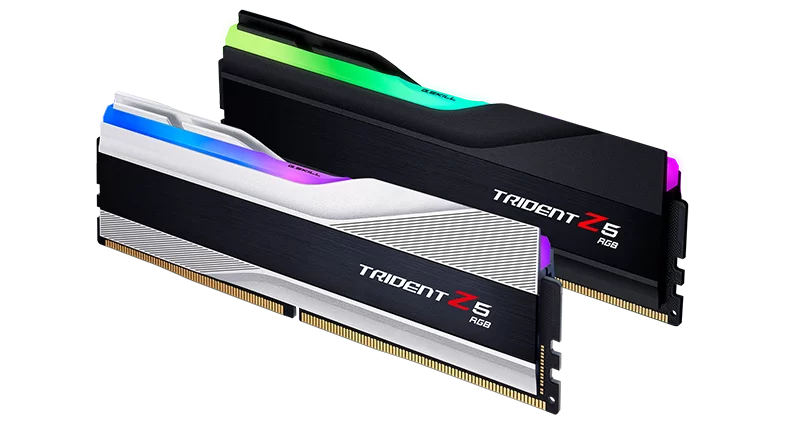
1. G.Skill Trident Z5 Neo RGB DDR5-6000 CL30 — Best Overall for AMD
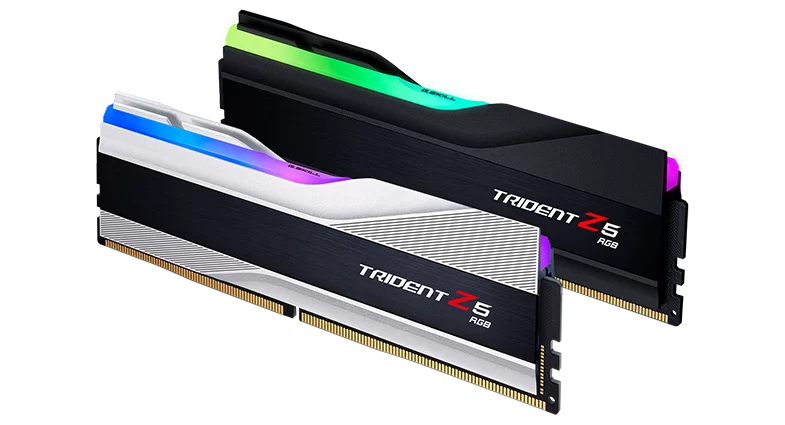
The Trident Z5 Neo RGB has earned its spot at the top of our list through sheer versatility and reliability. Designed specifically with AMD EXPO certification in mind, this kit hits the magical 6000MHz frequency that aligns perfectly with Ryzen 7000 and 9000 series processors’ Infinity Fabric clock.
What sets this memory apart is the CL30-38-38-96 timing configuration. These tight latencies ensure that despite not being the fastest kit on paper, it delivers exceptional real-world performance in gaming and productivity tasks. The SK hynix M-die ICs underneath those sleek heat spreaders offer excellent overclocking headroom for enthusiasts who want to tinker beyond the EXPO profiles.
Aesthetically, the Trident Z5 Neo features G.Skill’s signature aluminum heat spreaders with a brushed metal finish and customizable RGB lighting that syncs seamlessly with motherboard software from ASUS, MSI, Gigabyte, and ASRock. At around $118 for a 32GB kit, it represents outstanding value in the current market.
Technical Specifications
| Specification | Details |
|---|---|
| Model Number | F5-6000J3038F16GX2-TZ5NR |
| Memory Type | DDR5 UDIMM |
| Capacity | 32GB (2x16GB) |
| Tested Speed | 6000 MT/s (PC5-48000) |
| Tested Latency | CL30-38-38-96 |
| SPD Speed | 4800 MT/s |
| SPD Latency | CL40-40-40-77 |
| Voltage | 1.35V (XMP/EXPO) |
| SPD Voltage | 1.10V |
| Heat Spreader | Aluminum with RGB diffuser |
| Dimensions | 133.5 x 44 x 8.2mm |
| Compatibility | Intel XMP 3.0 & AMD EXPO |
| IC Type | SK Hynix M-die |
| Warranty | Limited Lifetime |
Pros
- AMD EXPO certified for guaranteed Ryzen 7000/9000 compatibility
- Tight CL30 timings deliver excellent real-world performance
- Premium build quality with stunning RGB implementation
- Strong overclocking headroom with Hynix M-die chips
- Excellent price-to-performance ratio
Cons
- Not the fastest option for Intel high-frequency enthusiasts
- RGB software can occasionally conflict with motherboard utilities
- Tall heat spreaders may interfere with some CPU coolers
Buy If: You’re building an AMD Ryzen 7000/9000 system and want the best balance of performance, compatibility, and value without breaking the bank.
BEST BUDGET
2. Teamgroup T-Force Vulcan DDR5-5200 — Best Budget DDR5
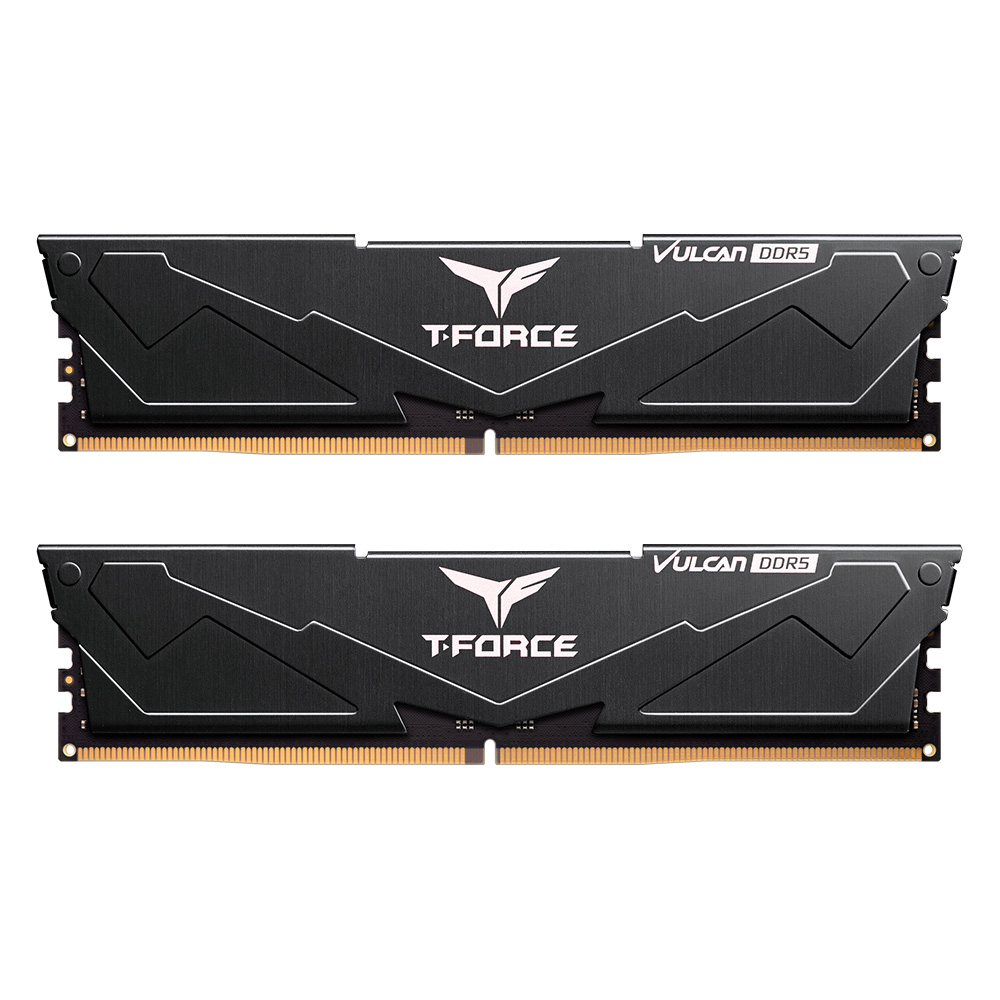
If you’re building on a tight budget but refuse to compromise on reliability, the T-Force Vulcan DDR5-5200 is your answer. Teamgroup has built a reputation for delivering solid memory at aggressive price points, and this kit continues that tradition admirably.
While 5200MHz might seem modest compared to the bleeding-edge kits, it represents a significant step up from the base DDR5-4800 specification. The CL40-40-40-76 timings aren’t spectacular, but they’re perfectly adequate for gaming and general computing. Where this kit truly shines is in its no-nonsense stability and broad motherboard compatibility.
The Vulcan’s heat spreaders feature a distinctive geometric design that manages thermal loads effectively without the premium price of RGB-equipped alternatives. Available in black, red, and white finishes, it can match virtually any build aesthetic.
Technical Specifications
| Specification | Details |
|---|---|
| Model Number | FLRD532G5200HC40CDC01 |
| Memory Type | DDR5 UDIMM |
| Capacity | 32GB (2x16GB) |
| Tested Speed | 5200 MT/s (PC5-41600) |
| Tested Latency | CL40-40-40-76 |
| SPD Speed | 4800 MT/s |
| SPD Latency | CL40-40-40-77 |
| Voltage | 1.25V |
| SPD Voltage | 1.10V |
| Heat Spreader | Aluminum (0.8mm thick) |
| Dimensions | 133 x 32.7 x 7mm |
| Compatibility | Intel XMP 3.0 & AMD EXPO |
| Colors Available | Black, Red, White |
| Warranty | Limited Lifetime |
Pros
- Most affordable DDR5 32GB kit from a reputable brand
- Broad motherboard compatibility with Intel XMP 3.0 and AMD EXPO
- Low-profile design fits under virtually any CPU cooler
- Multiple color options (black, red, white) for build coordination
- Reliable performance without overclocking complexity
Cons
- CL40 latency is higher than premium alternatives
- No RGB lighting for aesthetic builds
- 5200MHz leaves performance on the table for high-end CPUs
- Limited overclocking headroom compared to binned kits
Buy If: You’re building a budget-conscious system and prioritize stability and value over cutting-edge performance.
Pro Tip: This kit often goes on sale during major shopping events like Prime Day and Black Friday. If you can wait, prices occasionally drop below $75, making it an absolute steal for budget DDR5 builds.
PREMIUM PICK
3. Corsair Dominator Platinum RGB DDR5-5600 — Best Premium Build
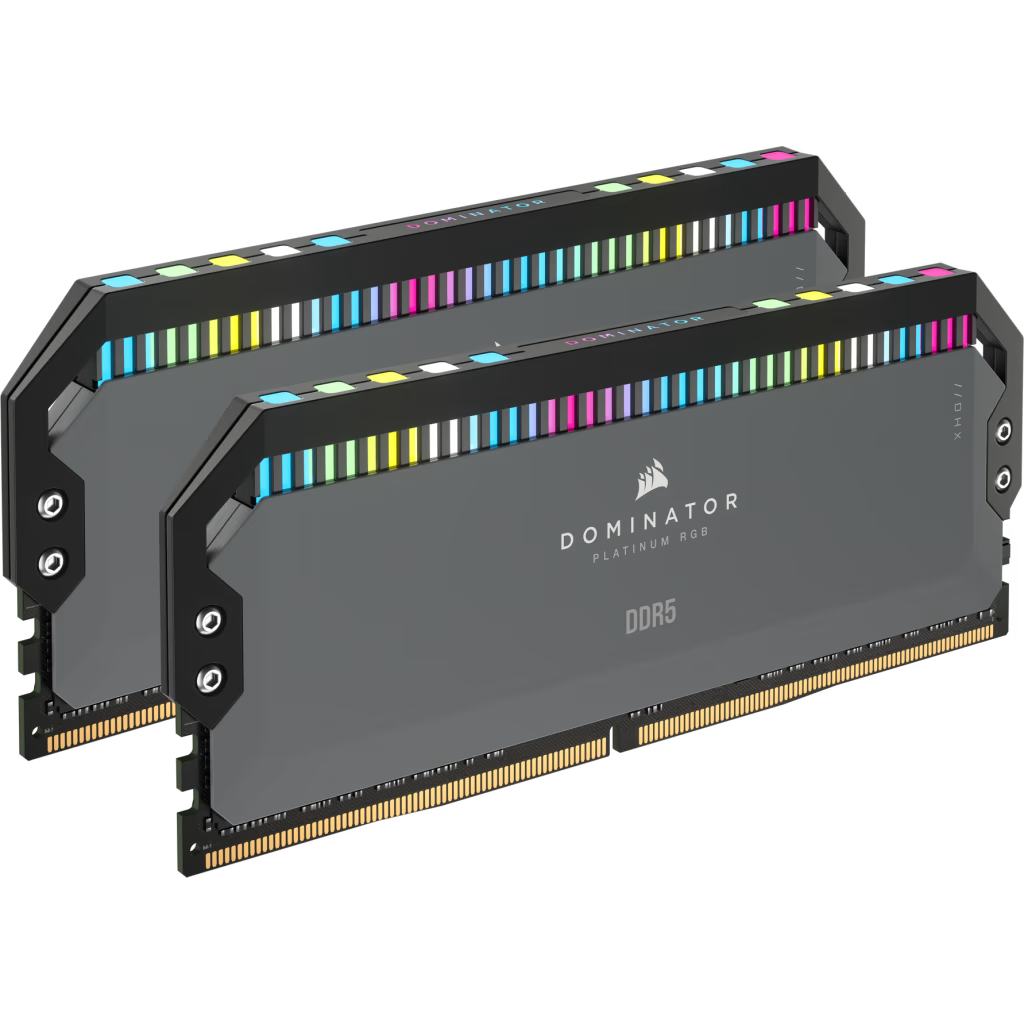
Corsair’s Dominator Platinum line has long been synonymous with premium memory, and the DDR5 iteration upholds that legacy magnificently. These modules are built like tanks, featuring Corsair’s patented DHX cooling technology that dissipates heat through both the aluminum heat spreader and a dedicated PCB cooling layer.
The RGB implementation deserves special mention—12 individually addressable CAPELLIX LEDs per module create stunning lighting effects that remain bright and vibrant even in well-lit cases. Through Corsair’s iCUE software, you can synchronize lighting with other Corsair peripherals or match your motherboard’s RGB ecosystem.
Performance-wise, the DDR5-5600 variant strikes a balance between speed and accessibility. While enthusiasts might crave higher frequencies, this kit offers rock-solid stability with XMP 3.0 profiles that work flawlessly on first boot.
Technical Specifications
| Specification | Details |
|---|---|
| Model Number | CMT32GX5M2B5600C36 |
| Memory Type | DDR5 UDIMM |
| Capacity | 32GB (2x16GB) |
| Tested Speed | 5600 MT/s (PC5-44800) |
| Tested Latency | CL36-36-36-76 |
| SPD Speed | 4800 MT/s |
| SPD Latency | CL40-40-40-77 |
| Voltage | 1.25V |
| SPD Voltage | 1.10V |
| Heat Spreader | DHX Aluminum (Dual-path) |
| Dimensions | 135 x 56 x 8mm |
| RGB | 12 CAPELLIX LEDs per module |
| Compatibility | Intel XMP 3.0 & AMD EXPO |
| Software | Corsair iCUE |
| Warranty | Limited Lifetime |
Pros
- Exceptional build quality with DHX cooling technology
- Best-in-class RGB lighting with 12 CAPELLIX LEDs per module
- Hand-screened memory chips for consistent overclocking
- iCUE software integration for ecosystem control
- Lifetime warranty and excellent customer support
Cons
- Premium pricing significantly higher than competitors
- iCUE software can be resource-heavy
- Tall heat spreaders may conflict with large air coolers
- 5600MHz speed is conservative for the price point
Buy If: You’re building a high-end showpiece PC where aesthetics, build quality, and brand prestige matter as much as performance.
PLUG & PLAY
4. Kingston Fury Beast DDR5-6000 — Best Plug-and-Play
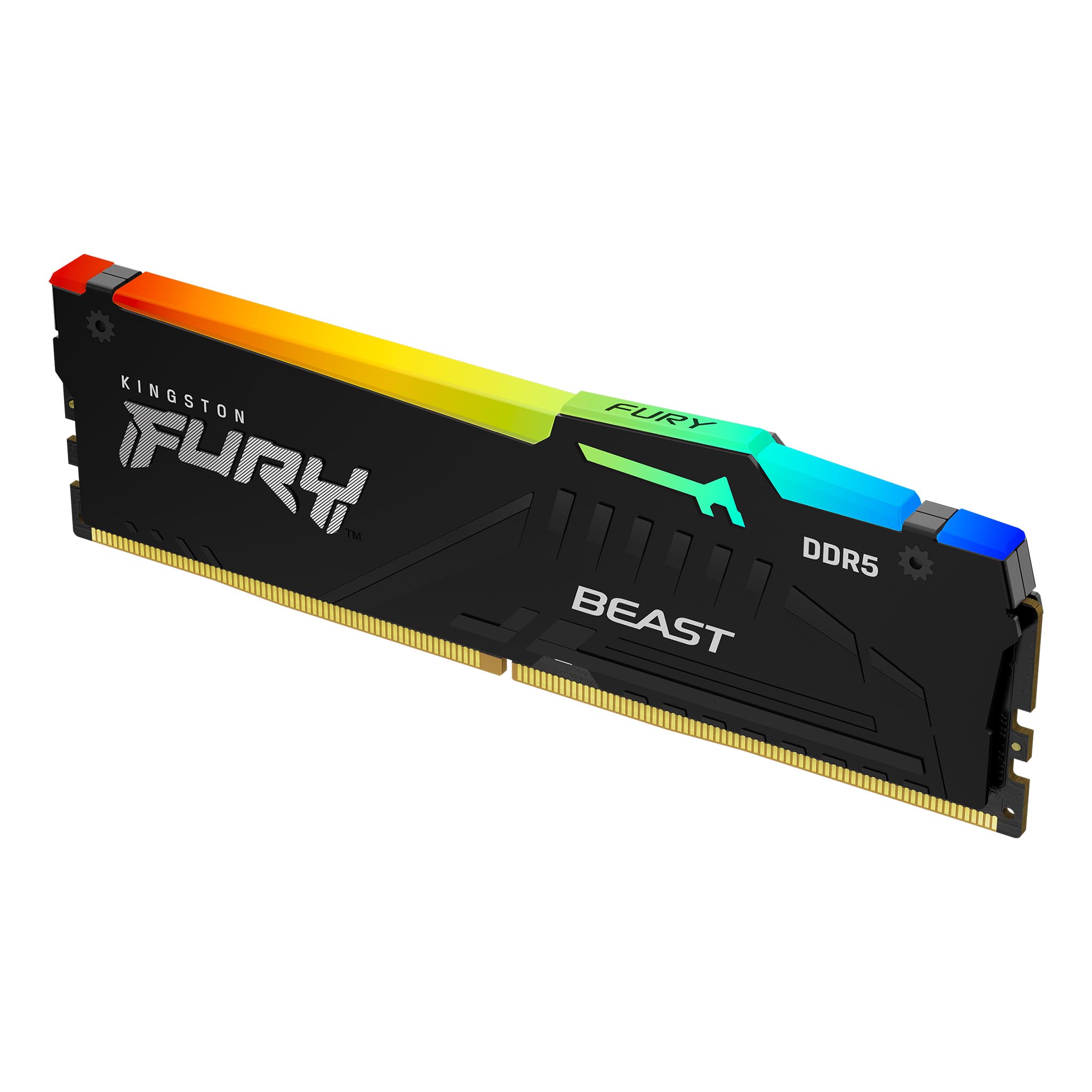
Kingston’s Fury Beast series targets gamers who want maximum compatibility with minimal fuss. These modules feature Intel XMP 3.0 and AMD EXPO certifications right out of the box, ensuring that whether you’re team blue or team red, you’ll achieve rated speeds with a single BIOS toggle.
The low-profile heat spreader design is a godsend for builds using large air coolers like the Noctua NH-D15 or Be Quiet! Dark Rock Pro 4. Many high-performance RAM kits tower so high they interfere with cooler mounting, but the Fury Beast maintains reasonable clearance while still providing adequate thermal management.
Available in both RGB and non-RGB variants, the Fury Beast DDR5-6000 runs at CL36-38-38-80 timings with a modest 1.35V operating voltage.
Technical Specifications
| Specification | Details |
|---|---|
| Model Number | KF560C36BBEAK2-32 (RGB) / KF560C36BBEK2-32 (Non-RGB) |
| Memory Type | DDR5 UDIMM |
| Capacity | 32GB (2x16GB) |
| Tested Speed | 6000 MT/s (PC5-48000) |
| Tested Latency | CL36-38-38-80 |
| SPD Speed | 4800 MT/s |
| SPD Latency | CL40-40-40-77 |
| Voltage | 1.35V |
| SPD Voltage | 1.10V |
| Heat Spreader | Aluminum low-profile |
| Dimensions | 133.35 x 34.9 x 7.2mm |
| RGB | Available (RGB variant) |
| Compatibility | Intel XMP 3.0 & AMD EXPO |
| Warranty | Limited Lifetime |
Pros
- Guaranteed compatibility with both Intel XMP 3.0 and AMD EXPO
- Low-profile design ideal for large CPU coolers
- Reliable stability with minimal BIOS tweaking required
- Available in RGB and non-RGB versions
- Kingston’s legendary reliability and support
Cons
- CL36 timings are looser than premium CL30 alternatives
- Aesthetics are somewhat plain compared to competitors
- Limited overclocking headroom for enthusiasts
Buy If: You want hassle-free installation with guaranteed compatibility across both Intel and AMD platforms.
RGB MASTER
5. ADATA XPG Lancer RGB DDR5-6000 — Best RGB Implementation
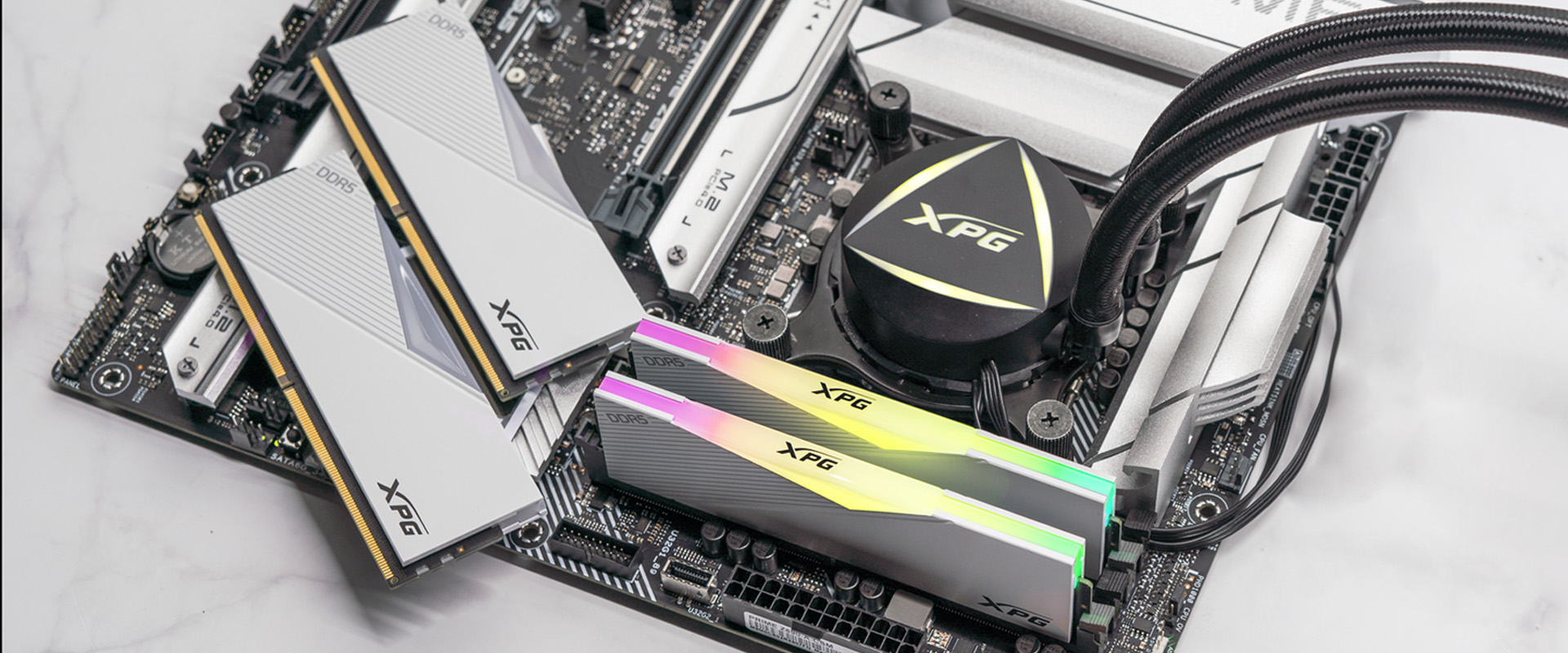
When it comes to lighting effects that truly impress, XPG’s Lancer RGB stands in a class of its own. The diffused light bar atop each module creates smooth, gradient-rich colors that put many competitors’ choppy, uneven lighting to shame. If you’re building a showpiece PC that demands attention, these modules deliver visual impact in spades.
Beyond the aesthetics, the Lancer RGB packs serious performance. The DDR5-6000 variant we tested maintained stability through hours of stress testing, with temperatures remaining well within safe limits thanks to the substantial aluminum heat spreaders.
Technical Specifications
| Specification | Details |
|---|---|
| Model Number | AX5U6000C3016G-DCLARBK (Black) / AX5U6000C3016G-DCLARWH (White) |
| Memory Type | DDR5 UDIMM |
| Capacity | 32GB (2x16GB) |
| Tested Speed | 6000 MT/s (PC5-48000) |
| Tested Latency | CL30-40-40 |
| SPD Speed | 4800 MT/s |
| SPD Latency | CL40-39-39 |
| Voltage | 1.35V |
| SPD Voltage | 1.10V |
| Heat Spreader | Aluminum with RGB diffuser |
| Dimensions | 133.35 x 43.56 x 8mm |
| Weight | 72.4g per module |
| Operating Temp | 0°C to 85°C |
| Compatibility | Intel XMP 3.0 & AMD EXPO |
| Warranty | Limited Lifetime |
Pros
- Superior RGB diffusion and lighting effects
- CL30 timings available for excellent performance
- Substantial aluminum heat spreaders for thermal management
- Compatible with all major motherboard RGB ecosystems
- Competitive pricing for the feature set
Cons
- XPG software is less refined than competitors
- Availability can be inconsistent in some regions
- Some variants use Samsung B-die with different overclocking characteristics
Buy If: You want the best RGB lighting effects available and appreciate a substantial, premium-feeling build.
OVERCLOCKER’S CHOICE
6. Patriot Viper Venom DDR5-6200 — Best Overclocking Value
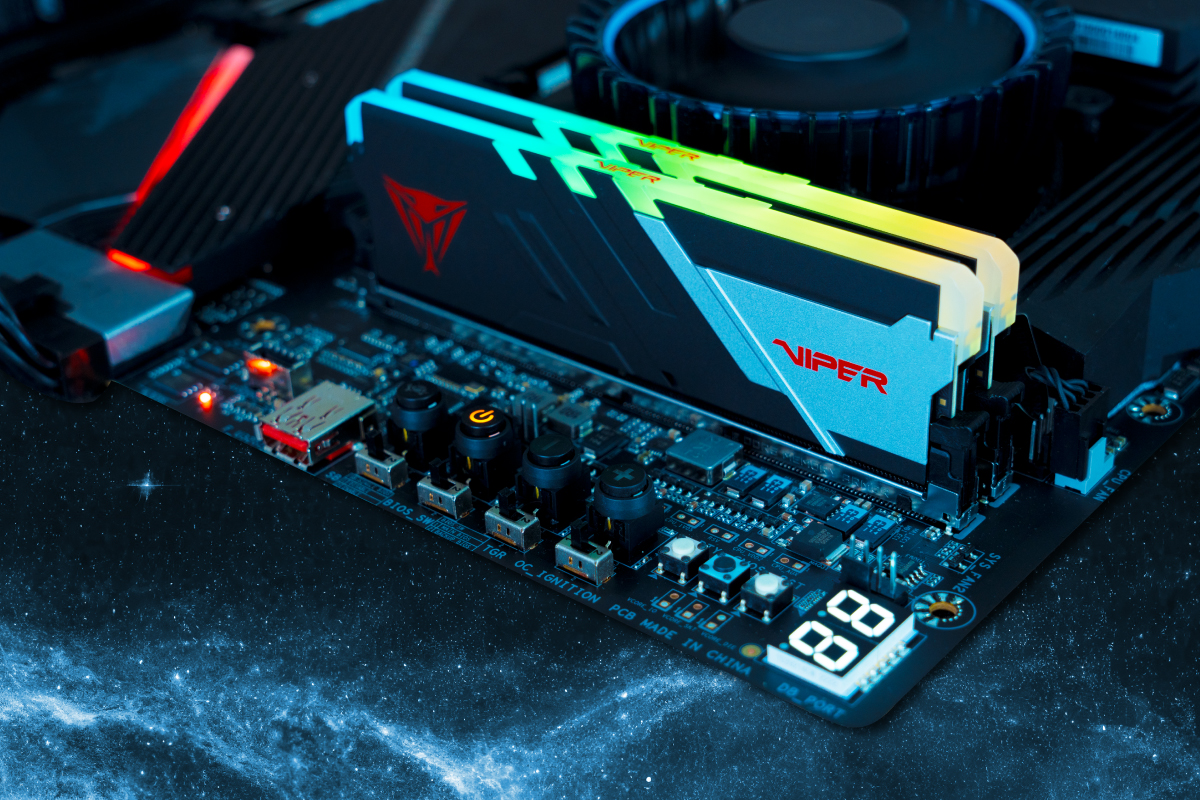
Patriot might not have the marketing budget of Corsair or G.Skill, but their Viper Venom DDR5 modules punch well above their weight class. These kits have become favorites in overclocking communities for their use of high-quality Hynix M-die or A-die ICs that routinely exceed rated specifications.
The DDR5-6200 variant hits a frequency that works beautifully with Intel’s latest platforms while remaining accessible for AMD users willing to tweak infinity fabric settings. The CL40-40-40-76 timings are conservative—many users report stable operation at CL36 with minor voltage adjustments.
Technical Specifications
| Specification | Details |
|---|---|
| Model Number | PVV532G620C40K |
| Memory Type | DDR5 UDIMM |
| Capacity | 32GB (2x16GB) |
| Tested Speed | 6200 MT/s (PC5-49600) |
| Tested Latency | CL40-40-40-76 |
| SPD Speed | 4800 MT/s |
| SPD Latency | CL40-40-40-77 |
| Voltage | 1.35V |
| SPD Voltage | 1.10V |
| Heat Spreader | Aluminum (matte black/silver) |
| Dimensions | 137.8 x 43.2 x 7.25mm |
| Weight | 51.8g per module |
| XMP Profiles | 3 profiles (6400/6200/6000) |
| IC Type | SK Hynix B-die |
| Warranty | Limited Lifetime |
Pros
- Exceptional overclocking headroom with Hynix ICs
- Aggressive, distinctive styling stands out
- Often priced lower than equivalent performance competitors
- Three XMP profiles for flexible tuning
- Thermal pad over PMIC for better overclocking stability
Cons
- CL40 stock timings are loose for the frequency
- Brand recognition lower than G.Skill or Corsair
- Availability can be limited during high demand
- Aggressive styling may not suit professional builds
Buy If: You enjoy overclocking and want enthusiast-grade memory chips without paying premium brand prices.
Important: Overclocking memory beyond rated specifications requires compatible hardware and may void warranties. Always stress test thoroughly using tools like TestMem5 or Karhu RAM Test to ensure stability before daily driving overclocked settings.
WORKSTATION
7. Crucial DDR5 Pro 32GB Kit — Best No-Nonsense Workstation RAM
Sometimes you don’t need RGB lighting or overclocking headroom—you just need reliable, high-quality memory that works flawlessly for years. Crucial’s DDR5 Pro fits this description perfectly, offering Micron’s legendary chip quality in a package designed for professional environments.
These modules ship with JEDEC standard profiles rather than XMP, meaning they boot at advertised speeds without enabling profiles in BIOS. This plug-and-play reliability makes them ideal for business workstations, server builds, or any environment where stability trumps raw performance.
Technical Specifications
| Specification | Details |
|---|---|
| Model Number | CP2K16G56C46U5 (Black) / CP2K16G56C46U5W (White) |
| Memory Type | DDR5 U-DIMM |
| Capacity | 32GB (2x16GB) |
| Tested Speed | 5600 MT/s (PC5-44800) |
| Tested Latency | CL46-45-45-90 |
| SPD Speed | 5600 MT/s |
| SPD Latency | CL46-45-45-90 |
| Voltage | 1.10V |
| SPD Voltage | 1.10V |
| Heat Spreader | Aluminum (camo-inspired) |
| Dimensions | 136.8 x 34.95 x 8mm |
| Weight | 34.2g per module |
| Colors Available | Stealth Black, Snow Fox White |
| Compatibility | Intel XMP 3.0 & AMD EXPO |
| IC Type | Micron (in-house) |
| Warranty | Limited Lifetime |
Pros
- JEDEC standard profiles for plug-and-play reliability
- Micron chip quality ensures long-term stability
- Low-profile aluminum heat spreaders
- Supports both Intel XMP 3.0 and AMD EXPO
- Excellent value for professional workstation builds
Cons”>
- CL46 timings are relatively high
- No RGB lighting options available
- Limited overclocking potential
- Crucial brand being phased out for consumer memory in 2026
Buy If: You need reliable, no-fuss memory for professional workstations where stability is more important than bleeding-edge performance.
SPEED DEMON
8. G.Skill Trident Z5 RGB DDR5-7200 — Best High-Speed Intel Performance
For Intel enthusiasts running 13th Gen Raptor Lake or 14th Gen processors (and the new Arrow Lake chips), the Trident Z5 RGB DDR5-7200 represents the current sweet spot for high-speed memory. At 7200MHz with CL34-45-45-115 timings, this kit extracts maximum bandwidth from Intel’s capable memory controllers.
The performance uplift over DDR5-6000 is noticeable in memory-intensive applications like video editing, 3D rendering, and simulation software. Gaming benefits are more modest but still measurable in CPU-bound scenarios at 1080p high refresh rates.
Technical Specifications
| Specification | Details |
|---|---|
| Model Number | F5-7200J3445G16GX2-TZ5RK |
| Memory Type | DDR5 UDIMM |
| Capacity | 32GB (2x16GB) |
| Tested Speed | 7200 MT/s (PC5-57600) |
| Tested Latency | CL34-45-45-115 |
| SPD Speed | 4800 MT/s |
| SPD Latency | CL40-40-40-77 |
| Voltage | 1.40V |
| SPD Voltage | 1.10V |
| Heat Spreader | Aluminum with RGB diffuser |
| Dimensions | 133.5 x 44 x 8.2mm |
| Compatibility | Intel XMP 3.0 (Optimized for Intel) |
| IC Type | SK Hynix A-die (binned) |
| Warranty | Limited Lifetime |
Pros
- Extreme 7200MHz speed for Intel platform performance
- Hand-screened ICs ensure quality at high frequencies
- Award-winning design with premium aesthetics
- Excellent overclocking potential beyond XMP
- XMP 3.0 support with customizable profiles
Cons
- Requires high-end Z790 motherboard for stability
- Premium pricing significantly higher than 6000MHz kits
- Not ideal for AMD platforms (sweet spot mismatch)
- Higher voltage (1.40V) increases heat output
Buy If: You have a high-end Intel 13th/14th Gen or Arrow Lake build and want to extract maximum memory bandwidth.
HIGH CAPACITY
9. Corsair Vengeance DDR5-5200 64GB — Best High-Capacity Option
Content creators working with 4K video, massive Photoshop files, or complex CAD projects need capacity more than clock speed. Corsair’s Vengeance DDR5-5200 64GB kit (2x32GB) delivers abundant memory space without the eye-watering prices of faster high-capacity kits.
The 5200MHz speed might seem pedestrian, but when you’re filling 64GB of RAM, stability and compatibility matter more than marginal frequency gains. These modules use carefully screened ICs that maintain stability even when all four DIMM slots are populated on high-end workstations.
Technical Specifications
| Specification | Details |
|---|---|
| Model Number | CMK64GX5M2B5200C40 |
| Memory Type | DDR5 UDIMM |
| Capacity | 64GB (2x32GB) |
| Tested Speed | 5200 MT/s (PC5-41600) |
| Tested Latency | CL40-40-40-77 |
| SPD Speed | 4800 MT/s |
| SPD Latency | CL40-40-40-77 |
| Voltage | 1.25V |
| SPD Voltage | 1.10V |
| Heat Spreader | Aluminum low-profile |
| Dimensions | 133 x 35 x 7mm |
| Weight | 0.13kg total |
| Compatibility | Intel XMP 3.0 |
| Features | Onboard voltage regulation (PMIC) |
| Warranty | Limited Lifetime |
Pros
- Massive 64GB capacity for professional workloads
- Low-profile design for cooler compatibility
- Solid aluminum heat spreaders for thermal management
- Onboard voltage regulation for stable overclocking
- Excellent price-per-gigabyte value for DDR5
Cons
- 5200MHz speed is modest for high-end builds
- CL40 timings are loose compared to performance kits
- No RGB lighting in this configuration
- Large modules may block adjacent slots on some boards
Buy If: You’re a content creator, video editor, or power user who needs massive memory capacity for heavy multitasking.
VALUE ALTERNATIVE
10. Klevv Cras XR5 RGB DDR5-6000 — Best Value Alternative
Klevv might not be a household name in Western markets, but this Essencore subsidiary has been producing exceptional memory for Asian markets for years. The Cras XR5 RGB represents their flagship DDR5 offering, combining stunning aesthetics with performance that rivals established brands.
The RGB implementation features a unique “infinite mirror” effect on the light bar that creates mesmerizing depth illusions. Build quality feels premium, with substantial heat spreaders that keep temperatures in check even during extended gaming sessions.
Technical Specifications
| Specification | Details |
|---|---|
| Model Number | KD5AGUA80-60A300G |
| Memory Type | DDR5 UDIMM |
| Capacity | 32GB (2x16GB) |
| Tested Speed | 6000 MT/s (PC5-48000) |
| Tested Latency | CL30-36-36-76 |
| SPD Speed | 4800 MT/s |
| SPD Latency | CL40-40-40-77 |
| Voltage | 1.35V |
| SPD Voltage | 1.10V |
| Heat Spreader | Aluminum with “infinite mirror” RGB |
| Dimensions | 133 x 44 x 8.5mm |
| Compatibility | Intel XMP 3.0 & AMD EXPO |
| IC Type | SK Hynix M-die |
| Warranty | Limited Lifetime |
Pros
- Unique “infinite mirror” RGB effect stands out
- Performance matches premium competitors at lower price
- AMD EXPO certified for Ryzen compatibility
- Premium build quality with substantial heat spreaders
- Often $10-15 cheaper than equivalent G.Skill kits
Cons
- Limited availability in Western markets
- Brand recognition and support network smaller
- Software ecosystem less developed than competitors
- RMA process may be slower than major brands
Buy If: You want distinctive aesthetics and solid performance but don’t want to pay the premium for bigger brand names.
Comprehensive Comparison Table
| Model | Speed | Latency | Capacity | Voltage | Height | Best For | Price (Est.) | Rating |
|---|---|---|---|---|---|---|---|---|
| G.Skill Trident Z5 Neo RGB | 6000MHz | CL30 | 32GB (2x16GB) | 1.35V | 44mm | AMD Gaming | ~$118 | ★★★★★ |
| Teamgroup T-Force Vulcan | 5200MHz | CL40 | 32GB (2x16GB) | 1.25V | 32.7mm | Budget Builds | ~$90 | ★★★★☆ |
| Corsair Dominator Platinum RGB | 5600MHz | CL36 | 32GB (2x16GB) | 1.25V | 56mm | Premium Builds | ~$160 | ★★★★☆ |
| Kingston Fury Beast | 6000MHz | CL36 | 32GB (2x16GB) | 1.35V | 34.9mm | Plug-and-Play | ~$110 | ★★★★☆ |
| ADATA XPG Lancer RGB | 6000MHz | CL30 | 32GB (2x16GB) | 1.35V | 43.56mm | RGB Aesthetics | ~$125 | ★★★★☆ |
| Patriot Viper Venom | 6200MHz | CL40 | 32GB (2x16GB) | 1.35V | 43.2mm | Overclocking | ~$105 | ★★★★☆ |
| Crucial DDR5 Pro | 5600MHz | CL46 | 32GB (2x16GB) | 1.10V | 34.95mm | Workstations | ~$95 | ★★★☆☆ |
| G.Skill Trident Z5 RGB | 7200MHz | CL34 | 32GB (2x16GB) | 1.40V | 44mm | Intel High-Perf | ~$160 | ★★★★★ |
| Corsair Vengeance 64GB | 5200MHz | CL40 | 64GB (2x32GB) | 1.25V | 35mm | Content Creation | ~$180 | ★★★★☆ |
| Klevv Cras XR5 RGB | 6000MHz | CL30 | 32GB (2x16GB) | 1.35V | 44mm | Value Alternative | ~$105 | ★★★★☆ |
How to Choose the Right RAM for Your Build
Selecting memory isn’t just about picking the fastest option your budget allows. You need to consider your entire system ecosystem to avoid compatibility headaches and performance bottlenecks.
Platform Considerations
AMD AM5 (Ryzen 7000/9000): Stick to DDR5-6000 kits with tight timings (CL30-CL36). This frequency aligns with the Infinity Fabric clock for optimal latency. Higher speeds often require decoupling the fabric clock, which can negate performance gains. Look for AMD EXPO certification for guaranteed compatibility.
Intel 12th/13th/14th Gen & Arrow Lake: These platforms can handle much higher frequencies—7200MHz to 8000MHz on premium Z790 motherboards. If you have a high-end Intel build, don’t be afraid to invest in faster memory to feed those hungry cores.
Older Platforms (DDR4): If you’re still running DDR4, 3600MHz CL16 remains the sweet spot for AMD Ryzen 5000 series, while Intel 11th Gen and earlier benefit from 3200MHz to 3600MHz kits.
Capacity Planning
For pure gaming in 2026, 32GB (2x16GB) is the new standard. Modern titles like Starfield, Microsoft Flight Simulator 2024, and Baldur’s Gate 3 can consume 16-20GB of system RAM alone when multitasking with Discord, Chrome, and streaming software.
Content creators should target 64GB (2x32GB or 4x16GB) to handle large video timelines, complex 3D scenes, and heavy multitasking. Professional workstations running virtual machines or heavy simulation software may even benefit from 128GB configurations.
Motherboard Compatibility
Always check your motherboard’s Qualified Vendor List (QVL) before purchasing high-speed memory. Just because a kit is rated for 7200MHz doesn’t mean your specific motherboard can achieve those speeds. When in doubt, stick to speeds explicitly listed in the QVL or opt for mainstream 6000MHz kits that virtually all DDR5 boards handle effortlessly.
Pro Tip: Update your motherboard BIOS before installing new RAM, especially on AMD platforms. Early BIOS versions often had memory compatibility issues that subsequent updates resolved. A quick BIOS update can mean the difference between XMP profiles working instantly and hours of troubleshooting.
Installation Best Practices
Installing RAM is straightforward, but a few best practices ensure optimal performance and longevity:
- Power down completely and unplug your PSU before opening the case. Residual power can damage sensitive components.
- Use the correct slots—typically A2 and B2 (the second and fourth slots from the CPU) for dual-channel operation. Check your motherboard manual for the optimal configuration.
- Apply even pressure when seating modules until both retention clips click into place. Uneven installation can cause recognition issues.
- Enable XMP or EXPO in BIOS immediately after installation. Memory will run at JEDEC standard speeds (usually 4800MHz) until you activate the performance profile.
- Verify stability using tools like MemTest86 or TestMem5 before loading your OS with important data. Memory errors can corrupt installations and cause mysterious crashes.
Troubleshooting Common Issues
Even quality RAM can encounter issues. Here are quick fixes for common problems:
System won’t POST: Clear CMOS by removing the motherboard battery for 30 seconds, then try booting with a single stick in the A2 slot. Gradually add the second stick once you’ve established baseline functionality.
XMP/EXPO instability: Try slightly increasing DRAM voltage (stay below 1.45V for daily use) or relaxing timings manually. Some CPUs need minor voltage tweaks to the memory controller (VDDQ or VDD2 on Intel, SOC voltage on AMD).
BSODs under load: Run Windows Memory Diagnostic or MemTest86 to isolate faulty modules. If errors appear, RMA the kit—lifetime warranties cover manufacturing defects.
Future-Proofing Your Memory Investment
DDR5 is still maturing, and we’ve yet to see the ceiling of this technology. Current high-end kits at 8000MHz will likely seem modest when DDR5-10000+ becomes mainstream in 2027-2028.
For now, invest in quality over extreme speeds. A DDR5-6000 kit from a reputable brand with tight timings will serve you well through multiple upgrade cycles. The money saved by avoiding bleeding-edge speeds can be allocated to a faster GPU or larger SSD—components that provide more tangible performance benefits.
Consider securing your digital workspace with proper system maintenance and security practices to ensure your hardware investment remains protected.
Ready to Upgrade?
Choosing the right RAM transforms your entire computing experience. Whether you’re chasing maximum FPS in competitive games or rendering 8K video timelines, the memory kits listed above represent the best options available in 2026. Remember to match your choice to your specific platform and use case—fastest isn’t always best if it introduces instability or costs significantly more for marginal gains.
FAQ

Jaeden Higgins is a tech review writer associated with DigitalUpbeat. He contributes content focused on PC hardware, laptops, graphics cards, and related tech topics, helping readers understand products through clear, practical reviews and buying advice.


