Book Appointment Now


What Does PCIe x16 Mean
What Does PCIe x16 Mean? A Complete Guide to High-Speed Expansion Slots in 2026
Quick Summary
PCIe x16 refers to a PCI Express slot that uses 16 data lanes to connect high-performance components to your motherboard. The “x16” designation indicates the number of lanes available for data transmission, with each lane serving as a dedicated pathway for sending and receiving information. Modern PCIe 5.0 x16 slots can deliver up to 64 GB/s of unidirectional bandwidth, making them essential for graphics cards, high-speed storage, and data-intensive applications. Understanding PCIe x16 is crucial for anyone building a PC, upgrading components, or optimizing system performance.
Understanding PCIe: The Foundation of Modern PC Connectivity
PCI Express, commonly abbreviated as PCIe or PCI-e, represents the primary interface standard connecting critical hardware components to your computer’s motherboard. Introduced in 2003 as the successor to older PCI and AGP standards, PCIe utilizes a serial, point-to-point architecture that delivers significantly higher bandwidth and lower latency than its predecessors.
The fundamental innovation of PCIe lies in its lane-based design. Unlike older parallel bus architectures where multiple devices shared the same data pathways, PCIe assigns dedicated lanes to each connected device. This point-to-point approach eliminates bottlenecks and allows each component to communicate with the system at its maximum potential speed without interference from other devices.
Each PCIe lane consists of two pairs of wires — one pair for transmitting data and one for receiving. This full-duplex design enables simultaneous two-way communication, effectively doubling the potential data throughput compared to half-duplex alternatives. The number of lanes allocated to a slot or device directly correlates with its available bandwidth, which explains why high-performance components like graphics cards require x16 configurations while simpler devices like sound cards function perfectly with x1 connections.
Decoding the “x16” Designation: What the Numbers Actually Mean
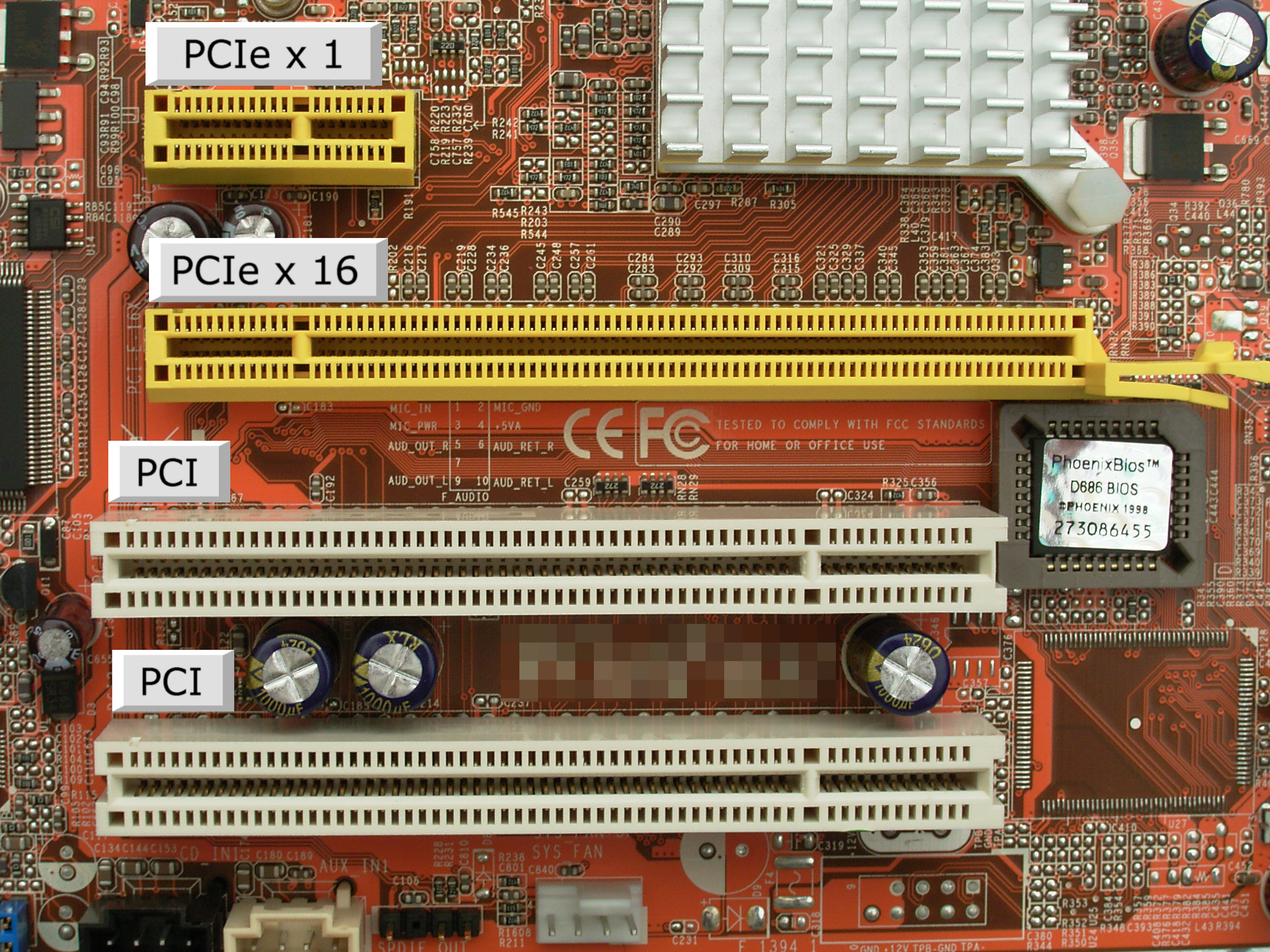
The “x16” in PCIe x16 specifically refers to the number of data lanes available for communication between the device and the motherboard. Think of these lanes as highways for data — the more lanes you have, the more traffic (data) can flow simultaneously without congestion.
A single PCIe lane can be visualized as a two-way street with one lane in each direction. In an x16 configuration, you effectively have 16 such two-way streets operating in parallel, creating a massive data pipeline capable of handling the enormous throughput requirements of modern graphics cards and accelerators.
It’s important to distinguish between mechanical and electrical configurations when examining PCIe slots. A slot may physically accommodate an x16 card (mechanical x16) while only providing x8 or x4 electrical connections. This distinction matters significantly for performance, as a card installed in an x16 mechanical slot with only x8 electrical wiring will operate at reduced bandwidth despite fitting perfectly into the connector.
PCIe Lane Configurations Explained
| Configuration | Lane Count | Typical Use Cases | Relative Bandwidth |
|---|---|---|---|
| PCIe x1 | 1 lane | Sound cards, USB expansion cards, basic network adapters | Base level (1x) |
| PCIe x4 | 4 lanes | NVMe SSDs, high-speed network cards, capture cards | 4x base bandwidth |
| PCIe x8 | 8 lanes | High-end network adapters, secondary GPUs, RAID controllers | 8x base bandwidth |
| PCIe x16 | 16 lanes | Primary graphics cards, AI accelerators, high-performance storage | 16x base bandwidth |
PCIe Generations and Bandwidth: The Evolution of Speed
PCIe technology has evolved through multiple generations, with each new version doubling the data transfer rate of its predecessor. This generational progression means that a PCIe x16 slot’s performance varies dramatically depending on which generation it supports.
The bandwidth of a PCIe connection depends on two factors: the number of lanes (x1, x4, x8, x16) and the generation (1.0 through 6.0). Multiplying these variables gives you the total available bandwidth. For example, a PCIe 4.0 x16 slot provides twice the bandwidth of a PCIe 3.0 x16 slot because the fourth generation doubles the per-lane speed while maintaining the same lane count.
Complete Bandwidth Comparison by Generation
| PCIe Generation | Transfer Rate (per lane) | Bandwidth (x16 slot) | Release Year |
|---|---|---|---|
| PCIe 1.0 | 2.5 GT/s | ~4.0 GB/s | 2003 |
| PCIe 2.0 | 5.0 GT/s | ~8.0 GB/s | 2007 |
| PCIe 3.0 | 8.0 GT/s (~1 GB/s per lane) | ~16 GB/s | 2010 |
| PCIe 4.0 | 16 GT/s (~2 GB/s per lane) | ~32 GB/s | 2017 |
| PCIe 5.0 | 32 GT/s (~4 GB/s per lane) | ~64 GB/s | 2019 |
| PCIe 6.0 | 64 GT/s with PAM4 | ~128 GB/s | 2022 |
Modern consumer motherboards predominantly feature PCIe 4.0 and PCIe 5.0 support. Intel’s Z690 and newer chipsets, along with AMD’s AM5 platform, offer PCIe 5.0 connectivity for primary x16 slots, ensuring maximum bandwidth for next-generation graphics cards and storage devices.
PCIe x16 in Practice: Real-World Applications
The PCIe x16 configuration serves as the backbone for the most demanding computing tasks, providing the necessary bandwidth for data-intensive operations across various applications.
Graphics Processing Units (GPUs)
Modern GPUs represent the most common use case for PCIe x16 slots. Contemporary graphics cards like the NVIDIA RTX 5090 and AMD Radeon RX 7900 XTX generate massive amounts of data that must flow continuously between the GPU and system memory. Gaming at 4K resolutions, real-time ray tracing, and AI-driven upscaling technologies like DLSS 3.0 all demand substantial bandwidth that only x16 configurations can reliably provide.
Recent testing with the RTX 5090 demonstrates that while PCIe 5.0 x16 and PCIe 4.0 x16 perform nearly identically in most gaming scenarios (within 1-4% difference), running the same card in PCIe 3.0 x16 can create measurable bottlenecks in bandwidth-sensitive applications. Video editing in DaVinci Resolve shows up to 10% performance reduction when moving from PCIe 5.0 x16 to PCIe 3.0 x16, with even more significant drops at lower lane configurations.
High-Speed Storage Solutions
While NVMe SSDs typically use PCIe x4 connections, enterprise-grade storage arrays and high-performance computing clusters utilize x16 slots for RAID controllers and storage accelerators. These devices aggregate multiple NVMe drives or provide hardware-accelerated storage processing that saturates x16 bandwidth.
Artificial Intelligence and Machine Learning
AI training and inference workloads require moving enormous datasets between system memory and accelerators. PCIe x16 slots accommodate AI accelerators and high-end GPUs used for machine learning, providing the throughput necessary to keep compute units fed with data. Multi-GPU AI setups particularly benefit from maximum lane allocation, as data must flow between GPUs and system memory efficiently to minimize training time.
Professional Content Creation
Video editors, 3D artists, and motion graphics professionals rely on PCIe x16 bandwidth for real-time playback and rendering. High-resolution footage, complex 3D scenes, and multi-layered compositions generate substantial data traffic between storage, GPU, and system memory. Reduced PCIe bandwidth manifests as dropped frames during preview, slower timeline scrubbing, and extended export times.
Backward Compatibility and Cross-Generation Performance
One of PCIe’s greatest strengths lies in its backward compatibility. A PCIe 5.0 graphics card will function perfectly in a PCIe 3.0 x16 slot, automatically negotiating the highest mutually supported speed. However, this compatibility comes with performance considerations that users should understand.
When you install a newer-generation card into an older-generation slot, the system automatically downshifts to the lower speed. The card continues to operate, but bandwidth becomes limited to the older generation’s specifications. For example, a PCIe 4.0 GPU in a PCIe 3.0 x16 slot operates at PCIe 3.0 speeds — effectively halving the available bandwidth compared to a native PCIe 4.0 connection.
The practical impact of this bandwidth reduction varies by workload. Gaming at standard resolutions often shows minimal difference between PCIe generations because most games don’t saturate the available bandwidth. However, professional applications, AI workloads, and high-refresh-rate 4K gaming can reveal more substantial performance gaps.
⚠️ Important Consideration
While backward compatibility ensures functionality, running a high-end GPU in a reduced-bandwidth slot may create bottlenecks in specific scenarios. Before upgrading your graphics card, verify your motherboard’s PCIe generation support and consider whether your workloads will benefit from maximum bandwidth. For most gamers, PCIe 3.0 x16 remains sufficient, but content creators and AI practitioners should prioritize newer platforms.
PCIe Lane Allocation and Motherboard Architecture
Understanding how motherboards distribute PCIe lanes helps explain why some x16 slots don’t deliver full bandwidth. Consumer CPUs provide limited PCIe lanes — typically 16 to 24 lanes directly from the processor — with additional lanes available through the chipset.
On many motherboards, installing multiple expansion devices forces lane sharing. A primary x16 slot might operate at full x16 when alone, but drop to x8 when you populate a secondary slot. Similarly, multiple M.2 NVMe SSDs may share bandwidth with SATA ports or PCIe slots, depending on the motherboard’s lane routing configuration.
High-end workstation and server platforms offer more generous lane allocations. Intel’s Xeon and AMD’s Threadripper processors provide 64 or more PCIe lanes, enabling multiple x16 devices to operate simultaneously at full bandwidth. These platforms cater to professionals requiring multiple GPUs, high-speed networking, and extensive storage without compromise.
Common Motherboard Lane Sharing Scenarios
| Configuration | Primary GPU Slot | Secondary Slot | Impact |
|---|---|---|---|
| Single GPU | x16 | Empty | Maximum bandwidth for graphics |
| Dual GPU | x8 | x8 | Reduced bandwidth per card, minimal gaming impact |
| GPU + Capture Card | x16 or x8 | x4 or x8 | Depends on specific motherboard routing |
| GPU + Multiple NVMe SSDs | x16 (often maintained) | Chipset lanes for storage | Modern boards preserve GPU lanes |
PCIe x16 vs. Lower Lane Configurations: Performance Impact
Modern GPUs have become more efficient at utilizing available bandwidth, but lane reduction still impacts performance in specific scenarios. Testing with current-generation cards reveals interesting patterns about where bandwidth matters most.
In gaming benchmarks, the difference between PCIe 5.0 x16 and PCIe 4.0 x16 typically measures 1-4% — essentially margin-of-error variation that most users won’t notice. However, the gap widens when comparing x16 to x8 or x4 configurations, particularly in professional applications.
Video editing in DaVinci Resolve demonstrates this clearly. PCIe 5.0 x16, 5.0 x8, and 4.0 x16 configurations cluster together at the top performance tier. However, dropping to PCIe 3.0 x16 (comparable to PCIe 4.0 x8 in bandwidth) reduces performance by approximately 10%. More severe reductions — such as PCIe 4.0 x4 or PCIe 3.0 x8 — can cut performance by 25% or more in bandwidth-sensitive workflows.
Unreal Engine development shows similar patterns, with meaningful performance degradation only appearing when bandwidth drops to PCIe 4.0 x4 levels or below. AI workloads using LLM inference show minimal sensitivity to PCIe bandwidth in single-GPU configurations, though multi-GPU setups with model offloading to system RAM would likely benefit from maximum lane allocation.
Future-Proofing Your Build: PCIe 5.0 and Beyond
As of 2026, PCIe 5.0 represents the cutting edge for consumer platforms, offering 64 GB/s unidirectional bandwidth through x16 slots. This generation provides headroom for next-generation GPUs and storage devices that may eventually saturate PCIe 4.0 interfaces.
The first consumer GPUs supporting PCIe 5.0 — including NVIDIA’s Blackwell architecture cards — have begun hitting the market. While current games don’t fully utilize this bandwidth, future titles with more advanced asset streaming, higher resolution textures, and AI-driven features may leverage the additional throughput.
PCIe 6.0 looms on the horizon with PAM4 signaling and 128 GB/s x16 bandwidth, though consumer adoption remains several years away. For now, investing in a PCIe 5.0-capable platform ensures compatibility with upcoming hardware while maintaining excellent performance with current-generation components.
How to Check Your PCIe Configuration
Determining your current PCIe setup requires checking both hardware specifications and software reporting. CPU-Z, a free utility, displays your graphics card’s current PCIe link width and speed under the “Mainboard” or “Graphics” tabs. GPU-Z provides similar information specifically for graphics cards.
Windows Device Manager offers basic lane information, though third-party utilities provide more detail. For Linux users, the lspci command reveals link status and capabilities.
Physical inspection of your motherboard manual remains essential for understanding lane sharing scenarios. Manufacturers detail how populating specific slots affects available bandwidth for other connections. This information proves crucial when planning multi-device configurations.
PCIe Configuration Checklist
- Verify your motherboard’s PCIe generation support in the specifications
- Check which slots offer full x16 electrical connections versus mechanical-only x16
- Review lane sharing scenarios if using multiple expansion cards
- Confirm your GPU is running at expected link speed using GPU-Z or similar tools
- Update motherboard BIOS to ensure optimal PCIe link training and compatibility
- Consider PCIe riser cable quality if using vertical GPU mounts — poor cables can downgrade links
Frequently Asked Questions About PCIe x16
Will a PCIe 4.0 graphics card work in a PCIe 3.0 x16 slot?
Yes, absolutely. PCI Express is fully backward and forward compatible. A PCIe 4.0 GPU will function perfectly in a PCIe 3.0 x16 slot, automatically negotiating to PCIe 3.0 speeds. The card will operate at approximately half the maximum bandwidth compared to a native PCIe 4.0 connection, but for most gaming and general use, this reduction proves negligible. You only notice performance differences in bandwidth-intensive professional applications or extreme gaming scenarios.
Does PCIe x16 mean the slot is always faster than x8?
Not necessarily — generation matters more than lane count in some comparisons. A PCIe 4.0 x8 slot provides the same bandwidth as a PCIe 3.0 x16 slot (approximately 16 GB/s). Similarly, PCIe 5.0 x8 matches PCIe 4.0 x16 performance. When evaluating slot performance, always consider both the lane count and the PCIe generation. A newer-generation x8 slot often outperforms an older-generation x16 connection.
Why does my x16 slot show as running at x8 in software?
This usually indicates lane sharing with another device. Many motherboards split the primary x16 connection into two x8 links when you install a device in a secondary slot. Check your motherboard manual for specific lane routing — this behavior is normal and documented. Some high-end workstation platforms offer full x16 bandwidth to multiple slots simultaneously, but consumer boards typically require trade-offs when populating multiple expansion slots.
Is PCIe 5.0 x16 necessary for gaming in 2026?
For pure gaming, PCIe 4.0 x16 remains entirely sufficient. Current testing shows only 1-4% difference between PCIe 5.0 x16 and PCIe 4.0 x16 in gaming workloads — differences imperceptible to most players. However, PCIe 5.0 provides future-proofing for upcoming GPU architectures and enables maximum performance in professional content creation, AI workloads, and high-speed storage applications. If building new, choosing a PCIe 5.0 platform makes sense; if upgrading an existing PCIe 4.0 system, there’s no urgent need to switch solely for gaming.
Can I damage my hardware by installing a card in the wrong slot?
No, PCIe slots and cards are designed to prevent physical damage from incorrect installation. A larger card cannot fit into a smaller slot due to physical keying and length differences. You can install a smaller card (like an x1 network adapter) into a larger slot (like x16), and it will function normally using only the lanes it requires. The remaining lanes simply go unused. Always ensure proper power delivery and physical clearance, but lane mismatches won’t cause hardware damage.
Conclusion: Maximizing Your PCIe x16 Investment
PCIe x16 represents the gold standard for high-bandwidth PC connectivity, enabling the performance levels modern computing demands. Whether you’re gaming at 4K, training AI models, or editing 8K video, understanding how these lanes function helps you make informed hardware decisions and optimize your system’s performance.
The key takeaways are straightforward: prioritize x16 slots for graphics cards and bandwidth-intensive accelerators, understand your motherboard’s lane sharing behavior, and don’t obsess over PCIe generations unless your workloads specifically demand maximum throughput. For most users, even PCIe 3.0 x16 delivers excellent performance, while enthusiasts and professionals benefit from the headroom provided by PCIe 4.0 and 5.0 platforms.
As computing continues evolving toward higher resolutions, more complex AI, and data-intensive applications, PCIe x16 will remain the backbone of system expansion. Investing in a platform with robust PCIe capabilities ensures your build stays relevant and performant through multiple upgrade cycles.
Ready to Optimize Your Build?
Explore our comprehensive guides to find the perfect components for your PCIe configuration. Whether you’re selecting a motherboard with optimal lane routing or choosing a graphics card that maximizes your available bandwidth, we have detailed recommendations to help you build the perfect system.
Related Articles You Might Enjoy
- Understanding PCIe x16 — Deeper technical dive into PCIe architecture and lane configurations
- Best PCIe 5.0 SSDs for Gaming — Explore next-generation storage leveraging maximum PCIe bandwidth
- CPU vs GPU — Understanding how your processor and graphics card work together over PCIe
- Best Motherboards of 2026 — Find boards with optimal PCIe lane routing and latest generation support
- How to Choose the Right CPU and GPU Combo — Balancing your system for maximum PCIe performance
- Graphics Card Power Connectors Tutorial — Complete guide to powering your PCIe graphics cards

Jaeden Higgins is a tech review writer associated with DigitalUpbeat. He contributes content focused on PC hardware, laptops, graphics cards, and related tech topics, helping readers understand products through clear, practical reviews and buying advice.