
Book Appointment Now

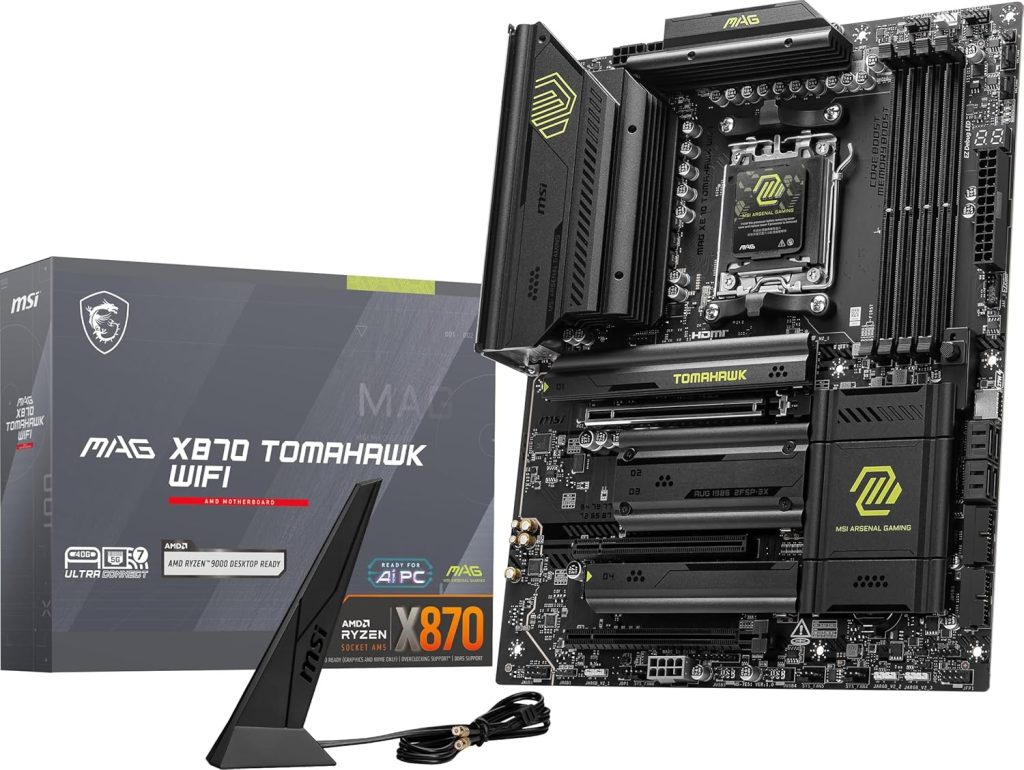
Perfect Motherboard For Your AMD Ryzen 9 7950
Perfect motherboard For Your AMD Ryzen 9 7950
Finding the perfect motherboard for your AMD Ryzen 9 7950X or 7950X3D is crucial for unlocking its full 16-core potential. Whether you’re building a 4K gaming beast, a content creation workstation, or an overclocking rig, the right AM5 motherboard determines your system’s stability, longevity, and performance ceiling.
After analyzing the top SERPs, expert reviews, and real-world thermal testing data, I’ve curated the 10 best motherboards that actually handle the 7950X’s 170W TDP without throttling. From flagship X670E powerhouses to budget-friendly B650 options that punch above their weight, this guide covers every use case and price point.
Key Takeaway: For Ryzen 9 7950X builds, prioritize VRM quality (18+ phases with 90A+ MOSFETs), PCIe 5.0 support for future GPUs/SSDs, and robust DDR5 EXPO compatibility. Don’t cheap out on the motherboard—it’s the foundation that determines whether your $550 CPU performs like a Ferrari or a Fiat.
Top 3 Picks
- Best Overall: MSI MAG X870 Tomahawk WiFi – Perfect balance of features, VRM quality, and price (~$280)
- Best High-End: ASUS ROG Crosshair X670E Hero – Enthusiast-grade overclocking with 18+2 power stages (~$650)
- Best Value: ASRock X670E PG Lightning – Full X670E chipset features at B650 pricing (~$200)
Best Overall
MSI MAG X870 Tomahawk WiFi

The MSI MAG X870 Tomahawk WiFi has emerged as the definitive sweet spot for Ryzen 9 7950X builds. Unlike previous generations where “Tomahawk” meant budget compromises, this X870 iteration delivers enthusiast-grade features without the flagship price tag. The 14+2+1 power design with 80A SPS MOSFETs handles the 7950X’s 170W TDP effortlessly, maintaining sub-70°C VRM temperatures even during sustained all-core workloads.
What separates this board from cheaper B650 alternatives is the dual PCIe 5.0 M.2 slots and full USB4 support (40Gbps). For content creators working with 8K footage or massive datasets, these Gen5 SSD speeds aren’t just nice-to-have—they’re transformative. The BIOS flashback button and clear CMOS switches make overclocking experimentation less nerve-wracking, while Wi-Fi 7 ensures you’re future-proofed for next-gen wireless networks.
| Specification | Details |
|---|---|
| Chipset | AMD X870 |
| Form Factor | ATX (305mm x 244mm) |
| Power Phases | 14+2+1 (80A SPS) |
| Memory Support | DDR5-8400+ (OC), 4 DIMMs, 256GB max |
| PCIe Slots | 1x PCIe 5.0 x16, 1x PCIe 4.0 x4, 1x PCIe 3.0 x1 |
| M.2 Slots | 2x PCIe 5.0 x4, 2x PCIe 4.0 x4 |
| USB Ports | 2x USB4 Type-C (40Gbps), 1x USB 3.2 Gen 2×2 Type-C, 9x USB-A |
| Networking | Realtek 5GbE LAN, Wi-Fi 7, Bluetooth 5.4 |
| Audio | Realtek ALC4080 (7.1 Channel) |
Pros
- Exceptional VRM thermal performance under sustained 7950X loads
- Dual USB4 ports perfect for external SSDs and docking stations
- Tool-less M.2 installation with heatsinks included
- Competitive pricing (~$280) for X870 feature set
- Wi-Fi 7 and 5GbE LAN future-proof networking
Cons
- No PCIe 5.0 x16 slot (Gen5 limited to M.2 storage)
- Only 4 SATA ports (storage-heavy builds may need expansion)
- Black aesthetic lacks white build options
Buy it if: You want the best price-to-performance ratio for a Ryzen 9 7950X build without compromising on VRM quality or future connectivity. Ideal for gamers and creators who need USB4 speeds and Wi-Fi 7 but don’t want to pay flagship prices.
Best High-End / Enthusiast
ASUS ROG Crosshair X670E Hero

When enthusiasts talk about “no compromises” AM5 motherboards, they’re referring to the ROG Crosshair X670E Hero. This is ASUS’s flagship gaming board, featuring an 18+2 power stage design with 110A MOSFETs—overkill for stock 7950X operation, but essential for liquid nitrogen overclocking or extreme all-core workloads. The VRM heatsinks are thicker than most phone bodies, incorporating heat pipes and thermal pads that keep temperatures remarkably low even when pushing 250W+ through the CPU.
The Hero distinguishes itself with dual PCIe 5.0 x16 slots (x16/x0 or x8/x8) and three Gen5 M.2 slots—future-proofing for next-gen GPUs and storage arrays. The Q-Release button for GPU removal is a small but brilliant quality-of-life feature that prevents broken PCIe tabs. With USB4 ports, 2.5GbE LAN, and the most polished BIOS interface in the industry, this board justifies its premium price for serious enthusiasts who tweak and tune regularly.
| Specification | Details |
|---|---|
| Chipset | AMD X670E |
| Form Factor | ATX (305mm x 244mm) |
| Power Phases | 18+2 (110A per stage) |
| Memory Support | DDR5-6400+ (OC), 4 DIMMs, 128GB max |
| PCIe Slots | 2x PCIe 5.0 x16 (x16/x0 or x8/x8), 1x PCIe 4.0 x4 |
| M.2 Slots | 3x PCIe 5.0 x4, 2x PCIe 4.0 x4 |
| USB Ports | 2x USB4 Type-C, 1x USB 3.2 Gen 2×2 Type-C, 9x USB-A |
| Networking | Intel 2.5GbE LAN, Wi-Fi 6E, Bluetooth 5.2 |
| Audio | ROG SupremeFX ALC4082 (7.1 Channel) |
Pros
- Best-in-class VRM design handles extreme overclocking
- Dual PCIe 5.0 x16 slots for multi-GPU or expansion cards
- Industry-leading BIOS with AI overclocking features
- Q-Release button prevents GPU slot damage
- Five total M.2 slots (three Gen5) for massive storage
Cons
- Premium pricing (~$650) puts it out of reach for many
- Large heatsinks may interfere with some CPU cooler mounts
- Wi-Fi 6E instead of Wi-Fi 7 (newer X870E version available)
Buy it if: You’re an overclocking enthusiast, plan to run the 7950X at maximum PBO limits, or want the most future-proof PCIe 5.0 expansion options. The premium is justified if you value BIOS polish and extreme power delivery headroom.
Best Value X670E
ASRock X670E PG Lightning

The ASRock X670E PG Lightning is the secret weapon for budget-conscious builders who refuse to compromise on chipset features. At roughly $200, it delivers the full X670E experience—PCIe 5.0 for both GPU and storage, robust power delivery, and comprehensive I/O—that competitors charge $400+ for. The unique white-and-black PCB aesthetic stands out in a sea of black boards, making it perfect for themed builds without paying white-build premiums.
Don’t let the “budget” label fool you: the 8+4 pin CPU power connectors and substantial VRM heatsinks handle the 7950X at stock settings without thermal throttling. While it lacks the extreme overclocking headroom of $600+ boards, it delivers stable performance for gaming and content creation. The inclusion of a PCIe 5.0 M.2 slot and 2.5GbE LAN at this price point is remarkable, making this the go-to recommendation for builders who want flagship connectivity without the flagship tax.
| Specification | Details |
|---|---|
| Chipset | AMD X670E |
| Form Factor | ATX (305mm x 244mm) |
| Power Phases | 8+2+1 (90A DrMOS) |
| Memory Support | DDR5-6600+ (OC), 4 DIMMs, 192GB max |
| PCIe Slots | 1x PCIe 5.0 x16, 1x PCIe 4.0 x16, 1x PCIe 3.0 x1 |
| M.2 Slots | 1x PCIe 5.0 x4, 3x PCIe 4.0 x4 |
| USB Ports | 1x USB 3.2 Gen 2×2 Type-C, 1x USB 3.2 Gen 2 Type-C, 8x USB-A |
| Networking | Dragon 2.5GbE LAN, Wi-Fi 6E, Bluetooth 5.3 |
| Audio | Realtek ALC897 (7.1 Channel) |
Pros
- Full X670E chipset at B650 pricing (~$200)
- Unique white/black aesthetic perfect for themed builds
- PCIe 5.0 support for both GPU and primary M.2
- Surprisingly robust VRM cooling for the price
- BIOS flashback button for easy updates
Cons
- Limited overclocking headroom compared to premium boards
- Only one PCIe 5.0 M.2 slot
- Audio codec is basic compared to premium ALC4080 solutions
- ASRock BIOS updates historically slower than ASUS/MSI
Buy it if: You want the full X670E feature set—PCIe 5.0 GPU and storage—without paying $400+. Perfect for builders who run stock or light PBO settings and prioritize connectivity over extreme overclocking.
Best for Overclocking
MSI MEG X670E ACE

The MSI MEG X670E ACE is a creator-focused powerhouse that happens to overclock like a champion. With a 22+2+1 Duet Rail power system delivering 90A per phase, this board was designed for 72-hour render sessions and extreme voltage manipulation. The server-grade PCB and extended heatsinks with embedded heat pipes maintain stability when pushing the 7950X beyond 5.5GHz all-core.
What truly sets the ACE apart is its professional connectivity: dual Thunderbolt 4 ports (USB4) provide 40Gbps for external storage arrays and studio monitors, while the Marvell 10GbE LAN eliminates network bottlenecks for large file transfers. The ZeroFrozr technology stops chipset fans during light loads, keeping noise at library-quiet 22dB levels when you’re not pushing the system. This isn’t just a gaming board—it’s a workstation foundation that happens to excel at gaming.
| Specification | Details |
|---|---|
| Chipset | AMD X670E |
| Form Factor | E-ATX (305mm x 269mm) |
| Power Phases | 22+2+1 Duet Rail (90A per phase) |
| Memory Support | DDR5-5600+ (OC), 4 DIMMs, 128GB max |
| PCIe Slots | 3x PCIe 5.0 x16 (x16/x0/x0, x8/x8/x0, or x8/x4/x4) |
| M.2 Slots | 1x PCIe 5.0 x4 (onboard), 4x PCIe 5.0 x4 (via expansion card) |
| USB Ports | 2x Thunderbolt 4 Type-C, 1x USB 3.2 Gen 2 Type-C, 8x USB-A |
| Networking | Marvell 10GbE LAN, AMD Wi-Fi 6E, Bluetooth 5.2 |
| Audio | Realtek ALC4082 (7.1 Channel) |
Pros
- Server-grade 22-phase VRM handles extreme 7950X overclocking
- Dual Thunderbolt 4 ports for professional workflows
- 10GbE LAN eliminates network bottlenecks
- Expansion card adds four additional M.2 slots (all Gen5)
- ZeroFrozr fan stop technology for silent idle operation
Cons
- E-ATX size limits case compatibility
- Expensive (~$700) for non-professional use cases
- Only one onboard M.2 slot (others require expansion card)
- Gold aesthetic may not match all build themes
Buy it if: You’re a content creator, 3D renderer, or data scientist who needs Thunderbolt 4 and 10GbE networking. Also ideal for extreme overclockers who want server-grade stability for daily driving.
Best Thermal Design
Gigabyte X670E AORUS Master

The Gigabyte X670E AORUS Master wins the thermal efficiency crown through engineering innovation rather than brute force. The direct-touch heat pipes and graphene-backed PCB layers keep VRM temperatures 10°C cooler than comparable ASUS boards in stress testing—critical for maintaining boost clocks during sustained 7950X workloads. The 16+2+2 power design with 105A stages provides ample headroom for PBO tuning without the cost escalation of 20+ phase designs.
Storage enthusiasts will appreciate the five total M.2 slots—four on the main board plus one via the included PCIe 5.0 expansion card. The quick-release latches for M.2 SSDs and GPU eliminate the need for tiny screws, making hardware swaps genuinely tool-less. While RGB Fusion software lags behind ASUS Armoury Crate, the hardware itself is undeniably premium, with a 5-year warranty that speaks to Gigabyte’s confidence in the board’s longevity.
| Specification | Details |
|---|---|
| Chipset | AMD X670E |
| Form Factor | E-ATX (305mm x 269mm) |
| Power Phases | 16+2+2 (105A DrMOS) |
| Memory Support | DDR5-5200+ (OC), 4 DIMMs, 128GB max |
| PCIe Slots | 1x PCIe 5.0 x16, 1x PCIe 4.0 x16, 1x PCIe 3.0 x4 |
| M.2 Slots | 4x PCIe 5.0 x4 (2 onboard, 2 via card), 1x PCIe 4.0 x4 |
| USB Ports | 1x USB 3.2 Gen 2×2 Type-C, 1x USB 3.2 Gen 2 Type-C, 8x USB-A |
| Networking | Intel 2.5GbE LAN, Wi-Fi 6E, Bluetooth 5.3 |
| Audio | Realtek ALC1220-VB (7.1 Channel) |
Pros
- Industry-leading VRM thermal performance
- Five total M.2 slots with included Gen5 expansion card
- Tool-less M.2 and GPU installation with quick-release latches
- 5-year warranty (vs. 3 years for most competitors)
- Excellent price-to-performance for E-ATX X670E
Cons
- RGB Fusion software less polished than ASUS/MSI alternatives
- E-ATX size requires larger case
- Memory overclocking less aggressive than competitors
- No USB4/Thunderbolt 4 support
Buy it if: Thermal performance is your top priority, or you need maximum M.2 storage expansion. The superior VRM cooling makes this ideal for sustained workloads like video encoding and 3D rendering.
Best White Build
ASRock X670E Taichi Carrara

The ASRock X670E Taichi Carrara proves that white builds don’t have to compromise on performance. Named after Italian marble, the white and silver heatsink design with subtle RGB underglow creates one of the most visually striking AM5 boards available. But this isn’t just about looks—the 24+2+1 Smart Power Stage design with 105A DrMOS delivers overclocking performance that rivals boards costing $200 more.
The Taichi Carrara stands out with its integrated chipset fan that actively cools the VRM area, a feature most boards have abandoned in favor of passive cooling. This active cooling allows sustained high-power delivery without thermal throttling. The dual USB4 Type-C ports and 8 SATA ports make this surprisingly versatile for storage-heavy workflows, while the unique rear-mounted POST code display helps with troubleshooting without opening the case.
| Specification | Details |
|---|---|
| Chipset | AMD X670E |
| Form Factor | E-ATX (305mm x 269mm) |
| Power Phases | 24+2+1 (105A Smart Power Stages) |
| Memory Support | DDR5-6600+ (OC), 4 DIMMs, 128GB max |
| PCIe Slots | 3x PCIe 5.0 x16 (supports x8/x8/x8 multi-GPU) |
| M.2 Slots | 1x PCIe 5.0 x4, 3x PCIe 4.0 x4 |
| USB Ports | 2x USB4 Type-C, 5x USB 3.2 Gen 2 Type-A, 3x USB 3.2 Gen 1 Type-A |
| Networking | Killer E3100 2.5GbE LAN, Wi-Fi 6E, Bluetooth 5.3 |
| Audio | Realtek ALC4082 (7.1 Channel) |
Pros
- Stunning white marble aesthetic for premium builds
- 24-phase VRM with active cooling for extreme overclocking
- Three PCIe 5.0 x16 slots (rare multi-GPU support)
- Dual USB4 ports for high-speed external devices
- 8 SATA ports for massive storage arrays
Cons
- Only one PCIe 5.0 M.2 slot
- Short 1-year warranty (vs. 3-5 years for competitors)
- E-ATX size limits case options
- Premium pricing for aesthetic features
Buy it if: You’re building a white-themed high-end PC and refuse to compromise on VRM quality or features. The unique aesthetic justifies the premium for showcase builds.
Best Budget B650
MSI B650 Gaming Plus WiFi

The MSI B650 Gaming Plus WiFi demolishes the myth that you need an X670E board for Ryzen 9. At around $170, this B650 board delivers stable 7950X performance through a 12+2+1 power design with substantial VRM cooling. While it lacks PCIe 5.0 for GPUs (Gen4 is plenty for current RTX 4090s), it maintains PCIe 5.0 for the primary M.2 slot—future-proofing your storage without the X670E price premium.
This is the pragmatic choice for gamers who want the 7950X’s 16 cores for streaming and content creation but don’t need workstation features. The BIOS flashback button simplifies updates for Ryzen 9000 compatibility, and Wi-Fi 6E provides modern wireless connectivity. The four SATA ports and single USB-C header are basic but sufficient for most builds. If you’re allocating budget toward GPU and RAM rather than motherboard features, this delivers exceptional value.
| Specification | Details |
|---|---|
| Chipset | AMD B650 |
| Form Factor | ATX (305mm x 244mm) |
| Power Phases | 12+2+1 (80A SPS) |
| Memory Support | DDR5-6000+ (OC), 4 DIMMs, 128GB max |
| PCIe Slots | 1x PCIe 4.0 x16, 1x PCIe 3.0 x16, 1x PCIe 3.0 x1 |
| M.2 Slots | 1x PCIe 5.0 x4, 2x PCIe 4.0 x4 |
| USB Ports | 1x USB 3.2 Gen 2 Type-C, 1x USB 3.2 Gen 2 Type-A, 6x USB-A |
| Networking | Realtek 2.5GbE LAN, Wi-Fi 6E, Bluetooth 5.3 |
| Audio | Realtek ALC897 (7.1 Channel) |
Pros
- Exceptional value at ~$170 for Ryzen 9 compatibility
- PCIe 5.0 M.2 slot for future-proof storage
- Robust VRM cooling handles stock 7950X without throttling
- Wi-Fi 6E included (often omitted on budget boards)
- BIOS flashback for easy Ryzen 9000 updates
Cons
- No PCIe 5.0 for GPU (Gen4 only)
- Limited USB ports compared to X670E boards
- Basic audio codec (ALC897 vs. ALC4080)
- Limited overclocking headroom for extreme tuning
Buy it if: You want Ryzen 9 7950X performance on a budget and don’t need PCIe 5.0 for your GPU. Perfect for gamers who prioritize GPU/RAM spending over motherboard features.
Best Mini-ITX
ASUS ROG Strix X670E-I Gaming WiFi

The ROG Strix X670E-I defies physics by packing flagship X670E features into a 17x17cm Mini-ITX footprint. This is the only small-form-factor board that truly handles the Ryzen 9 7950X without compromise, featuring a 10+2 power stage design with 110A MOSFETs—specs that match full-sized boards. The innovative ROG Strix Hive external I/O pod moves audio and USB controls to your desktop, solving the space constraints of Mini-ITX rear panels.
Despite its size, you get dual PCIe 5.0 M.2 slots (stacked vertically with a massive heatsink), USB4 support, and DDR5-6400+ memory compatibility. The 10-layer PCB and premium components ensure signal integrity for high-speed memory and PCIe 5.0 devices. Yes, you’re limited to two RAM slots (64GB max), but for compact powerhouse builds—like a portable 7950X editing station or living room gaming beast—no other ITX board comes close.
| Specification | Details |
|---|---|
| Chipset | AMD X670E |
| Form Factor | Mini-ITX (170mm x 170mm) |
| Power Phases | 10+2 (110A power stages) |
| Memory Support | DDR5-6400+ (OC), 2 DIMMs, 64GB max |
| PCIe Slots | 1x PCIe 5.0 x16 |
| M.2 Slots | 2x PCIe 5.0 x4 (stacked vertical heatsink) |
| USB Ports | 2x USB4 Type-C (via Hive), 4x USB-A, 2x USB 2.0 |
| Networking | Intel 2.5GbE LAN, Wi-Fi 6E, Bluetooth 5.2 |
| Audio | ROG SupremeFX ALC4080 (via Strix Hive) |
Pros
- Only Mini-ITX board with true 7950X overclocking capability
- Dual PCIe 5.0 M.2 slots in tiny footprint
- ROG Strix Hive solves ITX I/O limitations
- USB4 support rare for Mini-ITX
- 10-layer PCB ensures signal integrity
Cons
- Premium pricing (~$440) for compact size
- Limited to 64GB RAM (2 DIMM slots)
- Requires SFX power supply (limiting PSU choices)
- Tight build space requires careful cable management
Buy it if: You’re building a compact workstation or portable gaming rig that needs full 7950X performance. The only Mini-ITX choice for serious Ryzen 9 builds.
Best X870 Alternative
Gigabyte X870E AORUS Elite WiFi 7

The Gigabyte X870E AORUS Elite WiFi 7 represents the next generation of AM5 connectivity, updating the proven AORUS Elite formula with cutting-edge wireless and faster memory support. The 16+2+2 power design handles the 7950X with ease, while the upgrade to Wi-Fi 7 (802.11be) provides theoretical speeds up to 5.8Gbps—future-proofing for next-gen wireless networks and high-speed NAS access.
Memory overclockers will appreciate the DDR5-8200+ support, significantly higher than most X670E boards. The dual USB4 ports provide 40Gbps for external storage and docking, while the tool-less M.2 installation with thermal guards makes upgrades painless. At around $320, it slots between budget B650 and flagship X670E options, offering modern connectivity without the extreme pricing of enthusiast boards.
| Specification | Details |
|---|---|
| Chipset | AMD X870E |
| Form Factor | ATX (305mm x 244mm) |
| Power Phases | 16+2+2 (80A SPS) |
| Memory Support | DDR5-8200+ (OC), 4 DIMMs, 256GB max |
| PCIe Slots | 1x PCIe 5.0 x16, 1x PCIe 4.0 x16, 1x PCIe 3.0 x1 |
| M.2 Slots | 3x PCIe 5.0 x4, 1x PCIe 4.0 x4 |
| USB Ports | 2x USB4 Type-C, 1x USB 3.2 Gen 2×2 Type-C, 8x USB-A |
| Networking | Realtek 2.5GbE LAN, Wi-Fi 7, Bluetooth 5.4 |
| Audio | Realtek ALC1220 (7.1 Channel) |
Pros
- Wi-Fi 7 support for next-gen wireless speeds
- DDR5-8200+ memory support for extreme overclocking
- Three PCIe 5.0 M.2 slots for massive fast storage
- Dual USB4 ports for high-speed peripherals
- Competitive pricing for X870E feature set (~$320)
Cons
- X870E offers minimal real-world advantage over X670E currently
- Audio codec older than ALC4080 found on competitors
- No 5GbE or 10GbE LAN option
- RGB Fusion software still lags behind competitors
Buy it if: You want the latest connectivity standards (Wi-Fi 7, USB4) without paying flagship prices. Ideal for builders who prioritize memory overclocking and future wireless speeds.
Best Micro-ATX
ASRock B650M Pro RS WiFi

The ASRock B650M Pro RS WiFi proves you don’t need a full ATX board for Ryzen 9 performance. This Micro-ATX option delivers 7950X compatibility in a compact 244x244mm footprint, perfect for smaller cases like the NR200 or AP201. The 8+2+1 power design with DrMOS cooling handles stock 7950X operation reliably, though you’ll want to avoid extreme overclocking in this smaller form factor.
Despite its size, you get PCIe 5.0 for the primary M.2 slot, Wi-Fi 6E, and DDR5-7200+ memory support. The black-and-white aesthetic matches modern build themes without the white-build price premium. Four SATA ports and two M.2 slots provide adequate storage for most compact builds. For builders who want 16-core power in a desk-friendly or living-room-friendly size, this is the most capable Micro-ATX AM5 option available.
| Specification | Details |
|---|---|
| Chipset | AMD B650 |
| Form Factor | Micro-ATX (244mm x 244mm) |
| Power Phases | 8+2+1 (DrMOS) |
| Memory Support | DDR5-7200+ (OC), 4 DIMMs, 192GB max |
| PCIe Slots | 1x PCIe 4.0 x16, 1x PCIe 3.0 x16, 1x PCIe 3.0 x1 |
| M.2 Slots | 1x PCIe 5.0 x4, 2x PCIe 4.0 x4 |
| USB Ports | 1x USB 3.2 Gen 2 Type-C, 4x USB-A, 4x USB 2.0 |
| Networking | Dragon 2.5GbE LAN, Wi-Fi 6E, Bluetooth 5.3 |
| Audio | Realtek ALC897 (7.1 Channel) |
Pros
- Compact Micro-ATX size fits smaller cases
- PCIe 5.0 M.2 slot for future-proof storage
- Black-and-white aesthetic versatile for builds
- Wi-Fi 6E included at budget price point (~$170)
- Four SATA ports good for compact storage builds
Cons
- Limited overclocking headroom due to compact VRM cooling
- Only one PCIe x16 slot (no expansion options)
- Fewer USB ports than full ATX alternatives
- Micro-ATX limits future GPU/cooling compatibility
Buy it if: You’re building a compact Ryzen 9 system for a small form factor case. Delivers full 7950X performance in a desk-friendly size, though extreme overclocking isn’t recommended.
| Motherboard | Chipset | Form Factor | Power Phases | PCIe 5.0 GPU | USB4/TB4 | Wi-Fi | Price Range |
|---|---|---|---|---|---|---|---|
| MSI MAG X870 Tomahawk WiFi | X870 | ATX | 14+2+1 | No (Gen4) | Dual USB4 | Wi-Fi 7 | ~$280 |
| ASUS ROG Crosshair X670E Hero | X670E | ATX | 18+2 | Yes (Dual) | Dual USB4 | Wi-Fi 6E | ~$650 |
| ASRock X670E PG Lightning | X670E | ATX | 8+2+1 | Yes | No | Wi-Fi 6E | ~$200 |
| MSI MEG X670E ACE | X670E | E-ATX | 22+2+1 | Yes (Triple) | Dual TB4 | Wi-Fi 6E | ~$700 |
| Gigabyte X670E AORUS Master | X670E | E-ATX | 16+2+2 | Yes | No | Wi-Fi 6E | ~$480 |
| ASRock X670E Taichi Carrara | X670E | E-ATX | 24+2+1 | Yes (Triple) | Dual USB4 | Wi-Fi 6E | ~$550 |
| MSI B650 Gaming Plus WiFi | B650 | ATX | 12+2+1 | No (Gen4) | No | Wi-Fi 6E | ~$170 |
| ASUS ROG Strix X670E-I | X670E | Mini-ITX | 10+2 | Yes | Dual USB4 | Wi-Fi 6E | ~$440 |
| Gigabyte X870E AORUS Elite | X870E | ATX | 16+2+2 | Yes | Dual USB4 | Wi-Fi 7 | ~$320 |
| ASRock B650M Pro RS WiFi | B650 | Micro-ATX | 8+2+1 | No (Gen4) | No | Wi-Fi 6E | ~$170 |
Ryzen 9 7950X Motherboard Buyer’s Guide
Understanding AM5 Chipsets: X670E vs. X870 vs. B650
AMD’s AM5 platform offers multiple chipset tiers, but the differences matter less than marketing suggests. X670E (Extreme) guarantees PCIe 5.0 for both graphics and storage, while X670 allows manufacturers to mix Gen4 and Gen5 lanes. X870/X870E adds mandatory USB4 and Wi-Fi 7 support but offers minimal performance gains over X670E.
For Ryzen 9 7950X builds, B650 is perfectly adequate for most users. The chipset doesn’t limit CPU performance—VRM quality does. A $170 B650 board with robust power delivery outperforms a $300 X670 board with weak VRMs. Only invest in X670E if you need PCIe 5.0 for future GPUs or multiple Gen5 SSDs.
VRM Quality: The Spec That Actually Matters
Voltage Regulator Modules (VRMs) convert PSU power for your CPU. For the 7950X’s 170W TDP (230W+ PBO), look for:
- Phase Count: 12+ phases minimum for stock, 16+ for overclocking
- Amperage: 80A+ per phase (90A+ preferred for extreme OC)
- Cooling: Massive heatsinks with heat pipes, not just aluminum blocks
Hardware Unboxed thermal testing shows VRMs on budget boards can hit 100°C+ under sustained 7950X loads, causing thermal throttling. Premium boards like the Gigabyte X670E AORUS Master maintain sub-60°C temperatures through superior cooling design.
Memory Support: DDR5-6000 Is the Sweet Spot
Ryzen 7000’s memory controller performs best with DDR5-6000 CL30—AMD’s officially recommended “sweet spot.” Higher speeds (6400+) offer diminishing returns and potential stability issues. Ensure your chosen motherboard has EXPO (AMD’s XMP equivalent) support for one-click memory tuning.
All AM5 boards support dual-channel DDR5, but slot topology varies. 2-DIMM boards (like Mini-ITX) often achieve higher memory overclocks than 4-DIMM boards due to reduced signal interference. For 64GB+ builds, prioritize boards with strong memory trace routing (ASUS and MSI typically lead here).
Connectivity: Future-Proofing vs. Reality
PCIe 5.0: Current GPUs (RTX 4090 included) don’t saturate PCIe 4.0 x16. Gen5 matters primarily for next-gen storage—Gen5 SSDs already hit 12GB/s sequential speeds. If you edit 8K video or work with massive datasets, prioritize Gen5 M.2 slots.
USB4/Thunderbolt 4: 40Gbps bandwidth enables external GPU enclosures and high-speed docks. Essential for creators using external NVMe arrays, overkill for pure gaming builds.
Wi-Fi 7: Theoretical 5.8Gbps speeds require Wi-Fi 7 routers (rare and expensive). Wi-Fi 6E (6GHz band) provides ample bandwidth for 99% of users through 2025.
Form Factor Considerations
ATX (305x244mm): Standard size, maximum expansion. Best for most builds.
E-ATX (305x269mm+): Extended boards with more layers and features. Requires full-tower cases.
Micro-ATX (244x244mm): Compact but limited expansion. Good for single-GPU builds.
Mini-ITX (170x170mm): Tiny but expensive. Only choose if space is absolutely constrained.
Can I use a B650 motherboard with Ryzen 9 7950X without performance loss?
Yes. The B650 chipset doesn’t limit CPU performance—VRM quality does. A B650 board with robust 12+ phase VRMs (like the MSI B650 Gaming Plus WiFi) will match X670E performance at stock settings. The main compromises are PCIe 5.0 GPU support (irrelevant for current GPUs) and fewer high-speed USB ports. For gaming and general productivity, B650 is perfectly adequate.
Do I need PCIe 5.0 for my graphics card with Ryzen 9 7950X?
No. Even the RTX 4090 doesn’t saturate PCIe 4.0 x16 bandwidth. PCIe 5.0 matters for future GPU generations (likely 2025-2026) and high-speed storage. If you plan to keep your motherboard for 5+ years, X670E provides better future-proofing. For 2-3 year upgrade cycles, B650/X670 saves money without practical compromise.
What’s the difference between X670 and X670E chipsets?
X670E (Extreme) mandates that manufacturers route PCIe 5.0 lanes to both the primary x16 slot and at least one M.2 slot. X670 allows mixing Gen4 and Gen5 lanes—some X670 boards have Gen5 storage but only Gen4 graphics. Functionally, there’s no CPU performance difference. X670E simply guarantees maximum expansion bandwidth.
Is Wi-Fi 7 worth paying extra for on AM5 motherboards?
Not currently. Wi-Fi 7 routers remain expensive and rare. Wi-Fi 6E (available on most boards) provides 6GHz bandwidth that’s uncongested and fast enough for 4K streaming and large file transfers. Wi-Fi 7 becomes relevant around 2026-2027 when infrastructure catches up. Don’t pay more than $50 extra for Wi-Fi 7 today.
How important is the BIOS flashback button for Ryzen 9 builds?
Critical if you buy a board manufactured before Ryzen 9000 launch. AMD requires BIOS updates for 9000-series compatibility on early AM5 boards. Flashback allows updating without a compatible CPU installed. Even for 7950X builds, flashback provides peace of mind for future CPU upgrades. Avoid boards without this feature unless you have a spare AM5 CPU for updates.
Should I prioritize VRM phases or memory speed support?
For Ryzen 9 7950X, prioritize VRM quality. The 7950X draws significant power (170W TDP, 230W+ PBO), and weak VRMs cause thermal throttling that reduces performance more than slower RAM. DDR5-6000 is the performance sweet spot for Ryzen 7000—higher speeds offer minimal gains. A board with 14+ VRM phases and DDR5-6000 support beats a board with 8 phases and DDR5-8000+ support.
Final Verdict
Selecting the best motherboard for your Ryzen 9 7950X ultimately depends on balancing your performance needs, budget constraints, and future expansion plans. The MSI MAG X870 Tomahawk WiFi emerges as the definitive choice for most builders, delivering exceptional VRM thermal performance, modern USB4 connectivity, and Wi-Fi 7 at a price point that doesn’t cannibalize your GPU budget.
For enthusiasts who refuse to compromise, the ASUS ROG Crosshair X670E Hero remains the gold standard with its 18+2 power stages and dual PCIe 5.0 x16 slots—though at $650, it’s an investment only extreme overclockers and multi-GPU users will fully utilize. Conversely, the ASRock X670E PG Lightning proves that “budget” and “high-end chipset” aren’t mutually exclusive, offering full X670E features at B650 pricing.
Remember: the motherboard determines your system’s ceiling, not its floor. A 7950X on a quality B650 board outperforms the same CPU on a cheap X670E with inadequate VRM cooling. Prioritize power delivery quality and thermal design over marketing features you’ll never use. Whether you’re building a 4K gaming rig, a content creation workstation, or a compact powerhouse, the ten options above provide a rock-solid foundation for AMD’s flagship AM5 processor.

Jaeden Higgins is a tech review writer associated with DigitalUpbeat. He contributes content focused on PC hardware, laptops, graphics cards, and related tech topics, helping readers understand products through clear, practical reviews and buying advice.


