
Book Appointment Now


How Much It Cost To Build a PC
How Much Does It Really Cost to Build a Gaming PC in 2026?
Conversely, immersing yourself in the visually stunning worlds of AAA titles like *Cyberpunk 2077* at 4K resolution, or venturing into the realm of virtual reality (VR) gaming, demands a significant upgrade. These experiences necessitate a top-tier GPU, a powerful CPU, and potentially a high-refresh-rate monitor, all of which contribute to the increased cost. The overall price is a direct reflection of the gaming genres you enjoy and the level of performance you expect from your system. Ultimately, the more demanding your gaming preferences, the more substantial the investment will be.
Gaming PC Cost Tiers (2023 Estimates)
The topic of how much it would cost to build a gaming PC inspired us to create this helpful chart. These estimates include the tower components but exclude peripherals like monitors.
| PC Tier | Target Resolution | Estimated Cost |
|---|---|---|
| Entry Level | 1080p (Low/Med) | $500 – $700 |
| Mid-Range | 1080p (High) / 1440p | $800 – $1,200 |
| High-End | 1440p (High Refresh) / 4K | $1,500 – $2,500 |
| Enthusiast | 4K Ultra / VR | $3,000+ |
Is it cheaper to build a gaming PC or buy one pre-built?
There isn’t a simple answer to this question. Historically, building your own PC was always the most cost-effective option. Today, however, you can sometimes find terrific bargains on pre-built systems from retailers like Newegg or Amazon, especially during sales.
Pros of Building
- Generally cheaper for higher quality parts.
- Complete customization of aesthetics and performance.
- Easier upgradability and future-proofing.
- No “bloatware” software pre-installed.
Cons of Building
- Requires time and patience to assemble.
- You are your own tech support for troubleshooting.
- Risk of damaging components during assembly (though rare).
Average Cost of Components Breakdown
The GPU and CPU will take up the majority of the budget in almost all systems, simply because they are the most crucial components. Here is a realistic look at what you can expect to pay for key parts:
1. Central Processing Unit (CPU)
Cost Range: $100 – $500
You don’t want to sacrifice gaming performance by settling for a mediocre CPU. A modern mid-range CPU like the AMD Ryzen 5 5600X or Intel Core i5-12400F offers incredible value around the $150-$200 mark. For high-end gaming and streaming, expect to pay $300+ for Ryzen 7 or Core i7 models.
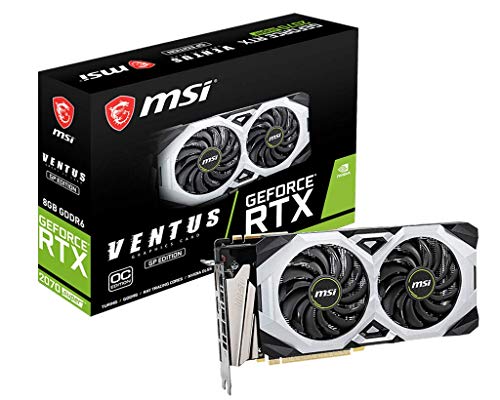
2. Graphics Card (GPU)
Cost Range: $250 – $1,500+
The graphics card is often the most expensive component. For 1080p gaming, cards like the RTX 3060 or RX 6600 offer great performance for around $300. For 1440p or 4K gaming, you will need to step up to the RTX 4070 or RX 7800 XT tiers, which can cost $500 to $800.
3. Random Access Memory (RAM)
Cost Range: $50 – $150
16GB of DDR4 RAM is currently the gold standard for gaming and can be found for as low as $50. DDR5 is faster but more expensive. 32GB is becoming more common for future-proofing and heavy multitasking.
4. Motherboard
Cost Range: $100 – $250
The motherboard connects everything. Ensure it has the right socket for your CPU (AM4/AM5 for AMD, LGA 1700 for Intel). You don’t need to overspend here unless you need specific features like built-in Wi-Fi 6 or excessive USB ports.
5. Storage (SSD/NVMe)
Cost Range: $50 – $150
An NVMe SSD is essential for fast boot times and game loading. A 1TB NVMe drive can be found for around $60-$80. Mechanical HDDs are now mostly used for bulk storage of media files due to their slower speeds.
6. Power Supply Unit (PSU)
Cost Range: $60 – $150
Never skimp on the PSU. A reliable 650W to 850W unit with an 80+ Gold efficiency rating ensures your expensive components are safe and powered stably.
7. Case & Cooling
Cost Range: $70 – $200
A good case offers better airflow to keep components cool. Don’t forget to budget for a decent CPU cooler if you are buying a high-end processor, as stock coolers often aren’t sufficient.
Sample Budget Gaming PC Build (2023)
A capable gaming PC can be built for as low as $700 (tower only). Here is what a balanced budget build might look like:
| Component | Recommendation |
|---|---|
| CPU | AMD Ryzen 5 5600 |
| GPU | AMD Radeon RX 6600 8GB |
| Motherboard | B550 Micro-ATX |
| RAM | 16GB DDR4-3200 |
| Storage | 1TB NVMe SSD |
| PSU | 600W 80+ Bronze |
| Case | Budget Mid-Tower with Mesh Front |
Frequently Asked Questions
Is it difficult to assemble a gaming PC?
It’s not that difficult. It’s hard to make a mistake if you follow instructions: everything has a specific place (e.g., RAM only fits one way). If you’re ever unsure, review your motherboard manual or watch a tutorial video.
Is it necessary to purchase Windows?
You can download and install Windows for free from Microsoft to get your PC running. However, to activate personalization features and remove the watermark, you will eventually need to purchase a license key.
Do I need to buy extra thermal paste?
Most CPU coolers come with thermal paste pre-applied or a small tube in the box. You generally don’t need to buy extra unless you plan to re-seat your cooler multiple times.
Conclusion
Anyone who enjoys gaming or needs a powerful workstation should consider building their own PC. Now that you have an idea of the costs involved, you can plan a build that fits your budget and performance needs. Start by researching specific components and look for bundles or sales to maximize your value. Good luck!

A passionate tech enthusiast with a deep focus on PC hardware, gaming rigs, and performance tuning, Bertine Gaynor has spent years exploring the latest innovations in processors, GPUs, and custom builds. On DigitalUpbeat.com, he shares hands-on reviews, performance breakdowns, and expert insights to help readers make smart hardware choices. When not testing components, he’s often optimizing setups for peak efficiency or diving into the latest tech trends shaping the future of computing.


