
Book Appointment Now


RAM Speed vs. Latency
RAM Speed vs. Latency: The Ultimate Guide to DDR4 & DDR5 Performance in 2026
📝 Summary: The MHz vs. CL Showdown
For years, PC builders have been conditioned to hunt for the highest possible RAM frequency (MHz). However, in the real world of 2026, latency (CL) is just as important as speed. This guide breaks down the technical relationship between the two, teaches you how to calculate “true latency,” and provides specific buying advice for Intel and AMD platforms. You will learn why a perfectly matched kit will always outperform a blindly fast one, and why understanding this balance is the key to a stutter-free, high-performance system.
When building or upgrading a PC in 2026, the choice of RAM is more critical than ever. With DDR5 now fully mature and memory controllers on CPUs like AMD’s Ryzen 7000/8000 and Intel’s 14th-gen becoming increasingly sophisticated, the conversation has shifted. It’s no longer just about “how fast” your RAM is, but “how fast does it respond?” This is the eternal battle between RAM Speed (MHz) and RAM Latency (CL). Choosing one over the other without understanding their relationship can lead to spending extra money for zero performance gain, or worse, an unstable system.
Let’s dive deep into the silicon to understand what these numbers actually mean for your gaming, content creation, and daily workflow.
📊 Decoding the Specs: Frequency vs. Latency
To understand the trade-off, you must first understand what each number represents. They measure two different things: the width of the pipe versus the time it takes to get the water moving.
Frequency (MHz/MT/s): The Data Rate
Frequency, measured in Megahertz (MHz) or, more accurately, Megatransfers per second (MT/s), dictates how many operations your RAM can perform each second. A stick rated at 6000MHz can transfer 6 billion pieces of data per second. Higher frequencies mean more bandwidth—the ability to move large chunks of data quickly. This is vital for workloads like 4K video editing or scientific simulations that stream massive files .
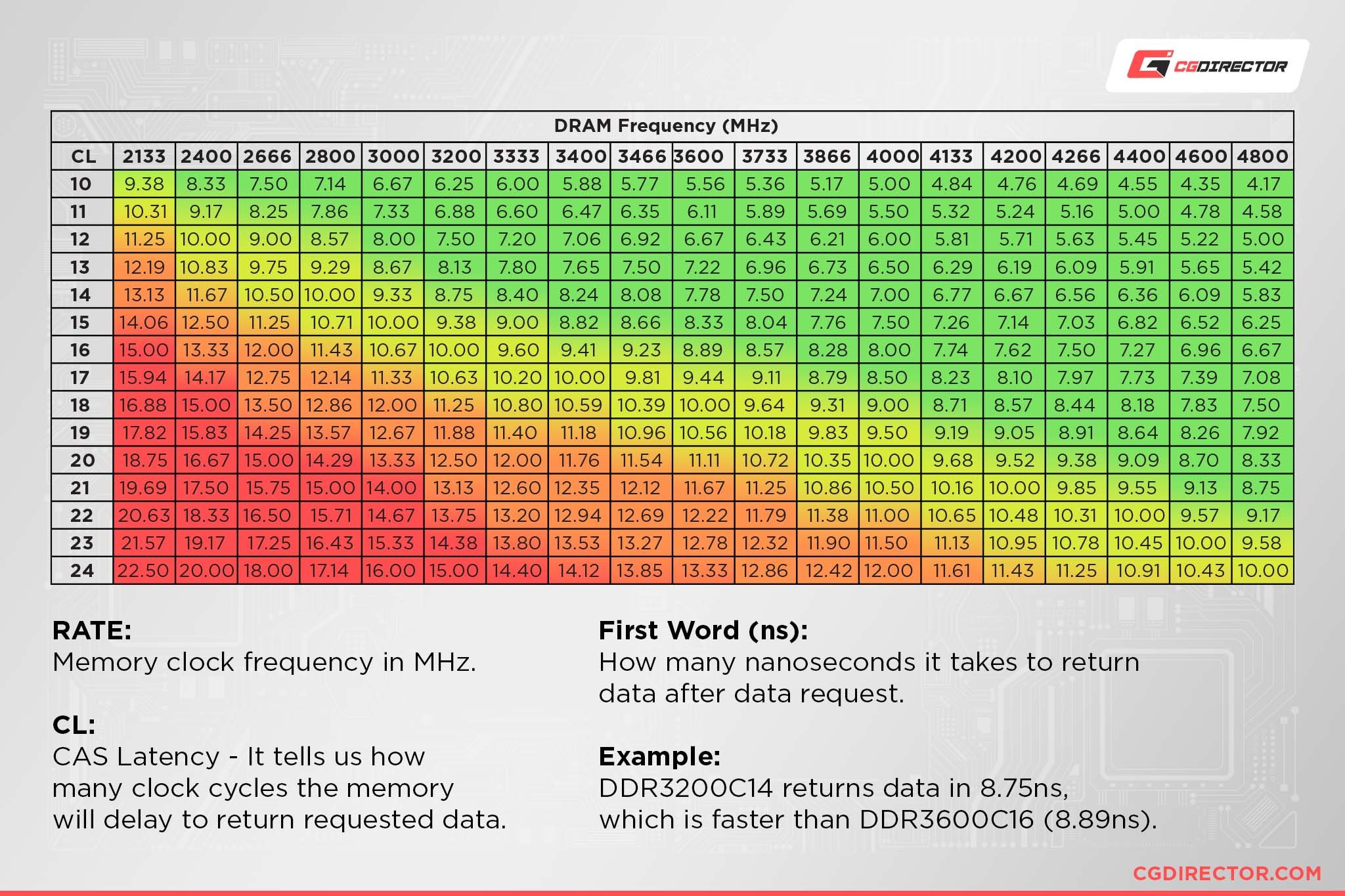
Latency (CL): The Reaction Time
Latency, represented by CAS Latency (CL), is the delay between when the memory controller requests data and when it is available. Think of it as the reaction time of the RAM. A lower CL number (like CL30) means a faster reaction time than a higher number (like CL40). Low latency is crucial for gaming and real-time applications where the CPU needs specific pieces of data instantly to avoid micro-stutters .
| Metric | Analogy | Impact on Performance |
|---|---|---|
| Frequency (MHz) | The width of the hose. | High frequency moves massive amounts of data (bandwidth). Great for video rendering. |
| Latency (CL) | The time it takes for the water to start flowing after you turn the tap. | Low latency gets data to the CPU faster for quick tasks. Great for gaming. |
⚖️ The Balancing Act: Calculating “True” Latency
You cannot look at MHz and CL in a vacuum. A higher frequency usually requires a looser (higher) CL, which can negate the speed benefit. The way to find the sweet spot is to calculate the actual time it takes for the RAM to respond, measured in nanoseconds (ns).
True Latency (ns) = (CL / Frequency in MHz) x 2000
Let’s apply this formula to common RAM types to see which is actually faster.
DDR4 vs. DDR5: A Practical Calculation
You might assume DDR5 is always faster, but the math tells a more nuanced story .
- DDR4-3200 CL16: (16 / 3200) * 2000 = 10.0 ns
- DDR4-3600 CL18: (18 / 3600) * 2000 = 10.0 ns (Identical response time, more bandwidth)
- DDR5-6000 CL30: (30 / 6000) * 2000 = 10.0 ns (The “Sweet Spot”)
- DDR5-6000 CL36: (36 / 6000) * 2000 = 12.0 ns (20% slower response!)
- DDR5-8000 CL38: (38 / 8000) * 2000 = 9.5 ns (Excellent performance, but hard to run)
As you can see, a poorly timed DDR5-6000 CL36 kit is actually slower to respond than a well-tuned DDR4-3200 CL16 kit, despite having nearly double the bandwidth .
🧠 Architecture Matters: AMD vs. Intel
The “ideal” RAM balance depends heavily on the CPU you pair it with. The memory controller on the chip (often called the IMC) and the internal architecture dictate how it handles speed and latency.
AMD Ryzen: The Infinity Fabric Dance
Modern AMD Ryzen processors (AM5 platform) use an interconnect called Infinity Fabric. For optimal performance, the memory clock (MCLK) should run in a 1:1 ratio with the Infinity Fabric clock (FCLK). On most Ryzen 7000/8000 series CPUs, the “sweet spot” where this ratio is stable is usually with DDR5-6000 memory. Going faster than this (e.g., 6400MHz or higher) often forces the FCLK into a 2:1 divider mode, which increases latency and can actually harm gaming performance. For AMD, DDR5-6000 CL30 is the undisputed king because it perfectly balances speed and latency while maintaining the critical 1:1 ratio .
Intel Core: Raw Bandwidth Hungry
Intel’s architecture (12th to 14th Gen and the new Core Ultra series) is generally more forgiving and can scale performance with higher frequencies. Intel chips love bandwidth. They can often handle DDR5-7200, 7600, or even higher speeds without the latency penalty seen on AMD. If you are building an Intel rig, you have more headroom to prioritize frequency, provided you can keep the CL timings reasonably tight. An Intel system will benefit more from a DDR5-7200 CL34 kit than an AMD system would.
⚡ Pro Tip: Check Your QVL
Before buying high-speed RAM, always check your motherboard’s Qualified Vendor List (QVL) on the manufacturer’s website. This list confirms that specific RAM kit (model number, speed, and capacity) has been tested and is guaranteed to run at its rated XMP or EXPO speed on your specific board. Bypassing this can lead to random crashes and blue screens, regardless of the MHz/CL numbers .
🧩 The 3D V-Cache Exception
There is one major exception to the RAM speed vs. latency debate: AMD’s 3D V-Cache processors (e.g., Ryzen 7 9800X3D, 9950X3D). These chips stack an extra layer of cache directly on the CPU die. This massive L3 cache acts as a super-fast holding area for data, meaning the CPU physically has to reach out to the system RAM far less often.
As a result, these CPUs are almost entirely immune to RAM speed fluctuations. Tests on the new Ryzen 7 9850X3D showed a less than 1% difference in FPS between using bone-stock DDR5-4800 and high-end overclocked kits . If you own an X3D chip, you can safely buy a moderately priced, stable kit (like DDR5-5600) and invest the savings into a better GPU or cooler, without worrying about latency .
⚠️ WARNING: The DDR5 8GB Capacity Trap
In 2026, if you are buying DDR5, you must avoid 8GB memory sticks. Due to chip density constraints, 8GB DDR5 sticks use a crippled “1Rx16” configuration, which has half the internal bank groups of a 16GB stick . This reduces effective performance by 10-15%, completely negating the benefit of DDR5. A 2x8GB DDR5 kit will often perform similarly to, or even worse than, a good DDR4 kit.
Rule of Thumb: Always buy 16GB sticks for DDR5 (e.g., 2x16GB for 32GB total). Never buy 2x8GB.
✅ The 2026 RAM Buying Matrix
To simplify your decision, here is a direct comparison of what to look for based on your specific hardware and use-case.
| Use Case / Platform | Recommended Spec | Why? |
|---|---|---|
| AMD Ryzen 7000/8000 (Non-X3D) | DDR5-6000 CL30 (2x16GB) | Perfect 1:1 ratio with Infinity Fabric. The price-to-performance sweet spot . |
| AMD Ryzen X3D Chips | DDR5-5600 CL40 (2x16GB) | Performance is independent of RAM speed. Save money here; invest in the GPU . |
| Intel Core (12th-14th Gen / Ultra) | DDR5-6800 to 7200 CL34 | Intel scales with bandwidth. Higher frequency yields better results, if timings are tight. |
| Content Creator (Video/3D) | Max Capacity with High Frequency | Workloads are bandwidth-heavy. Prioritize 64GB+ capacity, then frequency, then latency. |
| Budget / Office Build | DDR4-3200 CL16 (2x8GB) | Still a fantastic performer. “True latency” matches entry-level DDR5, and platforms are cheap. |
✔️ Pre-Purchase Checklist
- Have you calculated the “True Latency” (ns) of the kit?
- Have you checked the Motherboard QVL for the exact model number?
- Are you buying a 2x16GB kit for DDR5? (Avoiding the 8GB stick trap).
- Does this speed align with your CPU’s “sweet spot” (6000 for AMD, higher for Intel)?
- Do you have the latest BIOS update installed for maximum RAM compatibility?
❓ Frequently Asked Questions
Is CL30 better than CL36?
Yes, significantly. CL30 offers a 20% faster response time (lower latency) than CL36 at the same frequency (e.g., 6000MHz). Always pick the lower CL number when frequencies are equal .
Does RAM speed matter for gaming?
Absolutely. But it’s the combination of speed and latency that determines “real-world” feel. For competitive shooters, lower latency (CL) helps reduce micro-stutters and improves 1% lows. For open-world games, higher frequency helps with asset streaming .
Can I mix different RAM speeds?
You can physically install them, but the system will downclock all sticks to the speed of the slowest module. If you mix a 6000MHz stick with a 4800MHz stick, both will run at 4800MHz. It is highly discouraged for stability.
Is DDR5 worth it in 2026, or should I stick with DDR4?
If building a new high-end PC, DDR5 is mandatory. It offers higher bandwidth and future-proofing. However, for budget builds, a good DDR4-3600 CL16 kit is still incredibly capable and offers great value, as the platform costs (CPU + Mobo) are lower .
What does XMP or EXPO do?
XMP (Intel) and EXPO (AMD) are “one-click overclocking” profiles stored on the RAM. By default, RAM runs at a slow, safe JEDEC standard (e.g., 4800MHz). Enabling XMP/EXPO in the BIOS tells the motherboard to run the RAM at its advertised higher speed (e.g., 6000MHz) and timings .

Jaeden Higgins is a tech review writer associated with DigitalUpbeat. He contributes content focused on PC hardware, laptops, graphics cards, and related tech topics, helping readers understand products through clear, practical reviews and buying advice.


