Book Appointment Now

How To Turn XBOX One X into laptop with Modder
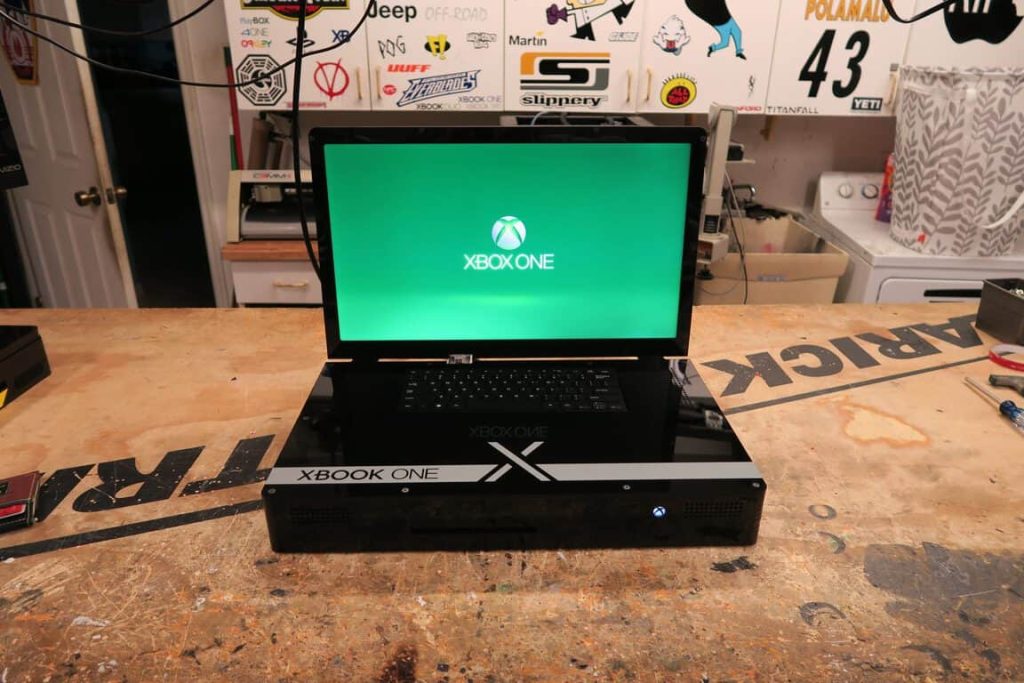
The Xbox One X is Transformed into the ‘Xbook One X’ Laptop by Modder
Key Features of the Xbook One X
Just in time for holiday wishlists, this bespoke creation takes the standard console experience and condenses it into a laptop form factor. Here is what makes the Xbook One X special:
Build Highlights
- Display: Integrated 21.5-inch ViewSonic LCD with 1080p resolution.
- Controls: Built-in keyboard for system navigation and menu use.
- Audio: Integrated speakers for sound without a headset.
- Connectivity: Retains HDMI out (for 4K TV connection), Ethernet, and optical audio out.
Limitations
- No Battery: Requires a power outlet due to high power consumption.
- Weight: Significantly heavier than a standard laptop.
- Price: Custom commission costs around $2,500.
Display and Graphics
The Xbook One X features a 21.5-inch 1080p screen. While the console itself is capable of 4K, Zarick opted for 1080p because 4K resolution on a 21-inch screen offers diminishing returns and would drastically increase the cost and complexity. However, the system retains an HDMI-out port on the back, so you can still plug it into a massive 4K TV at home to enjoy the full graphical fidelity of the Xbox One X’s AMD Jaguar CPU and RX590-based GPU.
Cooling and Power
Zarick claims on his website that his device only requires one power cable, maintaining a relatively clean setup. However, considering the power consumption of the Xbox One X, the Xbook One X cannot run on batteries; it must be plugged in.
The device employs default Xbox cooling to keep the machine functioning even during ‘intense gaming,'” according to Zarick’s website. The Xbox One X uses a sophisticated vapor chamber to keep the machine cool. Zarick designed the custom case to pull air in from the bottom and exhaust it out the back, ensuring the system stays within safe operating temperatures.

A passionate tech enthusiast with a deep focus on PC hardware, gaming rigs, and performance tuning, Bertine Gaynor has spent years exploring the latest innovations in processors, GPUs, and custom builds. On DigitalUpbeat.com, he shares hands-on reviews, performance breakdowns, and expert insights to help readers make smart hardware choices. When not testing components, he’s often optimizing setups for peak efficiency or diving into the latest tech trends shaping the future of computing.