Book Appointment Now


Single vs Dual Channel Memory
Single vs Dual Channel Memory: Why Dual Channel Often Wins
Channel A — Slot A2
Channel B — Slot B2
Quick Summary: A single RAM stick only uses one memory channel, leaving half your CPU’s memory bandwidth unused. Installing two matched sticks in the correct slots activates dual-channel mode — doubling the data bus width from 64-bit to 128-bit and delivering up to 2× more bandwidth. For gaming, content creation, and especially integrated graphics, this is one of the highest-value free upgrades available.
⚡ Key Takeaways
- Dual channel doubles the memory bus width from 64-bit to 128-bit
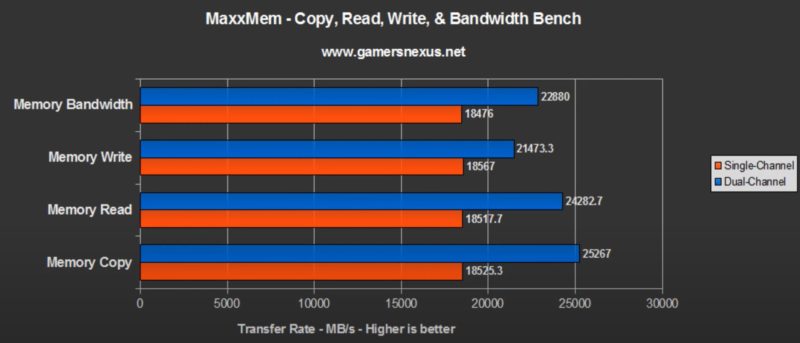
- Real-world bandwidth improvements of 30–90% depending on workload
- Integrated graphics (Intel/AMD APU) see the most dramatic gains — often 40–80% more FPS
- Correct slot placement is critical — most boards require A2 + B2, not A1 + A2
- Same capacity, speed, and timings across both sticks is strongly recommended
1. How Memory Channels Work
Modern CPUs connect to RAM through a memory controller built into the processor die. This controller communicates with DRAM over a data bus — and the width of that bus determines how much data can transfer in a single clock cycle.
DDR4 and DDR5 sticks have a 64-bit data bus each. In single-channel mode, one stick operates alone — the CPU sees a 64-bit path to memory. In dual-channel mode, two sticks operate in parallel across two independent 64-bit channels, presenting a combined 128-bit data bus to the CPU.
The improvement is not a software trick or overclocking — it is a fundamental change in how the memory controller addresses DRAM. The CPU literally has twice as many lanes to move data through.
💡 Interleaving: How it actually works
Dual channel doesn’t just bolt two channels together. The memory controller uses address interleaving — alternating memory addresses across Channel A and Channel B. Consecutive cache lines land on opposite channels, so both can be accessed near-simultaneously rather than sequentially.
Dual channel doesn’t just bolt two channels together. The memory controller uses address interleaving — alternating memory addresses across Channel A and Channel B. Consecutive cache lines land on opposite channels, so both can be accessed near-simultaneously rather than sequentially.
2. Single vs Dual Channel — Performance Benchmarks
The real-world impact varies significantly by use case. Bandwidth-hungry workloads like integrated graphics and large data sets gain the most; latency-bound single-threaded tasks gain the least.
| Workload | Single Channel | Dual Channel | Uplift |
|---|---|---|---|
| Memory Bandwidth (AIDA64) | ~38 GB/s | ~76 GB/s | +100% |
| iGPU Gaming (720p low) | ~28 FPS | ~52 FPS | +86% |
| dGPU Gaming (1080p, CPU-bound) | ~95 FPS | ~118 FPS | +24% |
| dGPU Gaming (1440p, GPU-bound) | ~82 FPS | ~86 FPS | +5% |
| Video Encoding (Handbrake) | 100% (baseline) | ~88% time | +14% |
| Blender Render (CPU) | 100% (baseline) | ~93% time | +8% |
| Web Browsing / Office | — | — | ~0–3% |
⚠️ Integrated Graphics Warning:
If you are using Intel UHD Graphics, AMD Radeon integrated graphics, or any APU (e.g. Ryzen 5 8600G), running in single-channel mode is a serious performance penalty. iGPUs share system RAM as VRAM, making memory bandwidth their #1 bottleneck. Dual channel is essentially mandatory for playable performance.
If you are using Intel UHD Graphics, AMD Radeon integrated graphics, or any APU (e.g. Ryzen 5 8600G), running in single-channel mode is a serious performance penalty. iGPUs share system RAM as VRAM, making memory bandwidth their #1 bottleneck. Dual channel is essentially mandatory for playable performance.
3. Slot Placement — Getting It Right
This is where most builders go wrong. Installing both sticks in adjacent slots (A1 + A2) does not activate dual channel — those are on the same channel. You must use slots from different channels.
The correct slots are almost always the second slot of each channel, labeled A2 and B2 on the motherboard silkscreen. This is also the manufacturer-recommended configuration for best signal integrity at high frequencies.
🎯 Slot Configuration Guide
| Config | Slots Used | Channel Mode | Recommended? |
|---|---|---|---|
| 1 stick | A2 (any single slot) | Single Channel | No — upgrade ASAP |
| 2 sticks — wrong | A1 + A2 (same channel) | Single Channel | No — incorrect placement |
| 2 sticks — correct | A2 + B2 | Dual Channel ✓ | Yes — standard build |
| 4 sticks | A1 + A2 + B1 + B2 | Dual Channel ✓ | Yes — max capacity |
💡 How to verify dual channel is active
Download CPU-Z (free), open the Memory tab, and check the “Channel #” field. It will read “Dual” when correctly configured. You can also check Task Manager → Performance → Memory, where it shows “Speed” and channel count.
Download CPU-Z (free), open the Memory tab, and check the “Channel #” field. It will read “Dual” when correctly configured. You can also check Task Manager → Performance → Memory, where it shows “Speed” and channel count.
4. Matched vs Mismatched Kits
For dual channel to operate at full potential, both sticks should be identical — same capacity, manufacturer, speed, and timings. Mismatched kits can still activate dual channel, but with caveats.
Matched Kit (Recommended)
- Full dual-channel bandwidth guaranteed
- XMP/EXPO profile works across both sticks
- Designed and tested to work together
- Better overclocking headroom
- No timing or voltage negotiation needed
Mismatched Sticks
- Dual channel may still activate (Flex Mode)
- System runs at slower stick’s speed
- Timings loosen to lowest common denominator
- XMP profiles may conflict or disable
- Stability issues more likely at high frequencies
If you add a second stick later, buy the exact same part number as your existing one if possible. If unavailable, match capacity and rated speed, then manually set timings in BIOS rather than relying on auto-detection.
5. Dual Channel vs Capacity Trade-offs
A common dilemma: buy one 32GB stick now, or two 16GB sticks for the same price in dual channel? The answer depends on your use case.
| Scenario | Best Choice | Reason |
|---|---|---|
| Gaming PC, tight budget | 2× 8GB (16GB dual) | Bandwidth matters more than extra capacity for most games |
| Gaming PC, future-proof | 2× 16GB (32GB dual) | 32GB becoming baseline for AAA titles; dual channel retained |
| iGPU / APU build | 2× matched sticks always | Single channel makes iGPU nearly unplayable for 3D |
| Video editing / 3D workstation | 4× sticks if board allows | Capacity matters; fill all 4 slots for max dual-channel RAM |
| Server / NAS build | 1× stick is acceptable | Sequential I/O throughput less bandwidth-dependent |
6. Flex Mode — The Asymmetric Option
Many Intel and AMD platforms support Flex Mode (also called Flex Memory Technology): if you install mismatched capacities — say 8GB + 16GB — the system runs the overlapping 8GB region in dual channel, and the remaining 8GB from the larger stick in single channel.
📐 Flex Mode Example: 8GB + 16GB = 24GB total
| Region | Size | Channel Mode |
|---|---|---|
| Matched region | 8GB + 8GB | Dual Channel |
| Overflow region | 8GB (remainder) | Single Channel |
Flex mode is better than full single-channel operation, but worse than a properly matched dual-channel kit. It’s a useful stop-gap when repurposing existing hardware, but not a recommended configuration for new builds.
7. DDR5 and Multi-Channel Advances
DDR5 introduces an important architectural change: each physical stick now contains two independent 32-bit sub-channels (instead of a single 64-bit channel in DDR4). This means even a single DDR5 stick has some internal parallelism.
| Memory Type | Single Stick Bus | Dual Stick Bus | Internal Sub-channels |
|---|---|---|---|
| DDR4 | 64-bit | 128-bit | None (single 64-bit) |
| DDR5 | 64-bit (2× 32-bit) | 128-bit (4× 32-bit) | 2 per stick |
In practice, DDR5’s sub-channel design narrows — but does not eliminate — the gap between single and dual-channel configurations compared to DDR4. Dual channel is still strongly recommended, especially for AMD Zen 4 which benefits greatly from memory bandwidth.
8. Quick-Start Checklist
| # | Step | Status |
|---|---|---|
| 1 | Buy two matched sticks of the same model, speed, and capacity | Required |
| 2 | Install in A2 + B2 (check your motherboard manual for exact slots) | Required |
| 3 | Enable XMP/EXPO in BIOS to reach rated speed | Recommended |
| 4 | Boot to OS, open CPU-Z → Memory tab, confirm “Channel #: Dual” | Verify |
| 5 | Run AIDA64 Memory Benchmark to confirm bandwidth doubled vs single stick | Optional |
| 6 | Run TM5 Extreme1 stability test — zero errors required | Validate |
Frequently Asked Questions
Does dual channel increase latency?
No — dual channel does not increase memory latency. It only changes bandwidth (throughput). CAS latency figures remain governed by the timings profile. In some workloads, interleaving actually reduces effective latency because data can be fetched from both channels simultaneously.
Can I mix 8GB and 16GB sticks for dual channel?
Yes, via Flex Mode — the overlapping capacity runs in dual channel, the remainder in single channel. You get some benefit, but a matched kit is always better. See Section 6 above for the breakdown.
Does dual channel work with 4 sticks?
Yes. Four sticks across all four slots (A1 + A2 + B1 + B2) still operate in dual-channel mode. It does not become quad-channel — consumer platforms only support two channels. The benefit is maximum capacity while retaining full 128-bit bandwidth.
Does dual channel matter for gaming with a discrete GPU?
Yes, but less dramatically than for integrated graphics. GPU-bound scenarios at high resolutions show minimal improvement. CPU-bound scenarios at 1080p with a powerful GPU can show 15–25% FPS gains from dual channel, particularly in games with frequent CPU-to-memory traffic patterns.
Final Verdict
Dual channel is one of the most impactful zero-cost configuration upgrades you can make. Two matched sticks in the correct slots doubles memory bandwidth, with performance gains ranging from modest (heavy GPU workloads at 4K) to transformative (integrated graphics, APU builds, CPU-bound gaming at 1080p).
If you currently have a single RAM stick, buying a second matched stick and moving to dual channel will almost certainly outperform any other same-budget upgrade — including faster storage, a CPU cooler upgrade, or XMP tuning alone.

Jaeden Higgins is a tech review writer associated with DigitalUpbeat. He contributes content focused on PC hardware, laptops, graphics cards, and related tech topics, helping readers understand products through clear, practical reviews and buying advice.